

LinkedIn Ads
- LinkedIn Ads Revenue Attribution
- LinkedIn Ads Customer Journeys
- LinkedIn Ads CRM Sync
- LinkedIn Ads Optimization
- LinkedIn Ads Benchmarks
Google Ads

Meta Ads
Cross-Channel
Ad Signals
New



Google Ads ROI Calculator
Turn your Google Ads budget into predictable revenue. Use our free B2B calculator to see how your Search campaigns relate to qualified pipeline and closed-won deals. Plug in your metrics below to uncover your true return on ad spend.
Now back it up with real data
This calculator shows what's possible. Fibbler shows what's actually happening. Connect your ads to pipeline and revenue in your CRM, and see which campaigns are involved in real deals.
"Fibbler gives Understory and our clients a direct line from marketing to sales, with clear influence insights and LinkedIn Ads data the sales team can act on. We're big fans of the tool!"

How the Google Ads ROI Calculator Works
Stage 1: Calculate Your Clicks
Clicks = Ad spend / CPC
Determines the total volume of high-intent search traffic your budget will generate.
Stage 2: Estimate Your Leads
Leads = Clicks x Landing page conversion rate
Projects how many of those searchers will fill out a form, make a purchase, or convert on your landing page.
Stage 3: Find Your Cost Per Lead
CPL = Total costs / Leads
Shows exactly how much you are paying to acquire a single conversion, including ad spend, agency fees, and other costs.
Stage 4: Forecast Your Customers
Customers = Leads x Lead-to-customer close rate
Estimates the number of leads that will become paying customers. For ecommerce, this is 100% since the conversion is the sale. For B2B, this accounts for your sales team's close rate.
Stage 5: Calculate Your Revenue
Revenue = Customers x Avg deal value (or order value)
Projects the total gross revenue your new customers will bring into the business.
Stage 6: Determine Your Net Profit
Net profit = (Revenue x Profit margin) - Total costs
Unlike simple ROAS calculations, this accounts for your actual margins and all costs, giving you the real dollar amount you take home.
Stage 7: Calculate Your True ROI
ROI = (Net profit / Total costs) x 100
Reveals the final percentage return on your Google Ads investment after accounting for margins, agency fees, and other costs. This is the number that actually matters.
Google Ads benchmarks for B2B
Average Cost Per Click (CPC): $2.50 to $5.00+
Google Search captures active intent, with CPCs varying significantly by vertical. Ecommerce keywords can run as low as $1.20, while B2B SaaS and financial services keywords regularly exceed $5.00. The calculator lets you select your industry to see the relevant benchmark.
Average Conversion Rates: 2.5% to 5.0%
Conversion rates depend heavily on user intent and landing page quality. B2B SaaS typically sees around 2.5%, while local services can reach 5.0% thanks to higher purchase urgency. Ecommerce sits around 3.0%. These are landing page conversion rates, not lead gen form rates.
Average Close Rates: 10% to 35%
For B2B verticals, close rates range from 10% (real estate, where deal cycles are long) to 35% (local services, where buyer intent is immediate). B2B services average around 25% and SaaS around 20%. For ecommerce, the calculator sets this to 100% since the conversion is the purchase.
Profit Margins: 30% to 75%
This is what separates a useful ROI calculator from a toy. ROAS means nothing if your margins are thin. SaaS companies typically operate at 75% margins, professional services around 40%, and ecommerce around 30%. The calculator factors margin into every output so you see real profit, not just gross revenue.
How to Improve Your Google Ads ROI
1. Tightly Control Keyword Match Types
Stop hemorrhaging budget on Broad Match keywords. In B2B, a search for "free CRM software" is entirely different from "enterprise CRM pricing." Stick to Exact and Phrase match types to ensure you are only paying for high-intent, commercially viable search queries.
2. Build Aggressive Negative Keyword Lists
Protect your ROI by actively excluding terms that indicate a lack of buying intent. Add words like "free," "login," "student," "jobs," and "template" to your negative keyword list so your expensive daily budget is strictly reserved for actual buyers.
3. Align Ad Copy with Landing Page Intent
If your ad promises a "Pricing Guide," do not send the user to a generic homepage. Google Quality Scores heavily factor in landing page relevance. Tightly themed ad groups pointing to dedicated, fast-loading landing pages will lower your CPC and dramatically boost conversion rates.
4. Optimize for Pipeline, Not Just CPL
A $20 Cost Per Lead is useless if 100% of those leads are unqualified students or spam bots. Train the Google algorithm to optimize for down-funnel metrics. Feed offline conversion data back into Google Ads so the system learns to bid on users who actually become Sales Opportunities, not just form-fillers.
5. Track Revenue with True Multi-Channel Attribution
Google takes 100% of the credit for the final click, completely ignoring other channels like LinkedIn that helped drive the deal. To measure true ROI, connect Google Ads to your CRM with a tool like Fibbler so you can map the entire 272-day buyer journey across all your platforms.
The problem with this calculator (and every other one)
This calculator assumes a clean, linear buyer journey: someone clicks your ad, fills out a form, talks to sales, and closes. Budget in, revenue out.
That is not how B2B buying works in 2026.
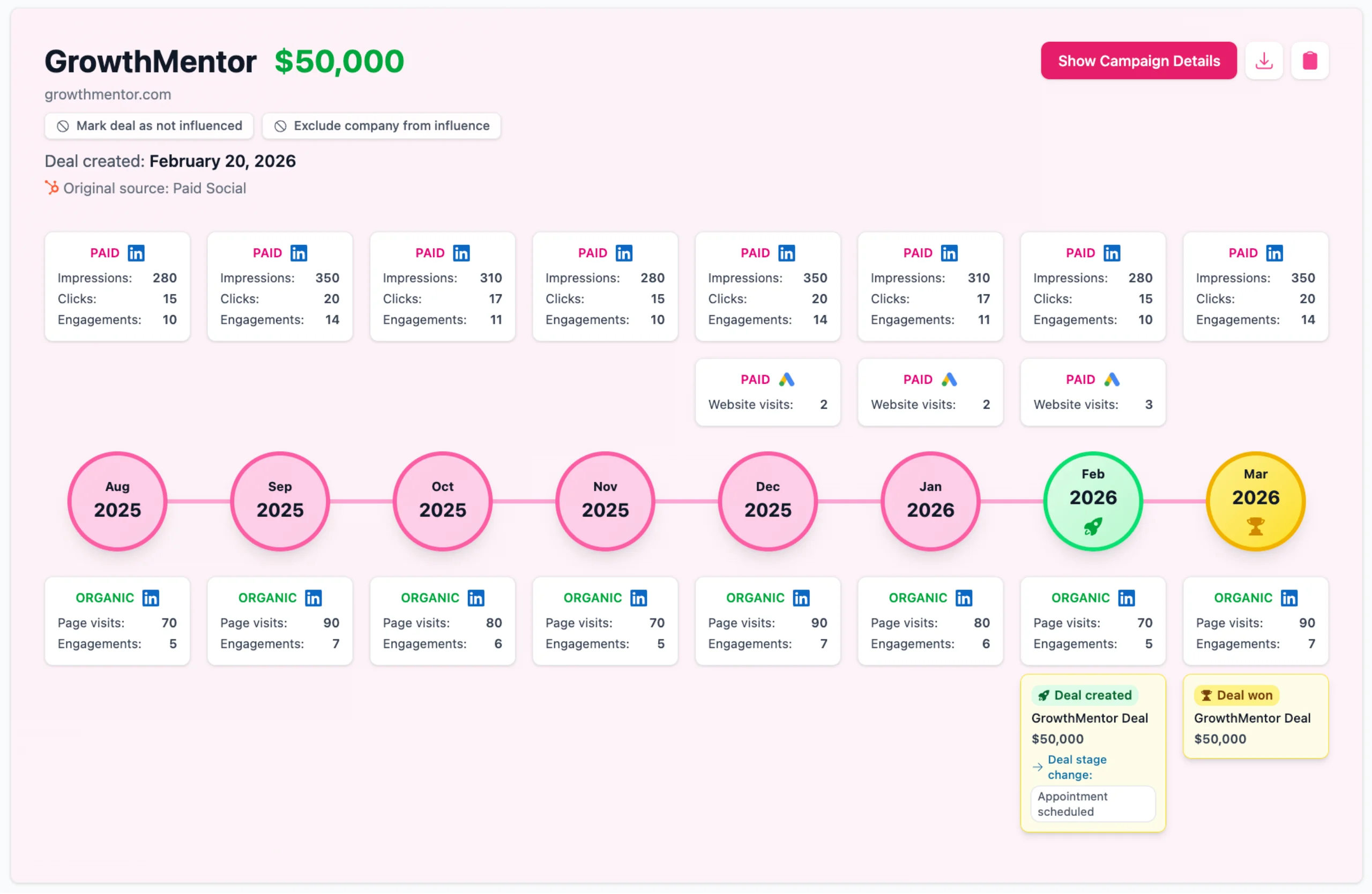
The real buyer journey looks more like this: a VP sees your brand mentioned in a LinkedIn post. Two weeks later, another person at that same company watches your Thought Leader Ad. A month after that, someone on the buying committee Googles your product name and clicks your Search ad. Your CRM gives Google 100% of the credit for that $50,000 deal.
The reality is that B2B buying cycles stretch to 272 days on average, involve 10+ stakeholders, and span channels that no single-platform calculator can capture. Google's native reporting will always inflate Search ROI because it ignores the months of social awareness that created the demand in the first place.
Calculators give you estimates. What you actually need is attribution - connecting every touchpoint across LinkedIn, Google, and organic back to real CRM deals.
That's what Fibbler does.
We connect your Google Ads, LinkedIn Ads, and Meta Ads data directly to your CRM, so you can see the full buyer journey - from the first LinkedIn impression to the final search click to closed-won revenue. No more guessing which channels were involved in the deal.
Test all features. No credit card required.
Frequently Asked Questions
How do you calculate Google Ads ROI for B2B?
To calculate true B2B ROI, look past top-of-funnel metrics like clicks. Take the total revenue from closed-won CRM deals influenced by a Google campaign, subtract the ad spend, divide by that spend, and multiply by 100.
What is a good ROI for B2B Google Ads?
A healthy B2B Google Ads account typically generates a 3x to 5x Return on Ad Spend (300%-500% ROI). With high enterprise contract values, acquiring a $30,000 customer for $5,000 in ad spend is highly efficient and scalable.
Why does Google's native tracking inflate ROI?
Google defaults to last-click models confined to its own ecosystem, ignoring touchpoints like LinkedIn or the "Dark Funnel." It often takes 100% credit for demand generated elsewhere, making your Search ROI look artificially high.
Should B2B companies use Performance Max (PMax) campaigns?
PMax works for ecommerce but is risky for B2B. It blends inventory across Search, Display, and YouTube, removing advertiser control. B2B teams generally see better ROI sticking to tightly controlled, manual Search campaigns targeting high-intent keywords.
How does Fibbler track Google Ads differently?
Unlike isolated platform metrics, Fibbler connects Google Ads directly to your CRM and other channels like LinkedIn and Meta. We unify your social and search data, revealing the complete multi-touch buyer journey from initial brand awareness to closed-won revenue.
Written by

Adam Holmgren
CEO @ Fibbler

Prove paid ads drive pipeline
Fibbler helps you see which companies view or engage with your LinkedIn, Google and Meta Ads, and connect them to pipeline and revenue in your CRM.
Try 30 days for free
Prove paid ads drive pipeline
Fibbler helps you see which companies view or engage with your LinkedIn, Google and Meta Ads, and connect them to pipeline and revenue in your CRM.
Try 30 days for free