

LinkedIn Ads
- LinkedIn Ads Revenue Attribution
- LinkedIn Ads Customer Journeys
- LinkedIn Ads CRM Sync
- LinkedIn Ads Optimization
- LinkedIn Ads Benchmarks
Google Ads

Meta Ads
Cross-Channel
Ad Signals
New



LinkedIn Ads ROI Calculator
Stop guessing your campaign impact. Use our free B2B calculator to project how your LinkedIn Ad spend translates into actual pipeline and closed-won revenue. Plug in your metrics below to see your true return on investment.
LinkedIn ROI is higher than this
This calculator only counts direct clicks. Fibbler shows which companies your ads actually reached and ties them to real deals in your CRM, so you can measure the pipeline LinkedIn created, not just the leads it captured.
"Attribution, attribution, attribution. I've been using Fibbler for a while now, and it's hands-down the best tool for tying our LinkedIn efforts directly to pipeline and revenue."

How the LinkedIn Ads ROI Calculator Works
Our calculator uses standard B2B funnel metrics to project your final revenue. Here is the exact math behind the model:
Stage 1: Calculate Your Clicks
Clicks = Ad spend / CPC
Determines the total volume of traffic your budget will generate.
Stage 2: Estimate Your Leads
Leads = Clicks x Landing page conversion rate
Projects how many of those clicks will fill out a form or convert on your landing page.
Stage 3: Find Your Cost Per Lead
CPL = Ad spend / Leads
Shows exactly how much you are paying to acquire a single top-of-funnel lead.
Stage 4: Qualify Your Leads
SQLs = Leads x Lead-to-SQL rate
Calculates the number of raw leads that will pass qualification and become Sales Qualified Leads.
Stage 5: Forecast Your Customers
Customers = SQLs x Close rate
Estimates the final number of closed-won deals generated from your LinkedIn campaigns.
Stage 6: Calculate Your Revenue
Revenue = Customers x Avg deal value
Projects the total gross revenue your new customers will bring in.
Stage 7: Determine Your ROI
ROI = ((Revenue - Product costs - Total costs) / Total costs) x 100
Reveals the final percentage return on your LinkedIn Ads investment, accounting for ad spend, agency fees, and product or service delivery costs.
LinkedIn Ads benchmarks for B2B
Average Cost Per Click (CPC): $3.00 to $6.50+
LinkedIn commands a premium because you target specific job titles and companies, not just keywords. B2B CPCs vary by industry, from around $3.00 for financial services to $6.50+ for SaaS and healthcare. While higher than other social platforms, you eliminate wasted budget by guaranteeing your ads reach actual decision-makers.
Average Landing Page Conversion Rates: 3% to 5%
Conversion rates depend heavily on your offer and landing page quality. Across B2B industries on LinkedIn, landing page conversion rates typically sit between 3% and 5%.
Average Lead-to-SQL Rate: 13% to 20%
Not every lead is sales-ready. Depending on your industry and qualification criteria, between 13% and 20% of your raw LinkedIn leads will typically progress to Sales Qualified Lead status. SaaS and healthcare tend toward the lower end, while professional services and recruitment see higher qualification rates.
Average SQL-to-Close Rate: 12% to 20%
Once a lead is qualified, close rates across B2B verticals typically range from 12% to 20%. Industries with shorter sales cycles and clearer buyer intent, like professional services and education, tend to close at the higher end.
How to Improve Your LinkedIn Ads ROI
1. Narrowly Define Your Target Audience
Narrow your targeting using LinkedIn's firmographic filters. Focus strictly on company size, job titles, and specific industries to avoid wasting spend on unqualified clicks that will never enter your pipeline.
2. Implement Rigorous Exclusion Lists
Protect your budget by actively excluding competitors, current customers, and mismatched company sizes. This ensures every dollar is spent efficiently on net-new, highly qualified prospects.
3. Focus on Reach and Engagement, Not Just Leads
Stop optimizing for the cheapest lead. Focus on reaching and engaging more buyers at your target accounts over time. If the right people at the right companies are consistently seeing your ads, pipeline will follow.
4. Track Revenue with True Attribution
Stop relying on platform estimates. Connect your LinkedIn Ads directly to your CRM using an attribution platform to see which campaigns are most associated with closed-won revenue.
Why Measuring LinkedIn Ads ROI Matters for B2B
For B2B organizations, the buyer journey is rarely a straight line. A prospect might click a LinkedIn ad, browse your website, leave, and then book a demo 90 days later through an organic search. If you only look at LinkedIn's native reporting, you lose visibility into how that initial ad spend influenced the final closed-won deal.
Relying on vanity metrics like clicks and impressions makes it impossible to defend your marketing budget to the executive team. By measuring true ROI and tracking pipeline influence, RevOps and marketing leaders can:
- Identify exactly which campaigns generate high-value accounts
- Eliminate wasted spend on audiences that never convert to pipeline
- Show the CFO clear evidence that paid social is linked to revenue
Why this calculator will almost always undervalue LinkedIn
If your results above look negative, that does not mean LinkedIn Ads are not working. It means you are measuring an awareness channel with a direct-response ruler.
LinkedIn is one of the strongest B2B brand awareness channels in the world. It lets you put your message in front of specific job titles at specific companies. No other platform offers that level of targeting. But the value it creates rarely shows up as a clean last-click conversion.
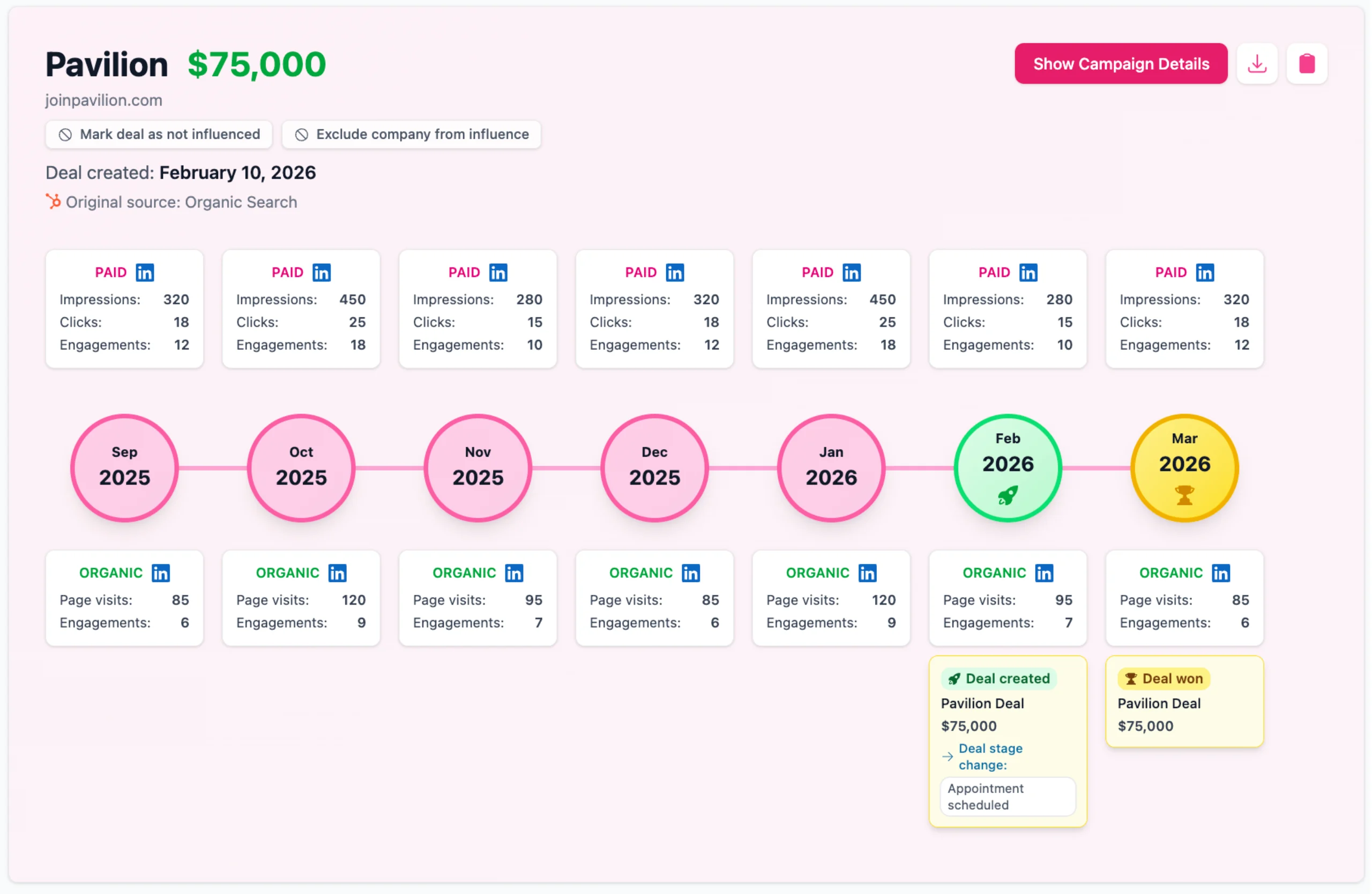
Here is what actually happens: a VP of Operations sees your Thought Leader Ad in their feed. They do nothing. Three weeks later, someone else at that company watches 40% of your video ad. A month after that, a third person on the buying committee Googles your product name and books a demo. Your CRM credits Google. LinkedIn gets zero credit for creating the demand in the first place.
The real question is not "what is my LinkedIn CPL?" It is "which target accounts are engaging with my ads, and are those accounts showing up in my pipeline?"
That's what Fibbler measures.
Instead of forcing LinkedIn into a linear funnel, Fibbler uses the LinkedIn Company Intelligence API to show you which companies are engaging with your ads and connects that directly to your CRM. You see which accounts your campaigns influenced, whether those accounts entered pipeline, and how much revenue is associated with them. Not a CPL estimate. Actual closed-won deals tied to real ad engagement.
Test all features. No credit card required.
Frequently Asked Questions
How do I measure true ROI on my LinkedIn Ads?
Instead of just looking at in-platform lead forms, true ROI requires mapping LinkedIn touchpoints to your CRM. You need to calculate the total contract value of closed-won deals attributed to your campaigns, minus your total LinkedIn spend, divided by that same ad spend.
Does LinkedIn's high Cost Per Click (CPC) ruin my ROI?
Not if you are selling high-ticket B2B services. While LinkedIn clicks often cost between $6 and $12, the firmographic targeting ensures you are reaching actual decision-makers. If a $10 click eventually leads to a $50,000 enterprise contract, the high initial CPC still yields a massive return.
Why shouldn't I just use LinkedIn Campaign Manager to track revenue?
LinkedIn's native reporting is excellent for measuring top-of-funnel engagement, but it is completely blind to your sales pipeline. It tells you exactly when an account clicked an ad, but it cannot tell you if that specific account actually signed a contract six months later.
How long does it take to see positive ROI from LinkedIn?
B2B sales cycles are notoriously long, often spanning 3 to 9 months. Because LinkedIn is primarily a demand generation and brand awareness channel, your true ROI is usually measured over a longer timeframe as target accounts move from initial ad exposure to a closed deal.
How does Fibbler improve LinkedIn attribution?
Fibbler uses the high-tier LinkedIn Company Intelligence API to deanonymize ad engagement. We match exactly which companies saw or clicked your ads directly to your CRM records, allowing you to see how much pipeline movement your LinkedIn budget is linked to without relying on platform estimates.
Written by

Adam Holmgren
CEO @ Fibbler

Prove paid ads drive pipeline
Fibbler helps you see which companies view or engage with your LinkedIn, Google and Meta Ads, and connect them to pipeline and revenue in your CRM.
Try 30 days for free
Prove paid ads drive pipeline
Fibbler helps you see which companies view or engage with your LinkedIn, Google and Meta Ads, and connect them to pipeline and revenue in your CRM.
Try 30 days for free