

LinkedIn Ads
- LinkedIn Ads Revenue Attribution
- LinkedIn Ads Customer Journeys
- LinkedIn Ads CRM Sync
- LinkedIn Ads Optimization
- LinkedIn Ads Benchmarks

Google Ads

Meta Ads
Cross-Channel
Ad Signals
New



How to Analyze Google Ads with Claude Using Fibbler's MCP Server
Quick Summary
Every Google Ads click is anonymous by default. Fibbler deanonymises that traffic at the company level and maps it to CRM pipeline. Connect it to Claude via the MCP server and the questions Google Analytics structurally can't answer (which companies clicked, which converted, which belong in your pipeline) suddenly have answers.
Your Ads Aren't the Problem. Your Data Is
Every click on your Google Ads is anonymous. Someone searches "B2B CRM pricing," clicks your ad, and lands on your site. Google shows you the click, the keyword, and the conversion if they fill out a form. What it cannot show you is who actually clicked.
A VP at a Series B company that fits your ICP perfectly, a consultant researching options for a client, and someone who will never buy anything all look identical to Google. Most B2B teams are making budget decisions based on that aggregate, identity-free data. You're optimising in the dark.
Fibbler solves this by deanonymising your Google Ads traffic at the company level and mapping it to your CRM pipeline. Connect it to Claude via the MCP server, and you can query that identified, attributed data in plain language. No exports, no guesswork, no anonymous click aggregates. This guide shows you how.
Why Listen to Us?
We've spent years working on the company-identification problem in B2B advertising, and Fibbler now powers attribution for over 1,000 B2B advertisers.
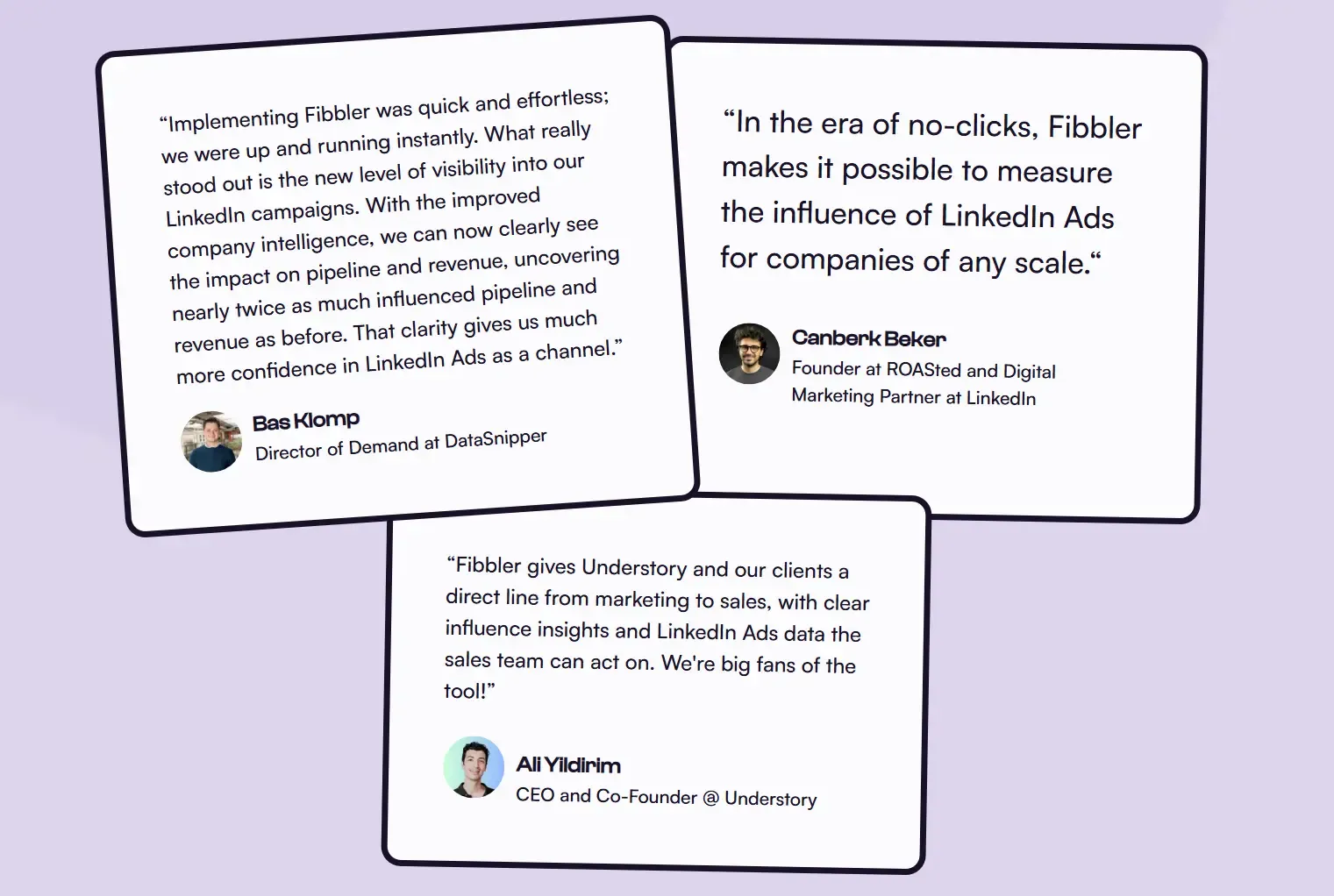
ROASted, Understory, Juro, and Copper CRM rely on us to deanonymise paid ad clicks and tie them back to closed revenue. Fibbler holds a 4.9/5 rating on G2 and is one of LinkedIn's official Marketing Partners. The MCP server reads from the same attribution data those teams use every day, which is why the answers Claude returns hold up under scrutiny.
Why Analyze Google Ads with Claude
Static dashboards force you to know the question before you start looking. Claude flips that. You ask in plain English, get an answer, then keep digging until you've actually understood something. Common workflows teams run through Claude:
- Pressure-test a campaign. Drop in a campaign name and ask whether the companies clicking it match your ICP, then follow up on the ones that don't.
- Hand SDRs a hot list. Ask which ICP-fit companies clicked your ads recently but never converted, and pass them straight to outbound the same day.
- Reason across channels. Claude's strength is synthesising patterns. Ask it to walk through closed deal journeys and explain how Google and LinkedIn show up together over time.
- Plan next quarter's budget. Have Claude weigh cost per ICP engagement, pipeline influence, and average deal size by campaign and recommend where spend should shift.
- Keep going. Every answer opens up another question. Claude reasons across the same dataset for as long as you want to keep asking, with no re-exporting or context resets.
What You'll Need Before You Start
A few things need to be in place before Claude can pull live data from Fibbler:
- An Unlimited or Agency plan with Fibbler. MCP isn't available on lower tiers. Plan details are at pricing.
- The Google Ads add-on switched on. Without it, your search clicks stay anonymous and there's nothing for Claude to query at the company level.
- At least one CRM connected. Salesforce, HubSpot, Attio, or Pipedrive all work. This is what lets Claude tie ad data to pipeline and revenue.
- Claude on web or Claude Desktop. Both connect via OAuth in about a minute.
Not on Fibbler yet? You can spin up a free trial at fibbler.co. The Google Ads add-on runs $59/month on top of your plan.
Connecting Fibbler's MCP Server to Claude
The setup is the same on Claude Web and Claude Desktop. OAuth handles the connection, so there's no API key to manage or config file to edit. Takes about a minute.
Step 1: Open the Connectors page
On Claude Web: go to claude.ai/settings/connectors and click Add connector. On Claude Desktop: open Settings → Connectors → Add custom connector.
Step 2: Paste the Fibbler server URL
https://app.fibbler.co/mcp
Step 3: Authorize with your Fibbler account
Log in with your Fibbler account when prompted to authorize. Once approved, Fibbler will appear as a connected tool.
Step 4: Verify the connection
Start a new chat and ask: "Give me an overview of my Fibbler account."
Claude will call the get_account_overview tool and return a summary of your connected integrations and available data. Once that summary appears, your setup is complete.
If you hit an authentication error, try disconnecting and reconnecting. For more help, see Fibbler's MCP common issues guide.
The Google Ads Prompt Library for Claude
What follows is a structured investigation into your Google Ads spend. Each prompt is designed to answer a question that Google Analytics structurally cannot, because it doesn't know who your visitors are. Some answers will confirm what you suspected. Others will reframe how you think about budget entirely.
Each prompt below is copy-paste ready. Adjust date ranges and ICP criteria to match your business.
The ICP Traffic Audit
"Using Fibbler data, analyze our Google Ads traffic from the last 60 days. What percentage of clicks came from companies that match our ICP - [insert your criteria: company size, industry, geography]? Which campaigns and keywords are attracting the highest proportion of ICP-matched companies versus off-ICP traffic?"
What this tells you:
This is the question Google Analytics can never answer. High click volume means nothing if the companies behind those clicks would never buy from you.
This prompt splits your campaigns into ICP-efficient and ICP-inefficient, directly telling you where your next budget increase should and shouldn't go. Most B2B teams running this for the first time discover that their highest-volume campaigns are not their highest-quality ones.
The Keyword-to-Pipeline Map
"Show me which Google Ads keywords over the last 90 days have driven clicks from companies that subsequently entered pipeline in our CRM. Then show me the keywords with the highest spend and zero pipeline influence. Rank both lists by cost so I can see where the budget is and isn't producing results."
What this tells you:
Two lists most B2B marketers have never seen side by side: the keywords that create pipeline and the keywords that create spend.
In Google's native reporting, last-click attribution gives conversion credit to branded terms that close deals. Non-branded demand-generation keywords that seeded the pipeline get no credit at all. Fibbler's attribution separates them.
The gap between these two lists is usually where the most significant budget reallocation opportunity lives.
The Anonymous Traffic Intelligence Report
"Identify companies that have clicked our Google Ads in the last 45 days but have not yet converted, entered our CRM, or appeared in any active pipeline. Which of these companies matches our ICP? What keywords brought them to the site and what pages did they visit?"
What this tells you:
In B2B, most buyers don't convert on first contact. They research, compare, go internal for budget approval, and come back weeks later if you stay visible.
This prompt finds the companies already in your funnel that Google's conversion tracking has written off, but Fibbler can still see. The output is a direct input to your SDR outbound list: companies that searched a relevant term, clicked your ad, and showed intent, but never raised their hand.
Fibbler's Signals feature can route these automatically to Clay or your outbound tool the same day they appear.
The Cross-Channel Journey Analysis
"For the deals closed in the last 6 months in our CRM, show me the full customer journey using Fibbler data. Which deals had Google Ads touchpoints in the journey? Which had LinkedIn Ads touchpoints? How many deals involved both channels, and where in the journey did each channel typically appear?"
What this tells you:
This is where Claude's reasoning capability is particularly valuable.
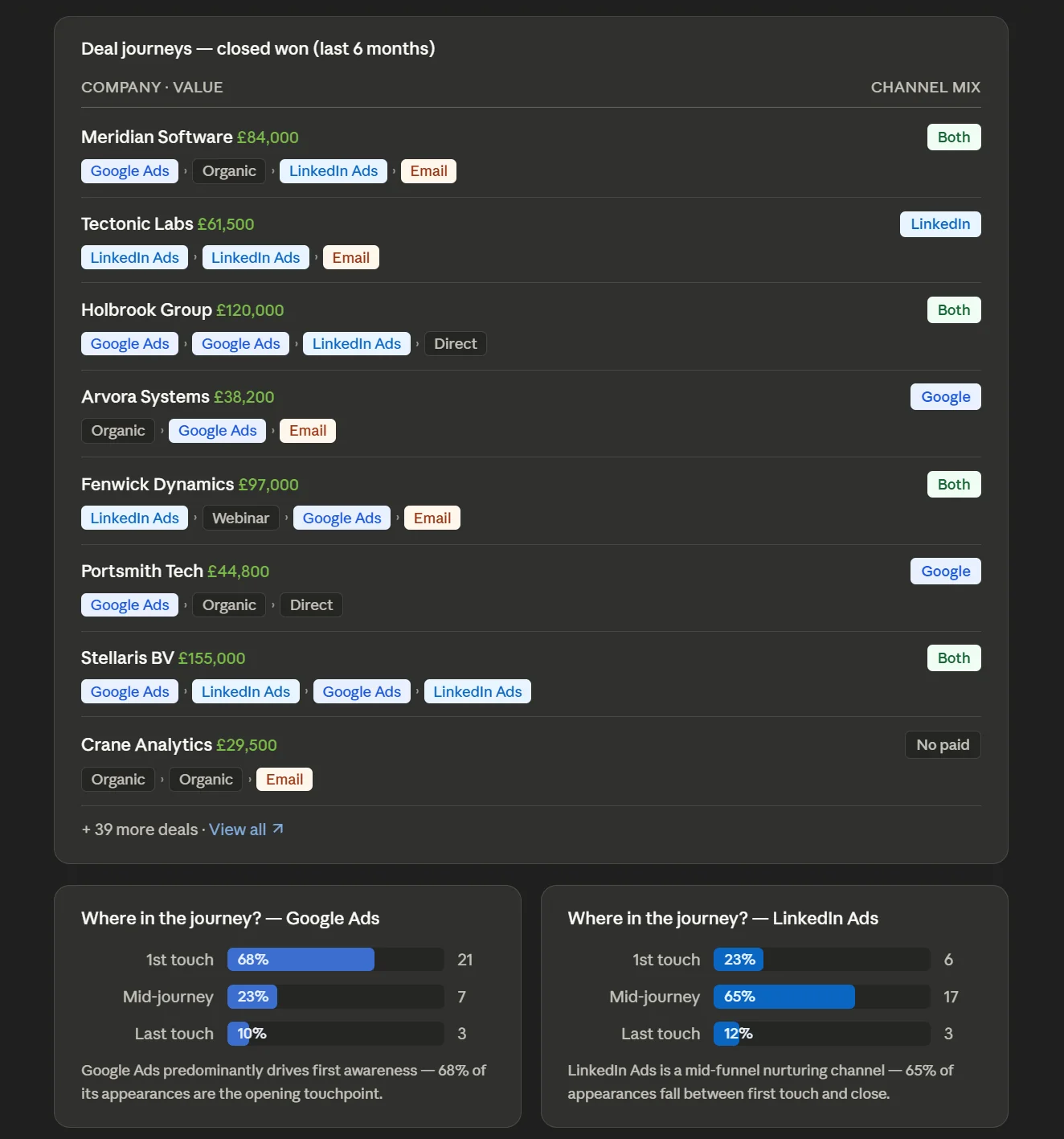
Multi-touch attribution across two channels involves pattern recognition across dozens of deal journeys simultaneously. Claude can synthesise that into a clear narrative, like "Google typically appears as a late-stage intent signal after LinkedIn creates initial awareness," that would take hours to build manually. That pattern is the strategic foundation for every channel budget conversation you have.
If Google and LinkedIn are playing different roles in the same funnel, you stop defending them as competitors and start presenting them as a system.
The Keyword Traffic Quality Audit
"Look at our Google Ads keywords from the last 60 days through Fibbler. For each keyword with meaningful spend, show me the average engagement depth of the companies that clicked through (pages per session, sessions per company, repeat visit rate). Flag any high-spend keywords where the traffic is consistently shallow - single-page visits, no return engagement. Then rank the cleanest keywords by engagement quality so I can see where the strong intent is concentrated."
What this tells you:
Pipeline influence is a lagging signal. By the time a keyword shows up as zero-pipeline waste, you've already burned a quarter's spend on it. Engagement depth is the leading signal that tells you the same story earlier.
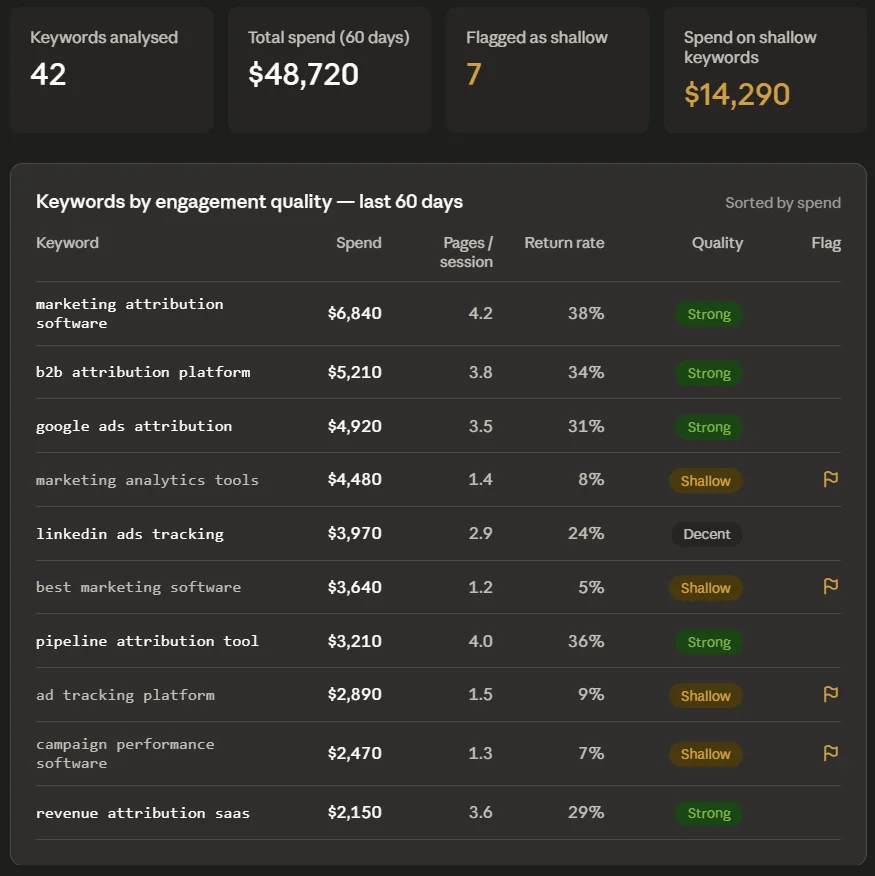
Shallow traffic from a keyword (companies clicking once, never returning, never going past the landing page) is rarely a creative or landing page problem. It's a match problem: the searcher's intent didn't line up with what you offered. Fibbler's company-level engagement data lets you see that mismatch at the keyword level instead of the campaign level, which is where Google Ads native reporting stops.
The cleanest keywords on the engagement side are usually your underspent winners. Worth scaling before they show up in the pipeline data.
The Budget Reallocation Model
"Based on our Google Ads data in Fibbler over the last quarter - cost per ICP company engaged, pipeline influence rate by campaign and keyword group, and average deal size associated with each campaign - build me a budget reallocation recommendation for next quarter. Assume flat total spend and optimise for pipeline influence over click volume."
What this tells you:
This prompt shifts the optimization objective from Google's default (conversions and ROAS) to the B2B metric that actually matters: pipeline influence.
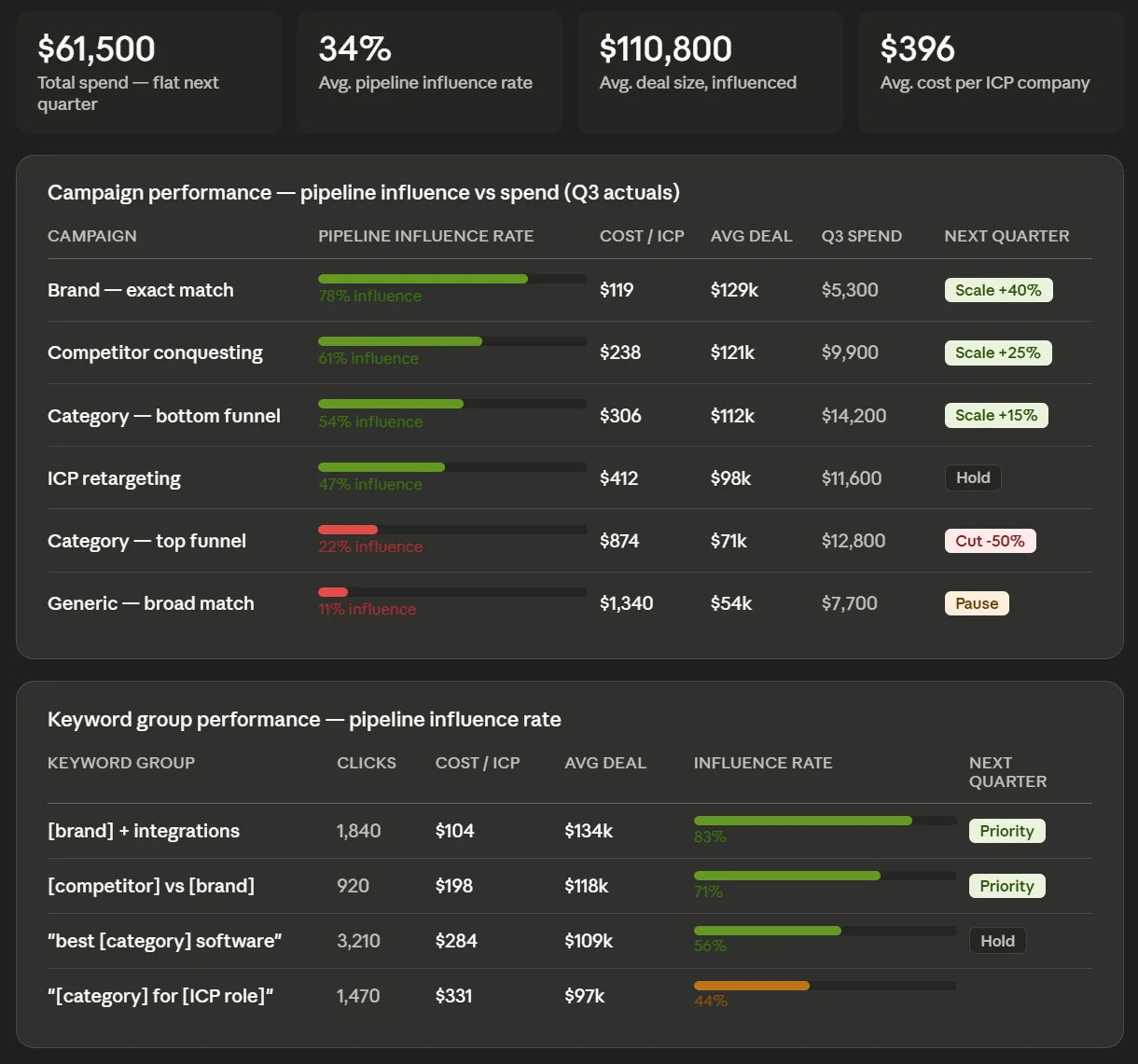
Claude reasons across your Fibbler data and produces a structured argument for where next quarter's budget should be concentrated. It won't replace your judgment, but it's a far stronger starting point than gut feel or last month's ROAS numbers. Use it as the data foundation for your quarterly planning conversation.
Interpreting Claude's Output for Google Ads
A few principles for getting from Claude's analysis to an actual decision.
When Claude identifies high-spend keywords with zero pipeline influence
Before you pause those keywords, ask a follow-up: "Are there companies in this keyword's traffic that fit our ICP but haven't entered the pipeline yet?"
Zero pipeline influence either means you are attracting the wrong audience, or you are generating early awareness with the right one. Fibbler's company identity data helps you tell the difference, so you know exactly when to pull the plug and when to be patient.
When Claude surfaces high-ICP anonymous traffic
This is a direct signal for your SDR team. Companies that searched relevant terms, clicked your ads, and visited your site but didn't convert are pre-warmed for outbound. Pass them the same day. Intent signals decay quickly.
When Claude shows cross-channel deal journeys
Use the output to reframe your budget conversation. If LinkedIn consistently appears in the first half of winning deal journeys and Google consistently appears in the second half, you're not running two competing channels. You're running a two-stage funnel. That framing changes how you defend both budgets to a CFO.
What This Workflow Replaces
Before this, answering any question about which companies were behind your Google Ads traffic meant exporting from Google Analytics, cross-referencing with CRM data, and manually trying to connect anonymous clicks to named accounts. Most teams gave up halfway and optimised for conversions instead.
That's not a strategy problem. It's a data access problem.
Connect Fibbler's MCP server to Claude, and the anonymous traffic layer disappears. You ask which companies clicked your highest-spend keywords. Claude queries the identified data and tells you. What used to be structurally unanswerable is now a prompt away.
That changes how you bid, how you budget, and what you consider worth scaling.
Getting Started
MCP comes with the Unlimited and Agency plans. Most teams have Google Ads connected and identified company traffic flowing within a day. Once Fibbler is set up, hooking it into Claude is a one-minute job on web or desktop, and the prompts above work straight away.
No credit card required. Cancel any time.
Written by

Adam Holmgren
CEO @ Fibbler

Prove paid ads drive pipeline
Fibbler helps you see which companies view or engage with your LinkedIn, Google and Meta Ads, and connect them to pipeline and revenue in your CRM.
Try 30 days for free
Prove paid ads drive pipeline
Fibbler helps you see which companies view or engage with your LinkedIn, Google and Meta Ads, and connect them to pipeline and revenue in your CRM.
Try 30 days for free