

LinkedIn Ads
- LinkedIn Ads Revenue Attribution
- LinkedIn Ads Customer Journeys
- LinkedIn Ads CRM Sync
- LinkedIn Ads Optimization
- LinkedIn Ads Benchmarks

Google Ads

Meta Ads
Cross-Channel
Ad Signals
New



The LinkedIn Ads MCP Server
built for pipeline attribution
A LinkedIn Ads MCP server lets your AI assistant query your campaign data in plain language. Most surface what's already in Campaign Manager: impressions, clicks, CTR, cost per lead. Fibbler goes further by joining campaign engagement to the companies in your CRM and the deals they've influenced.
Available on the Unlimited and Agency plans.

Fibbler is an official
LinkedIn Marketing Partner

Fibbler is an official
LinkedIn Marketing Partner
Connect LinkedIn once and your AI starts seeing pipeline within a day
Fibbler tracks every company that sees your campaigns, not just the ones that click, and joins all of it to your CRM. By tomorrow, your AI has more LinkedIn intelligence to query than Campaign Manager will ever show.
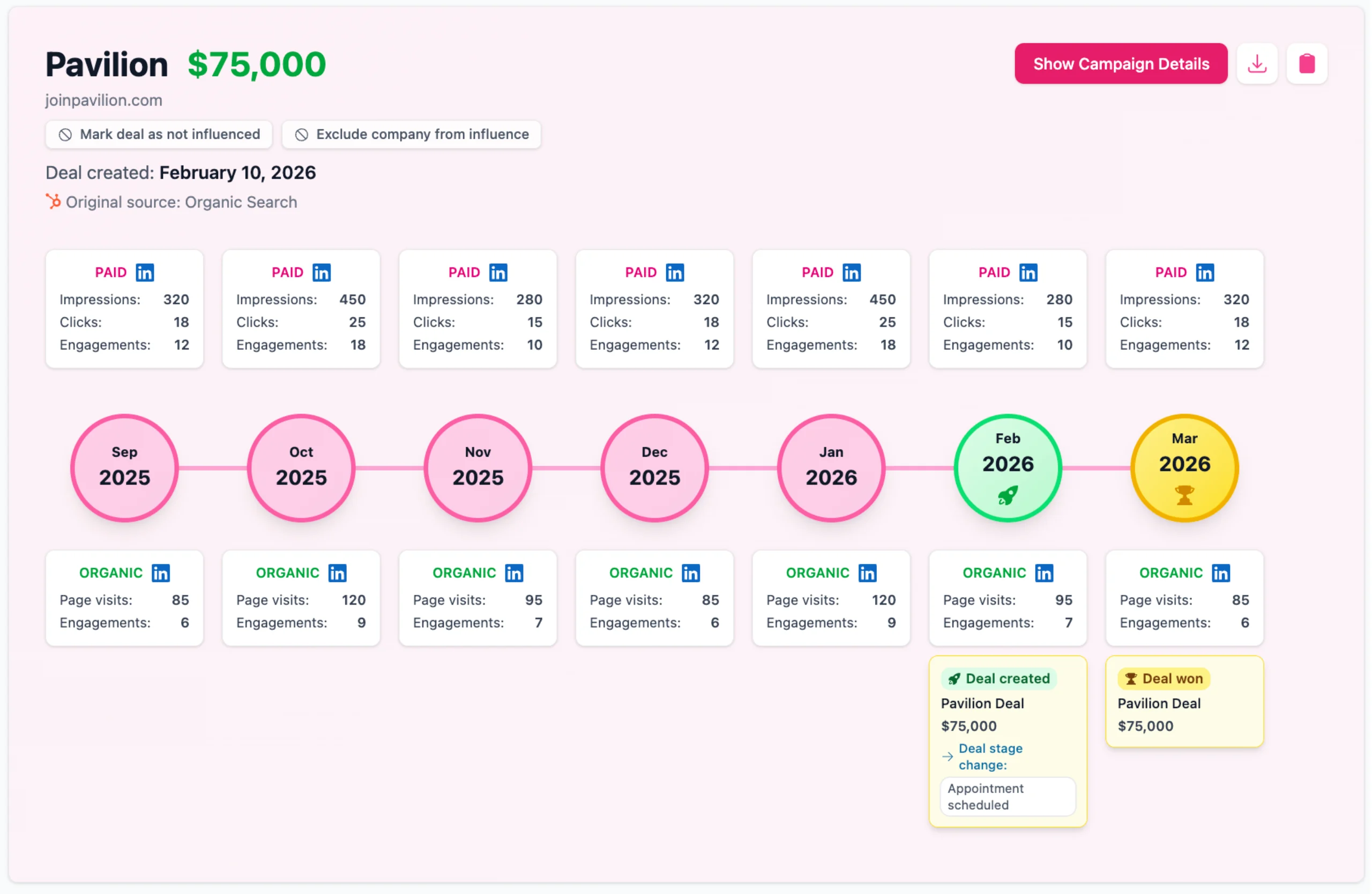
With Customer Journeys, you can see everything that happened on LinkedIn leading up to deal creation and close, from both paid and organic.
Read more about Customer Journeys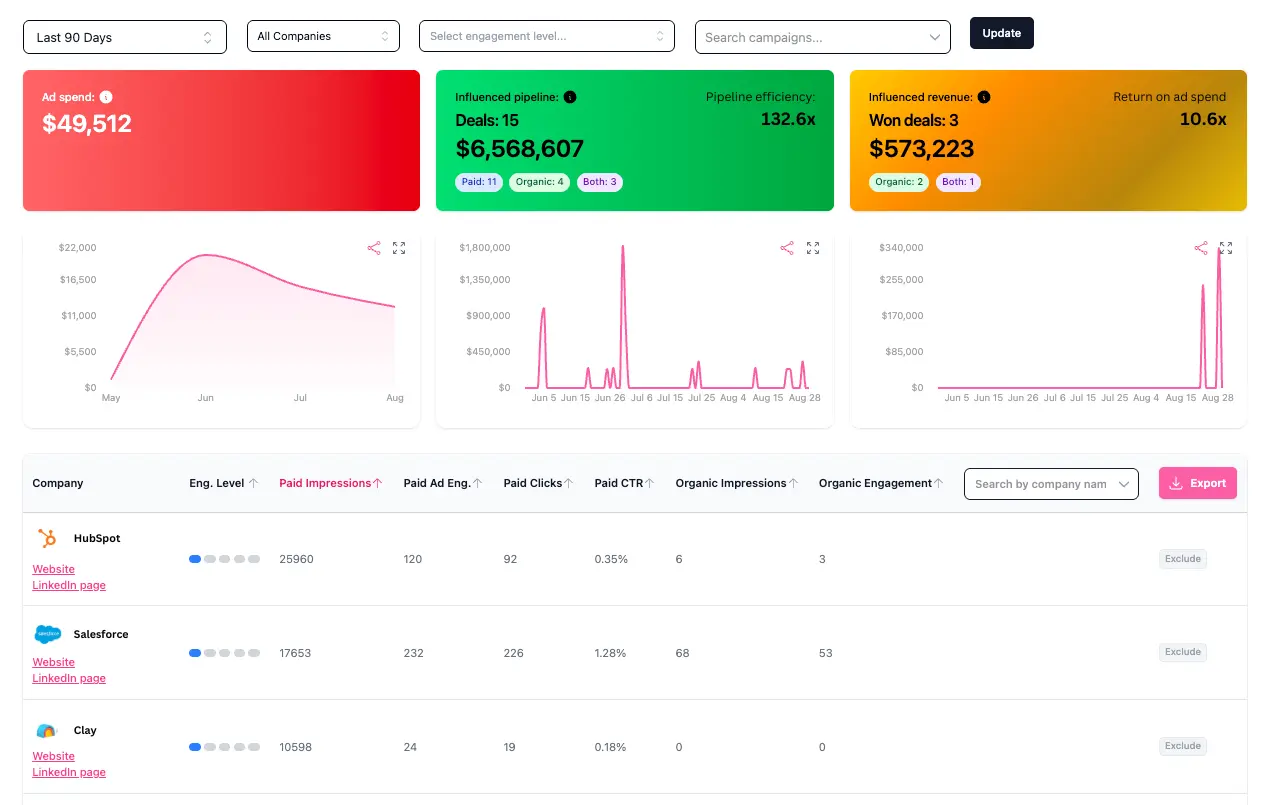
With Revenue Attribution, you can tie your LinkedIn Ads and organic content to pipeline and revenue in your CRM.
Read more about Revenue Attribution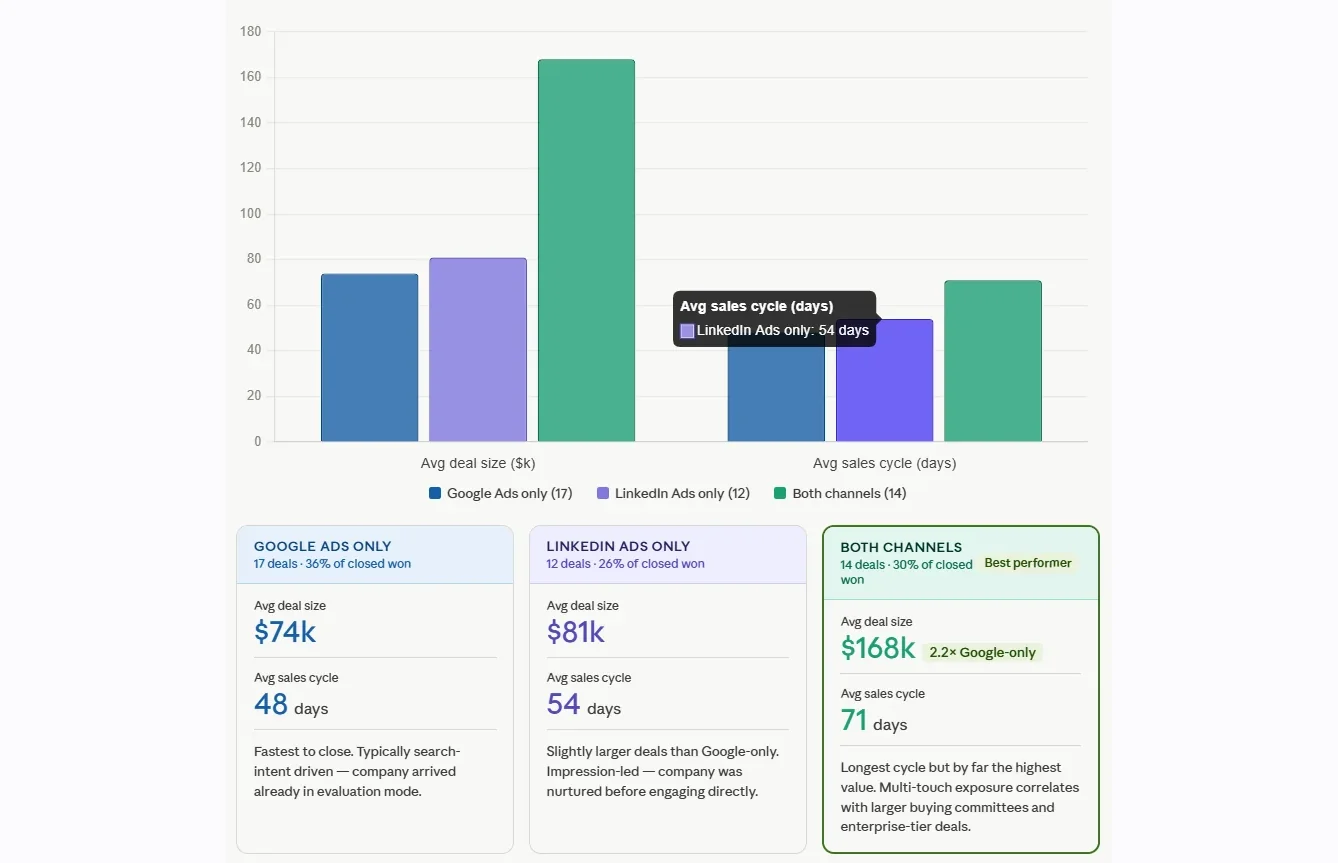
With the MCP server, Claude or ChatGPT can compare LinkedIn and Google Ads side by side in the same chat, showing which channel is associated with early awareness, which correlates with intent, and which deals both channels touched.
Read more about the MCP serverWhat Is a LinkedIn Ads MCP Server?
The Model Context Protocol (MCP) is an open standard that lets AI assistants like Claude and ChatGPT connect to live data sources. A LinkedIn Ads MCP server is the bridge between your LinkedIn campaign data and your AI. Rather than navigating Campaign Manager, exporting CSVs, or pasting numbers into prompts, you ask in chat and the AI queries the data directly.
That's a meaningful upgrade for any team running paid social. But for B2B marketers, the questions that matter most aren't about CTR or CPM. They're about which accounts are engaging with your campaigns, which of those accounts entered pipeline, and which deals LinkedIn actually influenced.
Native LinkedIn data can't answer those questions, and neither can a generic LinkedIn Ads MCP server. The data underneath is the same data Campaign Manager shows you. Fibbler's MCP server is different.
What makes Fibbler different
Account-level engagement, not just clicks.
Fibbler shows your AI which companies are seeing and engaging with your campaigns, including the silent accounts that never click.
CRM-attributed deals.
Campaign data is joined to HubSpot, Salesforce, Attio, or Pipedrive pipeline, so your AI can map a creative or audience to closed revenue.
Cross-channel by default.
If you also run Google Ads or Meta Ads through Fibbler, your AI can compare or combine those channels in the same conversation.
What you can ask your AI assistant with a Fibbler MCP connection
Pipeline Diagnosis
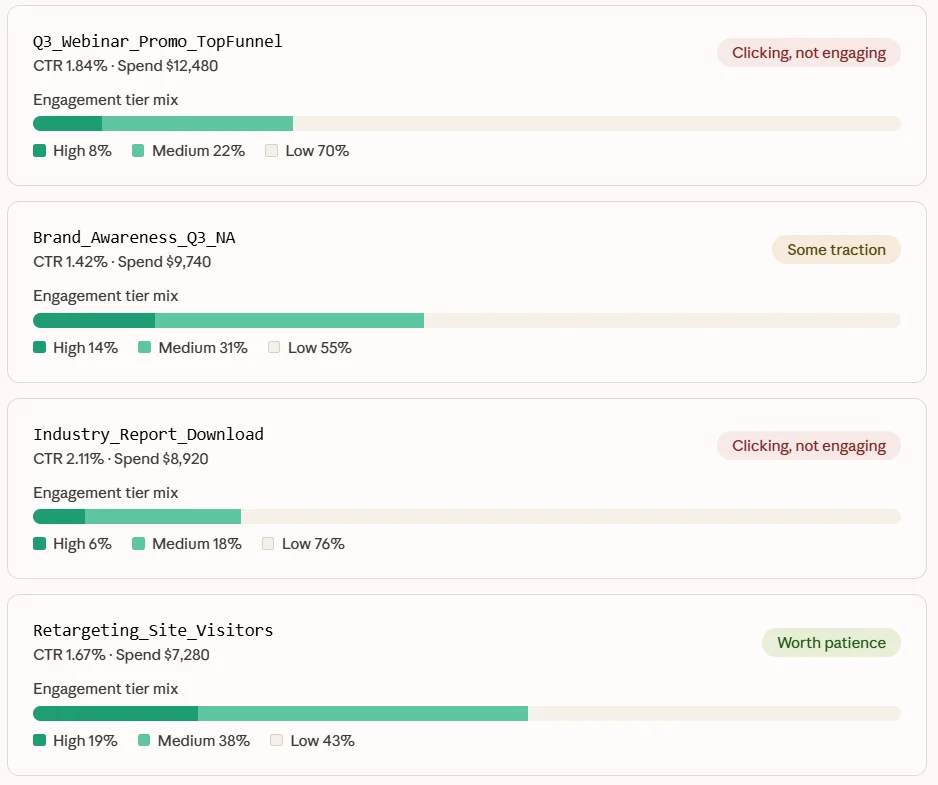
"Using Fibbler data, which LinkedIn campaigns from last quarter had strong CTR but zero pipeline influence in our CRM? For each one, show me the engagement profile of the companies seeing those ads (engagement tier breakdown, repeat exposure rate) so I can tell whether the audience is actually engaging or just clicking and bouncing."
The answer comes back like the example shown.
Campaign Performance Diagnosis
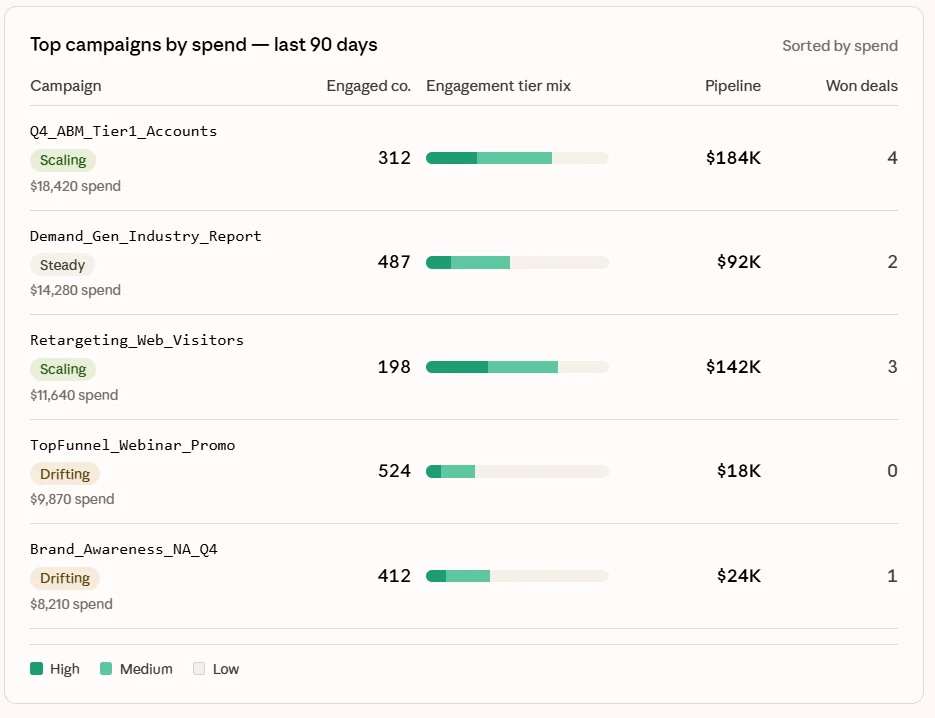
"Compare our top five LinkedIn campaigns by spend over the last 90 days. For each one, show me total engaged companies, the engagement tier breakdown, influenced pipeline value, and how many closed-won deal journeys it appears in. Which campaigns are pulling their weight and which are drifting?"
The answer comes back like the example shown.
Silent Account Surfacing
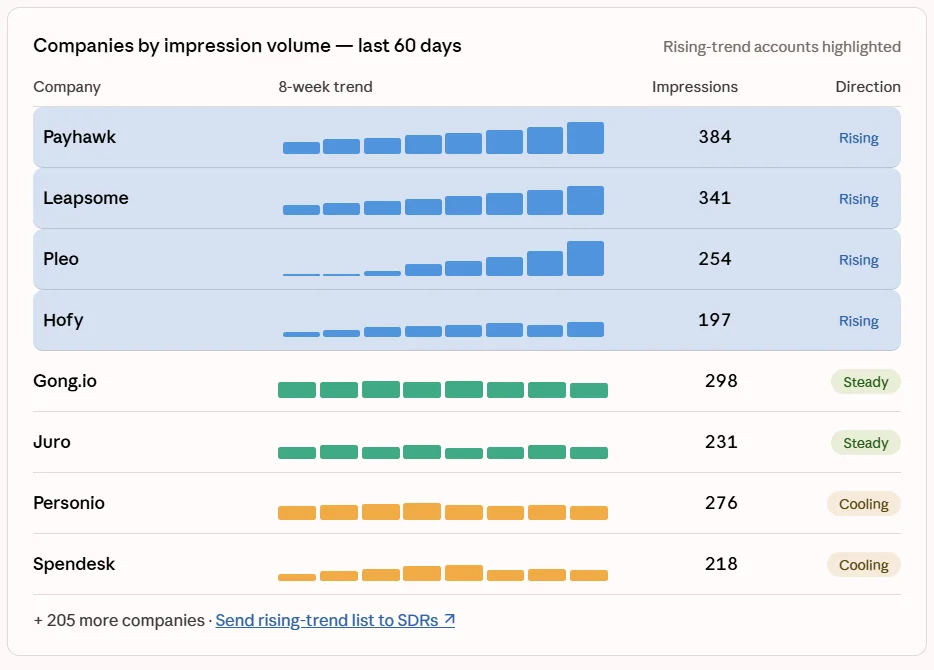
"Find companies that have received at least 10 LinkedIn ad impressions in the last 60 days but haven't clicked, visited the site, or entered our CRM. Show me their impression trend over the period, sorted by total impressions, so my SDRs can prioritise the rising-trend accounts for outbound."
The answer comes back like the example shown.
Why most LinkedIn Ads MCP servers don't work for B2B
Connect a generic LinkedIn Ads MCP server to Claude or ChatGPT and you can ask about CTR, CPM, frequency, and conversion rate. Your AI will produce confident, well-structured answers about exactly the metrics Campaign Manager already surfaces. Faster reporting, same blind spots.
The blind spot that matters in B2B is revenue. LinkedIn knows what happened inside its platform. It doesn't know which engaged companies turned into qualified opportunities, which deals were influenced by which creatives, or whether the campaigns burning the most spend are showing up in any closed business at all. That data lives in your CRM, behind a join LinkedIn can't make.
A LinkedIn Ads MCP server can't make that join either. It can only read what LinkedIn exposes, and LinkedIn doesn't expose pipeline outcomes.
Fibbler is built on top of an attribution layer that does. Your AI sees the campaign engagement, the companies behind it, the website visits, the CRM activity, and the deal-level outcomes in a single connected view. That isn't reporting on ads. That's reasoning about revenue.
How Fibbler's LinkedIn Ads MCP server actually works
Connect once
Link your LinkedIn Ads account and CRM to Fibbler, then add Fibbler's MCP server to Claude, ChatGPT, Cursor, or any other MCP-compatible client. No developer resources, no custom integration. Setup takes under a minute.
Fibbler maintains your live attribution layer
In the background, Fibbler is continuously joining LinkedIn campaign engagement to identified companies and your CRM pipeline. By the time your AI asks a question, the join is already done.
Your AI assistant queries exactly what it needs
When you ask a question, your AI sends a structured request to Fibbler's MCP server. It doesn't pull a raw export. It pulls the specific campaigns, creatives, audiences, or accounts relevant to your question. Tight context, accurate answers.
Answers come back grounded in real revenue data
No filter menus, no manual reconciliation, no waiting on a report. You ask, the AI queries Fibbler, the answer arrives in chat with company-level engagement and CRM attribution already applied.
Put your LinkedIn Ads data where your AI can actually use it
Fibbler's LinkedIn Ads MCP server is live on the Unlimited and Agency plans.
Try 30 days for freeTest all features. No credit card needed.
Before you connect
Quick answers on setup, security, plan availability, and what Fibbler's LinkedIn Ads MCP server actually does once you've wired it into Claude or ChatGPT.
What is a LinkedIn Ads MCP server?
MCP stands for Model Context Protocol, an open standard that lets AI assistants connect to live data sources. A LinkedIn Ads MCP server is a secure bridge between your LinkedIn campaign data and your AI assistant. When you ask a question, the AI retrieves the answer directly from the source instead of guessing from training data or pasted CSVs.