Revenue Attribution with Company Insights
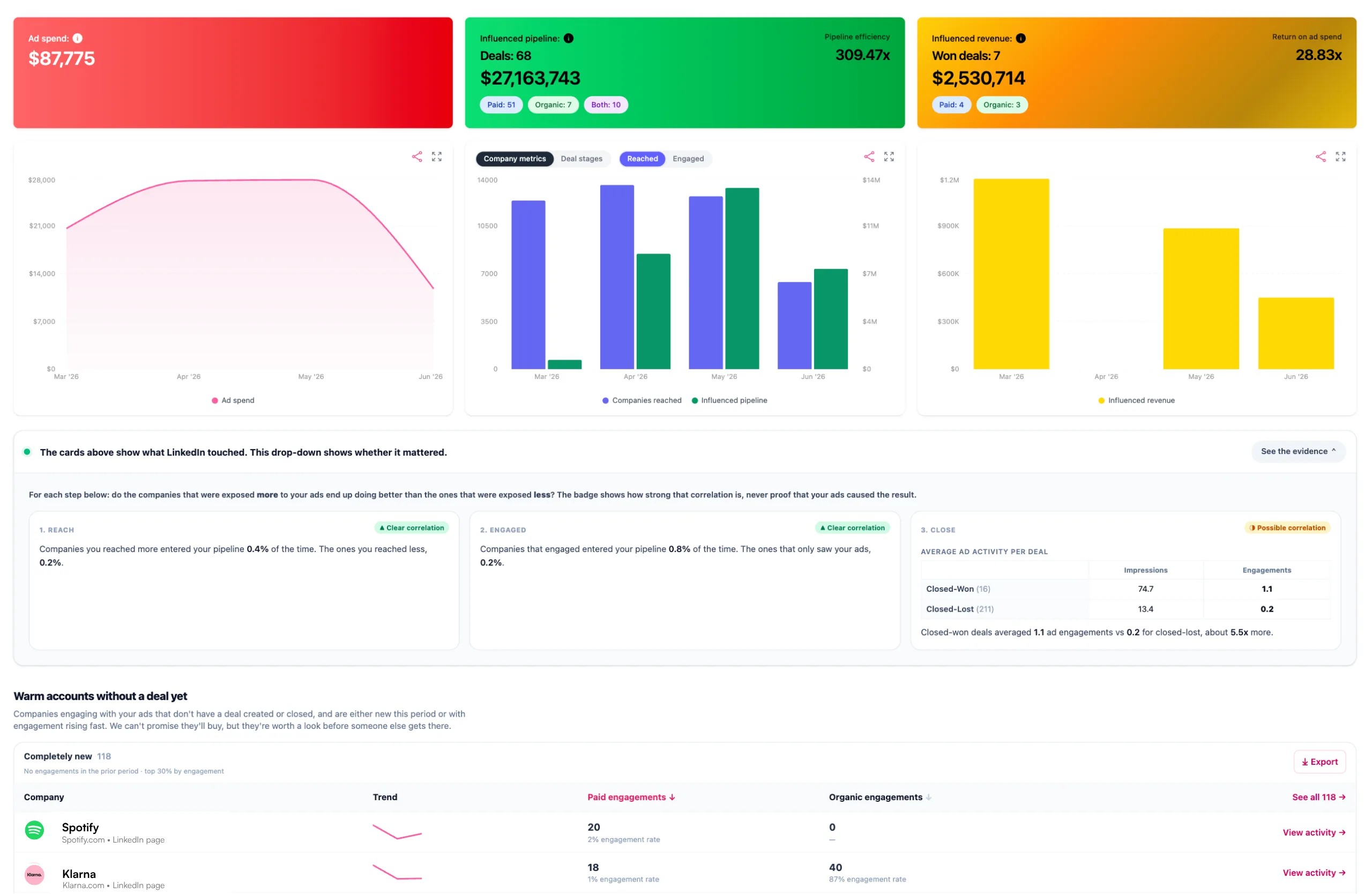
Company Insights is Fibbler's core attribution feature. It shows which companies viewed or engaged with your LinkedIn Ads and organic content, and connects that activity to pipeline and revenue in your CRM.
How it works
- Fibbler fetches company-level engagement data from LinkedIn (via the Company Intelligence API as a LinkedIn Marketing Partner)
- Fibbler fetches deals/opportunities from your CRM
- Fibbler matches companies between LinkedIn and your CRM primarily through domain, along with a few other signals
- Deals where the company had LinkedIn activity before deal creation are marked as "influenced"
If a deal is marked influenced but you don't think it should be, you can exclude it from influence so it stops counting toward the totals below.
Summary tiles
Three tiles sit at the top of the page:
- Ad spend: Your LinkedIn ad spend for the selected period.
- Influenced pipeline: The value of influenced deals created in the period that aren't closed-won yet. This includes open and closed-lost deals (closed-won is counted as revenue instead). "Influenced" means the company had LinkedIn touchpoints before the deal was created. The tile also shows pipeline efficiency (influenced pipeline divided by ad spend).
- Influenced revenue: Closed-won revenue from deals where the company had LinkedIn touchpoints before the deal closed. The tile also shows return on ad spend (influenced revenue divided by ad spend).
When ad spend and deals are in different currencies
LinkedIn bills your ad account in one currency and your CRM reports deals in another, so pipeline efficiency and return on ad spend cannot divide the two until the spend is converted. Fibbler converts it using the European Central Bank's published daily rates.
- The Ad spend tile shows the amount LinkedIn billed you, in the ad account's currency. When the two currencies differ it shows the converted figure underneath, marked as the one used for the ratios, so you can reproduce both ratios from what is on screen.
- A finished calendar month is priced at that month's closing rate, so a month you reported on in July reads the same when you open it again in December. Select several months and the rate used is the close of the last one.
- A rolling window (7, 30, 60 or 90 days) and a month still in progress use the latest published rate, because those track the present by design and will move slightly from day to day.
- The pipeline efficiency and return on ad spend tooltips name the exact rate date used. The ECB does not publish on weekends or holidays, so a month ending on a Saturday is priced at the last banking day before it. That is the date you will see.
The company table
Below the tiles, every company that saw or engaged with your ads is listed, with paid and organic activity split out:
- Company: Name and domain.
- Eng. Level: A five-bar meter showing the company's engagement band (Very low to Very high), based on how much the company engages with your ads and organic posts compared to the impressions it got.
- Paid Impressions, Paid Ad Eng., Video Views, Paid Clicks, Paid CTR: The company's paid activity. See what counts as a video view.
- Organic Impressions, Organic Engagement: The company's organic activity.
- Country, Industry, Company Size: Taken from the company's own LinkedIn page, the same source as Audience Insights. Country is where the company is headquartered, not where the person who saw the ad was. These three are also in the CSV export of the table.
Click Campaign Data on any company (or just click the row) to open <Company> - Campaign Performance. It shows the company's activity per campaign, and for a company with a deal, a Why this deal qualified as influenced box with the touchpoints that made it count.
See the evidence
Attribution shows what the ads touched. The evidence drawer answers the harder, more honest question: do the ads actually correlate with results? Open it from Company Insights and Fibbler compares the companies that were exposed more to your ads against those exposed less.
- Reach: did the companies you reached more often enter the pipeline more than those you reached less?
- Engage: did the companies that engaged with the ads enter the pipeline more than those that only saw them?
Both comparisons always read the last 12 months, whatever period is selected above them. A shorter window leaves the comparison resting on a handful of deals, which is not enough to tell a real pattern from noise.
Each step gets a plain-language verdict: Clear correlation, Correlation, No correlation, Negative correlation, or Too little data. The verdict is power-aware, so a small or noisy sample reads as "too little data" rather than a false signal.
Influenced pipeline growth
The same drawer answers a different question underneath: once you have reached a company, how long does pipeline take to arrive? Four bars show the share of your influenced deals that had appeared within 1, 3, 6 and 12 months of the first ad touch.
This is the answer to the most common way B2B advertising gets misread: judging last month's spend by last month's pipeline. The bars show how much of your pipeline only arrived after the first month, so a young month is often unfinished, not underperforming.
A toggle switches the starting line between First reached and First engaged. It only appears when your account has enough engaged companies to draw the second view. Show month by month opens the cohort table behind the bars: one row per month companies were first reached, and what that group has booked since, so you can see which months are still filling in.
Accounts with fewer than 60 influenced deals do not get this chart. A distribution across a dozen buckets needs that much evidence before its shape means anything, so Fibbler says so rather than drawing noise.
Warm accounts
Warm accounts are companies engaging with your LinkedIn ads that aren't a deal in your CRM yet. They are a ready-made prospecting shortlist: companies already paying attention that your sales team hasn't picked up. Each company is flagged as:
- New: a company that just started engaging this period, with no activity in the previous one.
- Rising: a company whose engagement at least doubled (grew 100% or more) versus the previous period. Genuine acceleration, not small jumps in noise.
View warm accounts across the whole account here, or per campaign in Campaign Analytics, and export the list to CSV to hand to sales. If you also run Google Ads, the same idea applies to website visitors. See Google Ads Company Insights.
Exclude companies
From the company table, you can exclude any company directly from your LinkedIn campaigns with one click. You can choose to exclude a company from all campaigns at once, or from individual campaigns. The exclusion is applied directly in your LinkedIn Campaign Manager.
This is useful for removing companies that are not a fit (competitors, existing customers, etc.) so your budget is spent on the right accounts. LinkedIn allows 200 excluded companies per campaign in total, and that includes any exclusions already on the campaign.
Exclude deals and companies from influence
Sometimes a deal is counted as influenced when you know it shouldn't be: a bad company match, an existing customer, a competitor, or a deal your team knows LinkedIn had nothing to do with. You can take these out of your influenced numbers so the totals reflect reality. There are two options.
- Exclude a deal from influence: removes a single deal from every influenced report and view.
- Exclude a company from influence: removes every deal for that company, and keeps new deals that sync in later excluded too, so the company never counts as influenced again. Use this for accounts that should never be attributed to LinkedIn, like current customers.
You'll find these controls in a few places:
- On each company row in the table, a Not influenced control lets you pick which of that company's deals to exclude.
- In the Influenced pipeline and Influenced revenue lists (opened from the summary tiles), each row has Exclude deal from influence and Exclude company from influence.
- From a company's Customer Journey.
This works across all connected CRMs (HubSpot, Salesforce, Pipedrive and Attio). Excluded deals drop out of influenced pipeline, revenue and Campaign Analytics straight away, and stay out across future CRM syncs.
Nothing is permanent. Everything you've excluded is listed under Excluded from influence on the Data Sources page, where you can Include again any deal or company to bring it back.
Influence threshold
You can customize when a deal is considered "influenced" by changing the attribution model. By default, Fibbler uses the Awareness model, which gives credit for impressions. You can switch to Engagement, Intent, or build a Custom model depending on how strict you want the attribution to be.
Learn more about the available models and how to configure them in Attribution Models.