Connect HubSpot to Fibbler
- In Fibbler, go to Data Sources
- Click "Connect CRM" and pick HubSpot from the list. The button says "Connect LinkedIn First" and can't be clicked until LinkedIn Ads is connected
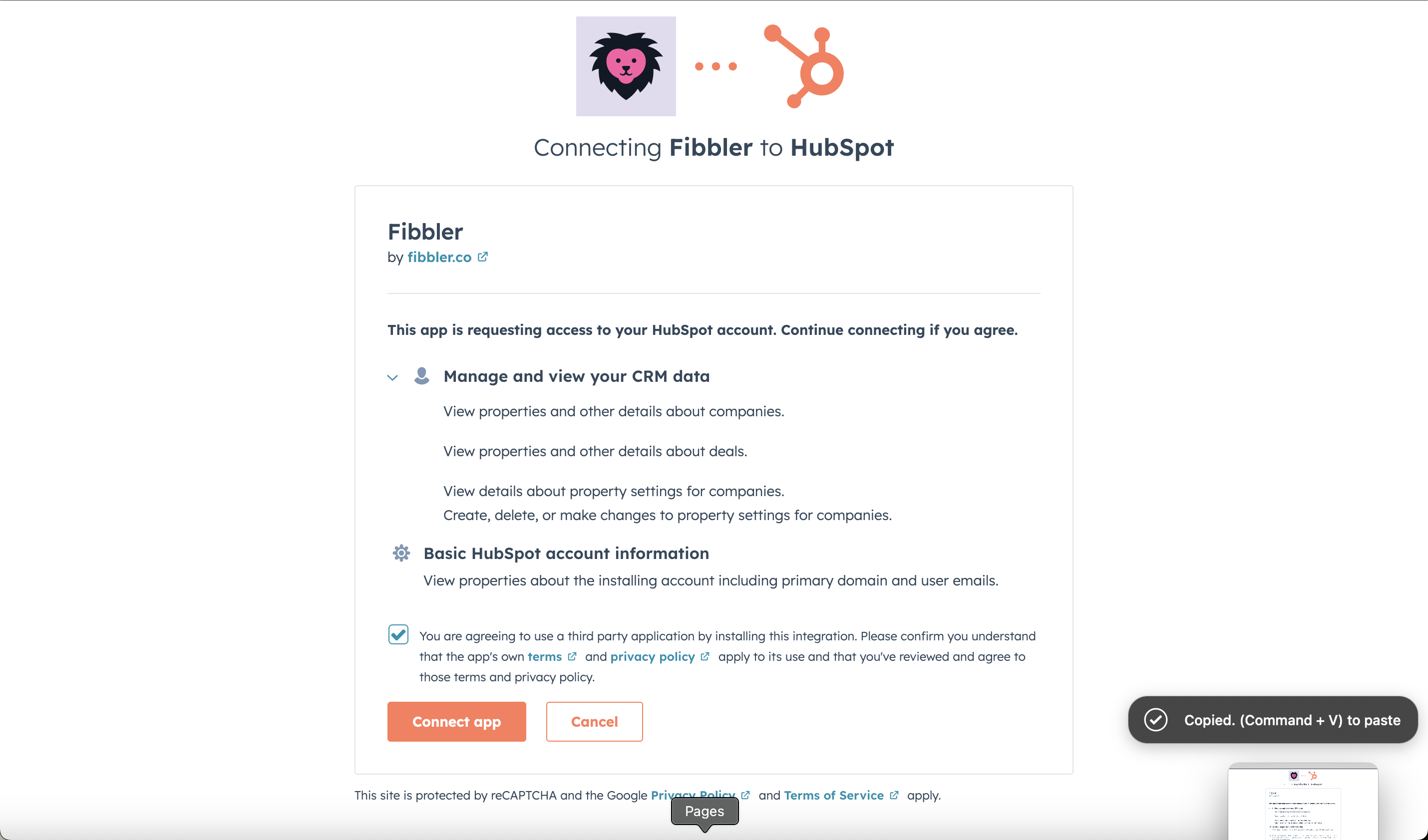
- Sign in with a HubSpot user who is a Super Admin, and pick the account you want to connect
- Review the permissions and authorize the connection
Permissions Fibbler asks for
HubSpot shows every permission on one screen when you connect, whether or not you use the feature it belongs to. Three of them are what Fibbler reads to produce attribution; the rest are only used by features that are off until you turn them on.
Always used
- View properties and other details about companies
crm.objects.companies.read— reads company names and domains, so ad engagement can be matched to the accounts in your CRM - View properties and other details about deals
crm.objects.deals.read— reads deal amount, stage and dates, for influenced pipeline and revenue - View details about property settings for companies
crm.schemas.companies.read— reads the names of your properties, not their values. It is how the deal revenue picker lists your currency properties, and how Fibbler sees which of its own fields already exist - View properties about the installing account including primary domain and user emails— HubSpot's standard app information, which tells us which portal you just connected
Only used by features you turn on
- Create, delete, or make changes to property settings for companies
crm.schemas.companies.write— creates Fibbler's own company properties. Used by CRM Data Sync and by Ad Engagement Signals - Create, delete, or make changes to companies
crm.objects.companies.write— writes values into those Fibbler properties. It is also what lets a signal create a company your portal is missing, which is a separate setting you choose - Create, delete, or make changes to contact lists
crm.lists.write— creates the list a signal fills, and keeps the right companies in it. Ad Engagement Signals only - View details about contact lists
crm.lists.read— looks up a list we created, by the id we stored when we made it. A signal running normally never reads a list; this is here so support can check one when you tell us it is not filling
Configure your CRM settings
After connecting HubSpot, make sure to complete the CRM configuration in Fibbler:
- Select your sales pipelines: Pick the HubSpot deal pipelines Fibbler should use for attribution. You can select more than one, and each pipeline gets its own settings below
- Deal Types (optional): If you use Deal Types in HubSpot to differentiate between New Business and Upsells, tick "We use 'deal types' and want to customize them in the Fibbler platform" and pick one per pipeline. If you are not using it, leave the box unticked
- Map your Closed Won and Closed Lost stages: Tell Fibbler which HubSpot deal stages count as Closed Won and Closed Lost. You can select more than one stage for each outcome
Which property deal revenue is read from
By default Fibbler reads pipeline and revenue from HubSpot's Amount property converted to your company currency. That is the right choice for almost every portal, and especially for portals with deals in more than one currency, because it puts every deal in the same currency before anything is added up.
If your revenue actually lives in a custom currency property, you can point Fibbler at it. On the Data Sources page, open your HubSpot source and expand Advanced, deal revenue property. The picker lists your currency properties, with Amount (default) first.
Two properties are deliberately not offered. The raw Amount in each deal's own currency would add different currencies into one meaningless total, and Exchange rate is a conversion factor rather than an amount. This setting is HubSpot only.
What Fibbler writes to HubSpot
Nothing, until you turn a feature on. Two features write to HubSpot, and both are off by default. On a company that already exists they only ever write Fibbler's own fields: your name, domain, owner, lifecycle stage and everything else your team maintains are never changed by us.
CRM Data Sync custom fields (optional)
CRM Data Sync is an optional feature that pushes ad engagement data into your CRM. You do not need to enable it to use Fibbler. Company Insights, Campaign Analytics, and attribution all work without it.
If you choose to enable it for LinkedIn, Fibbler automatically creates the following custom company properties in HubSpot:
- LinkedIn Impressions (7, 30, and 90-day windows)
- LinkedIn Clicks (7, 30, and 90-day windows)
- LinkedIn Engagements (7, 30, and 90-day windows)
- LinkedIn Paid Video Views (7, 30, and 90-day windows)
- LinkedIn Organic Impressions (7, 30, and 90-day windows)
- LinkedIn Organic Engagements (7, 30, and 90-day windows)
- LinkedIn Engagement Level (7, 30, and 90-day windows). Values: VERY_HIGH, HIGH, MEDIUM, LOW, VERY_LOW
The sync runs on a weekly schedule every Sunday, updating only HubSpot company records that already exist. CRM Data Sync will never create a company record in HubSpot.
Google Ads and Meta Ads visit fields (optional)
If you have the Google Ads or Meta Ads add-on, CRM Data Sync can also push website visits that came from those channels onto the same company records. Each channel is set up separately, and each creates its own properties:
- Google Ads:
fibbler_google_ads_visits_7_days,fibbler_google_ads_visits_30_days,fibbler_google_ads_visits_90_days, shown as "Google Ads Visits (7 days)" and so on - Meta Ads:
fibbler_meta_ads_visits_7_days,fibbler_meta_ads_visits_30_days,fibbler_meta_ads_visits_90_days, shown as "Meta Ads Visits (7 days)" and so on
You can also sync a named group of campaigns rather than the whole account. That creates one property per group and window, with a display name like "Google Ads Visits (7 days) - Brand Campaigns". The details are in the Google Ads CRM Sync and Meta Ads CRM Sync docs.
Ad Engagement Signals in HubSpot (optional)
Ad Engagement Signals sends the companies engaging with your ads somewhere your team already works. When you pick HubSpot as a destination, a signal does three things in your portal.
It writes six company properties, in their own property group called "Fibbler Ad engagement signals" so they never mix with what CRM Data Sync writes:
- Fibbler Signal Type
fibbler_signal_type— why the company was surfaced: New, or Rising fast - Fibbler Signal Date
fibbler_signal_date— when Fibbler last surfaced it - Fibbler Signal Name
fibbler_signal_name— which signal surfaced it - Fibbler Signal Channels
fibbler_signal_channels— which ad channels it engaged with - Fibbler Signal Why
fibbler_signal_why— the evidence, in one line - Created by Fibbler
fibbler_created— a checkbox, set only on a company record a signal created
It keeps a list, one per signal, under Segments. It is a static list of companies named Fibbler: followed by the signal's name. A company keeps its place in the list for 30 days and then drops out; the record, the properties and the history stay exactly as they are.
It creates a company that is missing.Signals are optional and only run once you set one up and turn it on. When a signal sends to HubSpot and the company isn't there yet, we create it. A company created this way is filled in with name, domain, industry, employee count and LinkedIn page, and is stamped with Created by Fibbler so you can find them all again.