Cross-Channel Insights
Cross-Channel Insights puts what each channel cost next to the pipeline and revenue it influenced, in one table. Spend on the left, return on the right, one row per channel. It answers the budget question directly: what am I paying per deal on each channel, and how much are the channels working on the same accounts.
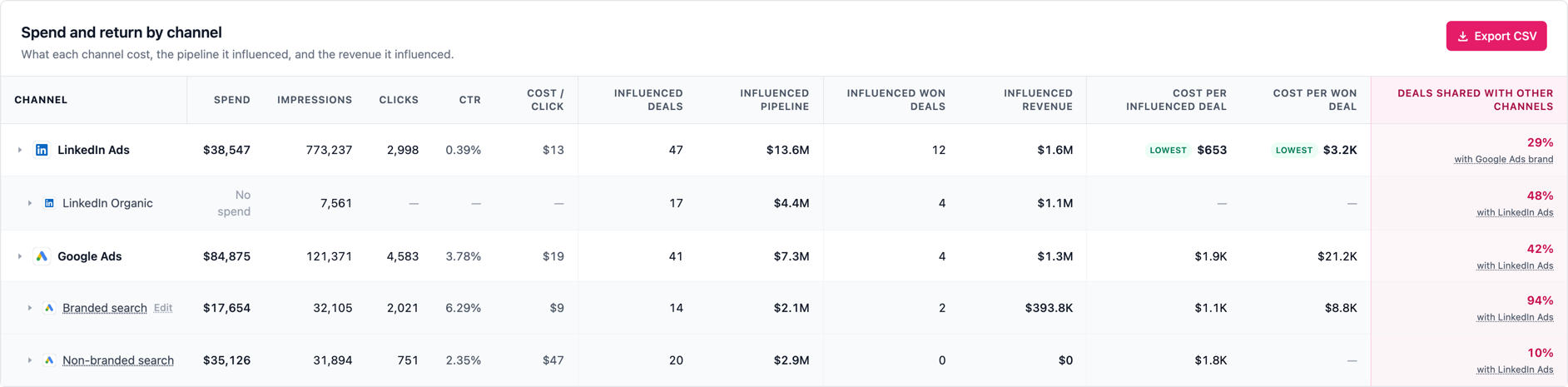
The channels
LinkedIn Ads and Google Ads are the two paid channels, each on its own row. LinkedIn Organic sits underneath LinkedIn Ads as a breakout: it carries no spend by definition, so its spend cell reads "No spend" rather than zero, but it still shows the deals it touched. Under Google Ads you get Branded search and Non-branded search, so you can see whether people are searching your name or searching the category.
Click any row to open the deals behind it. Every deal shows its company, stage, value, and which channels touched it, tagged as pipeline or won. You can export the whole table, a single channel with its deals, or one month of campaign spend.
What "influenced" means
A deal is influenced by a channel when that channel reached the company before the deal existed. Influenced deals are deals created in the period that are not closed-won, so open and closed-lost together. Influenced won deals are the ones that closed won in the period. The two never overlap, and both use the same definition as Company Insights, so the numbers reconcile across the product.
Influence is a correlation, not proof. It says the channel was there before the deal, not that it produced the deal.
Deals shared with other channels
A deal that two channels both touched counts on both rows. That is honest for each channel on its own, but it means the deal columns add up to more than your real total. The last column says how much of that is happening: the share of a channel's deals that another channel also touched, and which channel that mostly was. Hover it for a plain-language reading of what the number means for that row.
This is usually most interesting on Branded search. If almost every branded-search deal was also touched by LinkedIn, the brand searches are likely capturing demand that already existed rather than creating it. If non-branded search shares very little, it is finding accounts on its own.
Cost per deal, and why the channels are not identical
Cost per influenced deal is the period's spend divided by every deal the channel touched. Cost per won dealdivides it by the won ones only, so it is always the larger of the two. The lowest of each gets a "Lowest" tag, across the top-level channels only.
Read those two side by side rather than as a league table. LinkedIn reports impressions per company, so it counts companies that saw your ad and never clicked. Google Ads only sees a company once someone clicked and we could identify them. At equal real performance LinkedIn will therefore show more influenced deals and a lower cost per deal. A channel with no wins in the period shows no cost per won deal at all, which means we have no evidence yet, not that it is expensive.
Branded vs non-branded, and fixing the split
A search counts as branded when it contains one of your brand names. Everything else falls into non-branded, which makes non-branded the catch-all rather than a detection of category intent. Hover a search row to see the keywords counted in it.
We start from your account name, which cannot know that you were called something else before, or that you also sell under an acquired brand. Those searches land in non-branded and make your branded row look too small. Click Edit next to Branded search to add the missing names. One name fixes every variant of it at once, including future ones, so adding a former brand name reclassifies every search containing it. Account owners and admins can edit this.
Ad spend over time
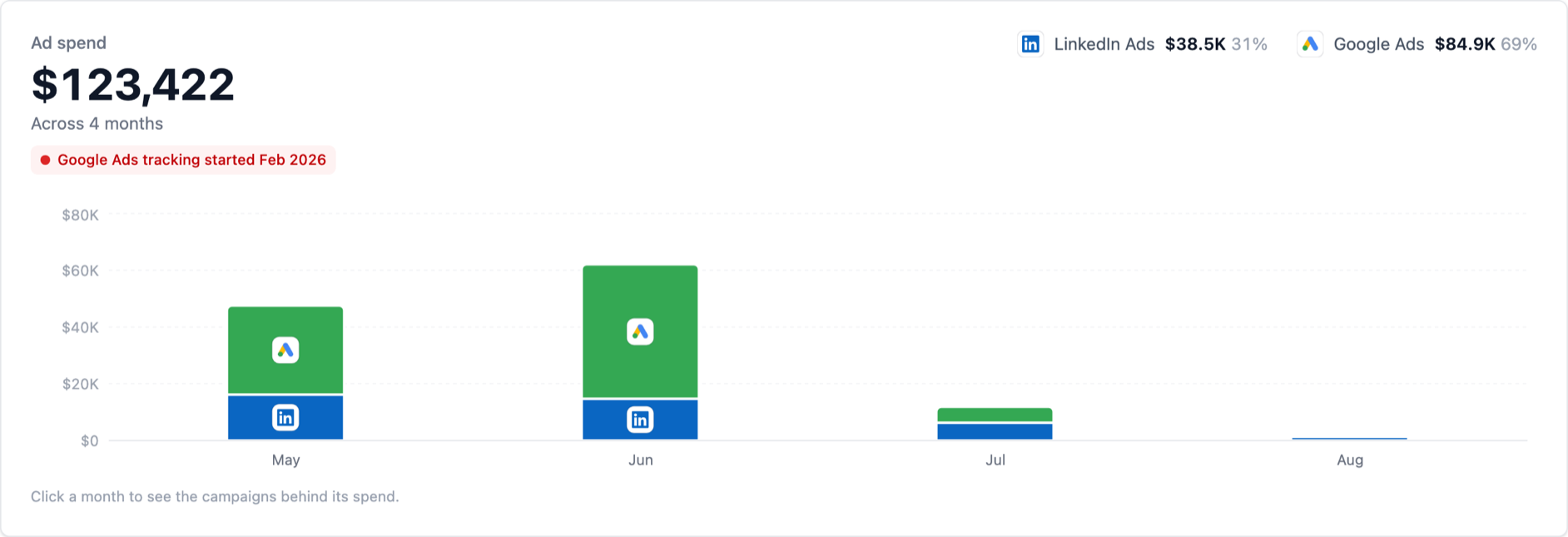
The chart at the top shows spend per month, stacked by channel, with each channel's share of the total. Click a month to see every campaign that spent in it, with its channel and its share of the month.
The red marker shows the month Google Ads tracking started. You can look back over your full LinkedIn history, further than Google Ads has been connected, so this matters: in months before that marker, Google Ads spend is unknown rather than zero. Comparing the two channels over a window that starts before it will flatter LinkedIn, because LinkedIn is credited with months Google has no data for.
What you need
Cross-Channel Insights requires both LinkedIn Ads and Google Ads to be connected, along with a CRM. If you have multiple CRMs connected, you will be asked which one to use. Spend that has not synced yet shows as "Not synced" rather than as zero, so a missing number is never mistaken for a free channel.