Campaign Analytics
Campaign Analytics shows how each of your LinkedIn campaigns performs: ad spend, delivery, engagement, the companies it reaches, and the pipeline and revenue it influenced. Click any campaign row to see the deals it influenced, or press its warm-accounts pill to see the companies it is engaging.
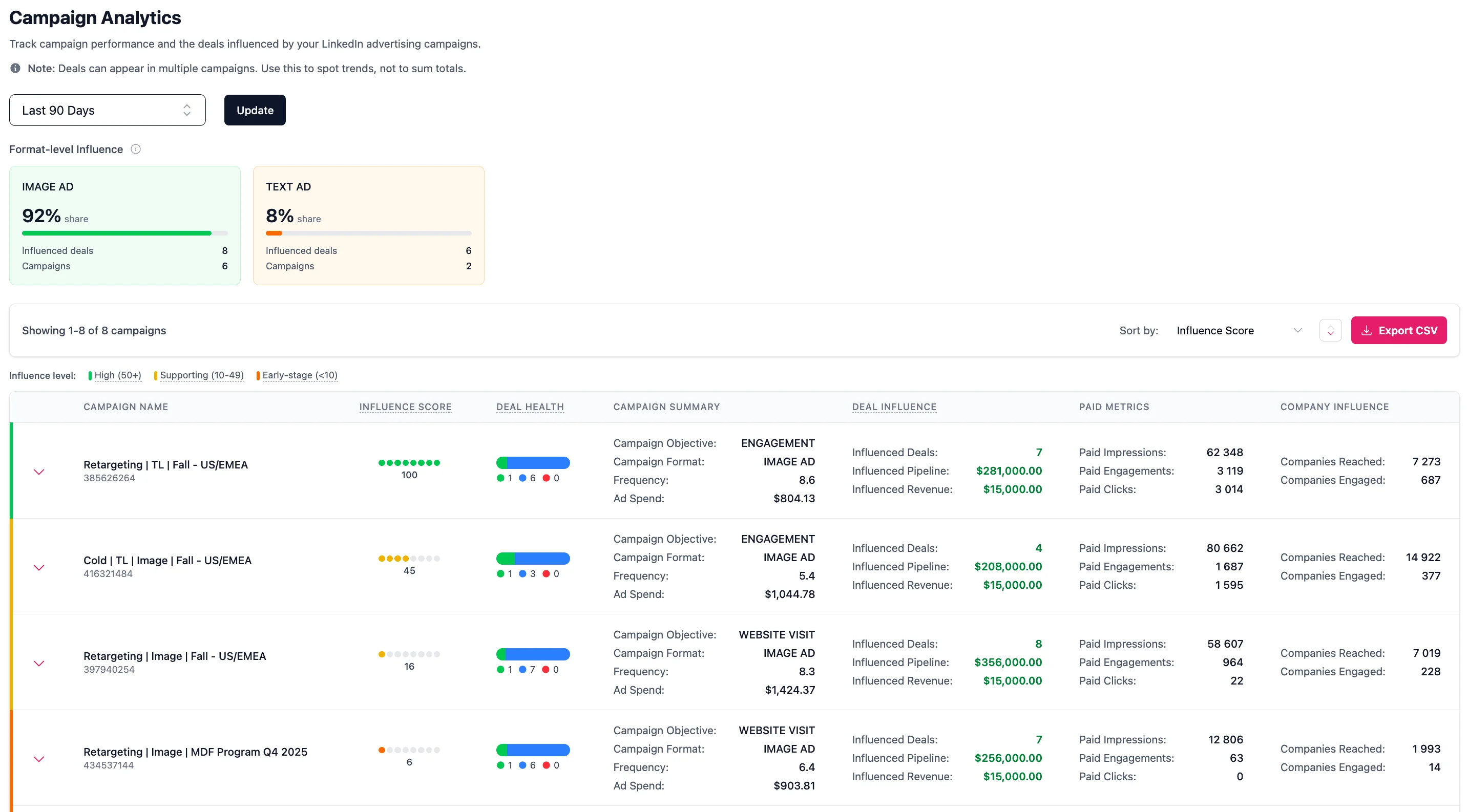
What each column shows
Every campaign row shows the campaign name with its campaign ID and ad format (for example Image Ad, Text Ad, Video) underneath. The table has these columns:
- Ad Spend: Total spend for the campaign in your LinkedIn account currency.
- Impressions: Total paid impressions delivered.
- Engagements: Total paid engagements (likes, comments, shares, follows), with the engagement rate shown underneath.
- Video Views: Total paid video views. See what counts as a video view below. Campaigns that do not run video ads show 0.
- Clicks: Total paid clicks on the campaign.
- Companies Reached: Number of companies that were served an impression.
- Companies Engaged: Number of companies that interacted with the campaign. This cell also shows the campaign's warm accounts pill (see below).
- Influenced Pipeline: The value of the pipeline deals this campaign influenced (open and lost deals, not yet won), with the number of deals shown underneath.
- Weighted Pipeline: This campaign's share of those same pipeline deals (see the next section).
- Influenced Revenue: The value of the closed-won deals this campaign influenced, with the number of deals shown underneath.
- Weighted Revenue: This campaign's share of those same won deals, split the same way as Weighted Pipeline.
What counts as a video view
Video views come from LinkedIn, and LinkedIn counts one when someone watches at least two continuous seconds with at least half of the video visible on screen. It is a lighter signal than a click: a view means the ad held attention for a moment, not that someone went looking for you. Fibbler reports paid video views only, so views on organic posts are not included.
The same metric appears in Company Insights, Customer Journeys and Warm Accounts, it can be pushed to your CRM with CRM Data Sync, and it can be used as a condition in a custom attribution model.
Influenced pipeline, revenue, and deals
A deal is influenced by a campaign when the buying company was exposed to that campaign's ads in the window before the deal was created. Influenced Pipeline is the value of the pipeline deals a campaign influenced (open and lost, not yet won); Influenced Revenue is the value of the closed-won deals it influenced. Click a campaign rowto expand the list of deals it influenced, with each deal's company, amount, stage, and date.
The same deal can be influenced by several campaigns, so these totals overlap across campaigns. Read them as a trend, not a sum: adding up Influenced Pipeline across campaigns counts a deal once for every campaign that touched it.
Weighted pipeline and revenue
Weighted Pipeline and Weighted Revenueare the deduplicated versions of Influenced Pipeline and Influenced Revenue, and each has its own column. We divide each deal's value between the campaigns that reached the company before the deal was created, so you can add up a Weighted column across campaigns without counting any deal twice.
Use the Weight by: dropdown above the table to pick what decides the split: Impressions (the default) or Engagement. Some ad formats, like text and spotlight ads, aren't part of the weighted split and show "not weighted". It is correlation, not proof that a campaign caused a deal.
Period-over-period comparison
Several columns include a percentage change versus the previous equivalent period. Green means growth, red means a decline. This applies to Ad Spend, Impressions, Engagements, Clicks, Companies Reached, Companies Engaged, Influenced Pipeline and Influenced Revenue. Video Views doesn't have a trend.
Hover over any trend percentage to see the previous period's value in a tooltip (for example "prev: $300,000"). This gives you quick context on whether a large percentage change is meaningful or just a result of small numbers.
Attribution settings
The Attribution settings link takes you to the Sources page, where you configure how influenced pipeline and revenue are calculated across Fibbler. See Attribution Models for what each setting does.
Warm accounts per campaign
Each campaign shows a warm accountspill in its Companies Engaged cell: the count of companies engaging with that campaign that aren't a deal in your CRM yet. Press the pill to open the list of those companies, scoped to the period you are viewing (the campaign row itself expands the influenced deals). These are the prospects a specific campaign is warming up, ready to hand to sales.
As elsewhere, companies are flagged New (just started engaging) or Rising (engagement at least doubled versus the prior period), and you can export the list to CSV. See Warm accounts for the full explanation.
Sorting and export
Use the Sort by dropdown to reorder campaigns by Influenced Pipeline, Weighted Pipeline, Influenced Revenue, Weighted Revenue, Campaign Name, Ad Spend, Impressions, Engagements, Video Views, Clicks, Companies Reached, or Companies Engaged. You can also click most column headers to sort by that column. Export all campaign data as a CSV for further analysis. The export includes the campaign ID, name, and format, every metric column with its trend percentage (Video Views has none), plus the deal counts, Influenced Pipeline, Weighted Pipeline, Influenced Revenue and Weighted Revenue. It also has an In Weighted Split column that says whether each campaign is part of the weighted split.