Google Ads Customer Journeys
When you connect Google Ads, the Customer Journeys page expands from a LinkedIn-only view into a multi-channel timeline. You get a combined view of LinkedIn ad impressions, Google Ads website visits, and CRM deal milestones for each company.
Company table
Each row in the table shows a company with:
- Company name and domain
- Deal summary: Created date, status (open/won/lost), and deal amount
- LinkedIn Ads: Paid impressions, paid clicks, and organic visits
- Google Ads: Website visits count
- Deal timeline: Recent deal events with dates
A totals row at the top shows aggregated metrics across all companies.
Filters
- Date range: Select which months to view
- Deal filter: All companies, companies with a deal in CRM, or companies with a won deal
- Channel filter: All channels, LinkedIn Ads only, Google Ads only, or LinkedIn + Google Ads
- Company search: Search for a specific company by name
- Original source (HubSpot only): Filter companies by their HubSpot original source
Journey detail
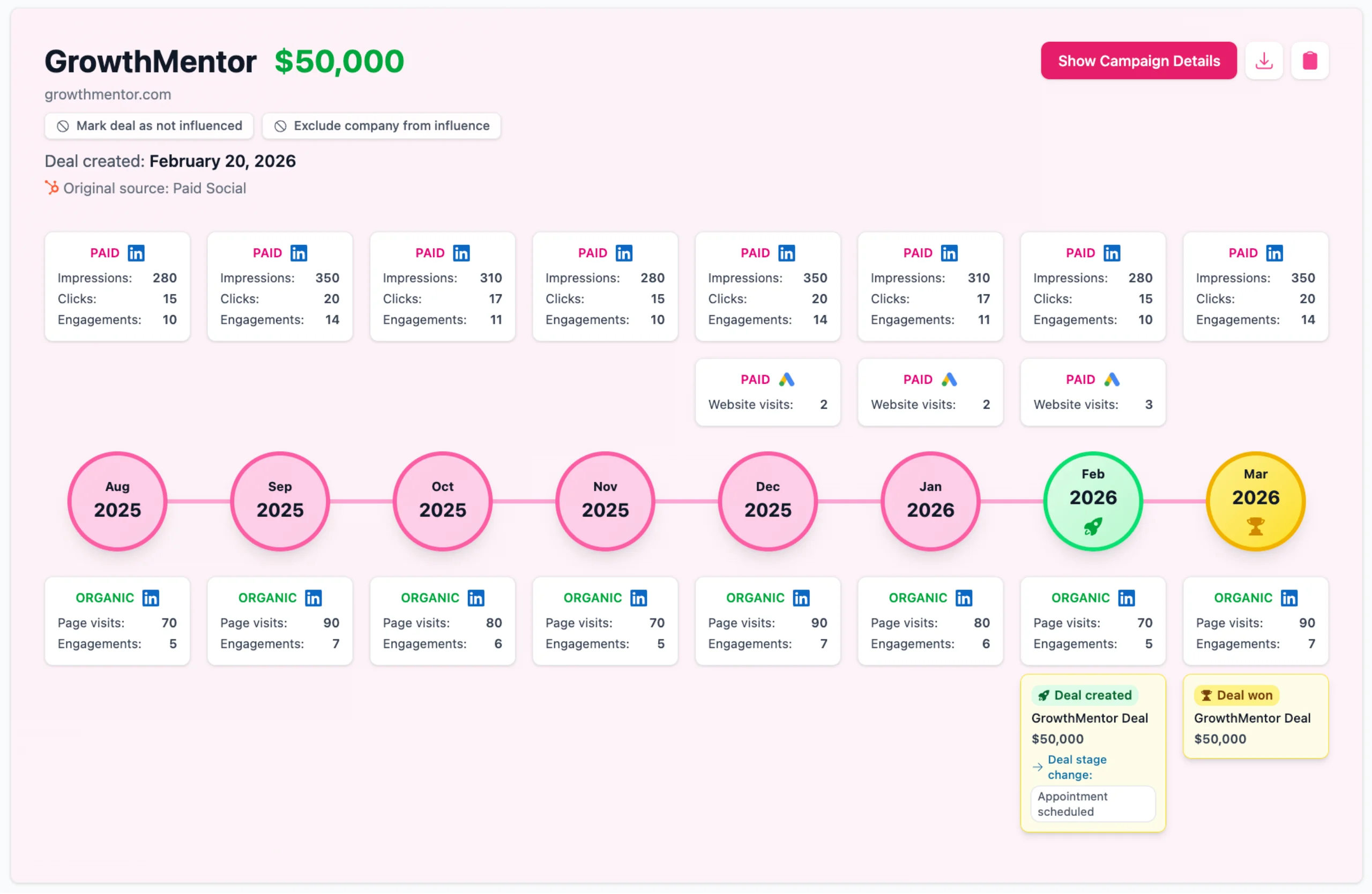
Click on any company row to expand the full journey. This shows a visual timeline with monthly columns containing:
- LinkedIn paid metrics: Impressions, clicks, and engagements per month
- Google Ads metrics: Website visits per month
- Timeline circles: Color-coded by activity type (deal created, deal won, deal lost, or channel activity)
- LinkedIn organic metrics: Page visits and engagements below the timeline
- Deal events: Deal created, won, or lost with amounts and dates
Campaign details
Toggle to "Show Campaign Details" in the journey detail to see a monthly breakdown of which campaigns drove the activity. Each month card shows:
- LinkedIn Ads campaigns: Campaign name with impressions, engagements, and clicks, sorted by engagement
- Google Ads campaigns: Campaign name with website visit count
- Google Ads keywords: Keyword with website visit count
- Deal events: Any deals created, won, or lost in that month
Google Ads influence
Google Ads visits are only counted as influence if they occurred before the deal was created. Visits after the deal creation date are excluded from the summary metrics, so you're measuring pre-deal influence rather than post-deal activity.