

LinkedIn Ads
- LinkedIn Ads Revenue Attribution
- LinkedIn Ads Customer Journeys
- LinkedIn Ads CRM Sync
- LinkedIn Ads Optimization
- LinkedIn Ads Benchmarks

Google Ads

Meta Ads
Cross-Channel
Ad Signals
New


LinkedIn Ads Clay Integration: How to Connect Engagement Data to Clay (2026 Guide)
Quick Summary
Running LinkedIn Ads and using Clay? Most teams only connect Lead Gen forms. This guide shows how to capture company-level engagement (engagements, clicks), route it into Clay, clarify account by engagement level, and turn ad exposure into qualified outbound and pipeline visibility.
Ready to Learn How to Connect Linkedin Ads with Clay the Right Way?
LinkedIn remains one of the strongest platforms for reaching B2B decision-makers. CMI's research found that 85% of B2B marketers say LinkedIn delivers the best value compared with other platforms, so it's understandable if it feels frustrating when you can't tap into that engagement signal inside Clay.
Sure, you can patch things together with Zapier or Make. But that usually only covers form submissions, and it falls apart the moment you want company-level engagement like engagements and clicks.
This article breaks down a better approach: the cleanest way to connect LinkedIn Ads engagement to Clay without hacks or messy workarounds.
Why Listen to Us?
At Fibbler, we work with B2B teams who want to start using company-level engagement (engagements, clicks) as an intent signal for outreach, enrichment, and pipeline reporting.
Here's what one of our clients said:
"Fibbler gives Understory and our clients a direct line from marketing to sales, with clear influence insights and LinkedIn Ads data the sales team can act on. We're big fans of the tool!"
Ali Yildirim
CEO and Co-Founder @ Understory
So when we talk about "LinkedIn Ads Clay Integration," you can trust it's based on real workflows we've seen teams run, refine, and scale.
Does Clay Offer a Native LinkedIn Ads Integration?
The word "integration" in this context can mean two different things, depending on your goal.
If your goal is to build an ICP list in Clay and push it into LinkedIn Ads (as a Matched Audience), Clay can support that kind of workflow. That's Clay → LinkedIn.
But if your goal is the other direction - pulling LinkedIn Ads engagement data (engagements, clicks) into Clay so you can enrich accounts, find decision-makers, and trigger outbound - which is the essence of this article, Clay doesn't natively do that on its own.
Instead, you'll typically need a bridge layer like Fibbler to capture that company-level engagement signal and route it into Clay in a structured way. The step-by-step setup is what we'll cover in this article.
Benefits of LinkedIn Ads + Clay Integration (With Fibbler as the Bridge)
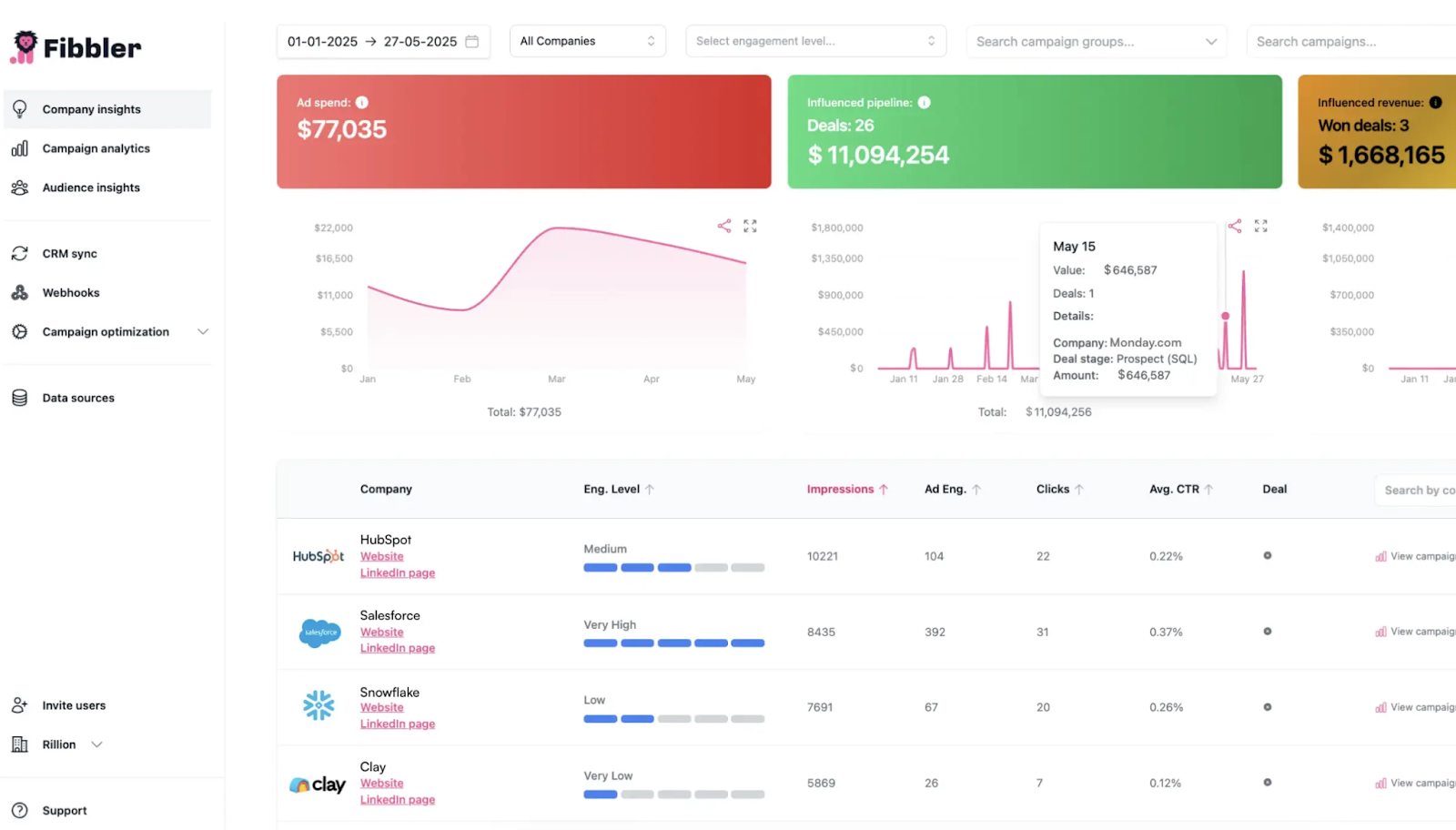
When you connect LinkedIn Ads to Clay using Fibbler as the bridge, LinkedIn Ads stops being just a "spend money and hope" channel, and starts becoming a signal engine you can actually use for targeting, outbound, and pipeline.
Here's what that unlocks:
You Get Company-Level Engagement (Not Just Form Fills)
Instead of only seeing who filled a Lead Gen form (which is what most Zapier/Make setups capture), Fibbler lets you work with company-level signals like impressions, clicks, and engagement over time.
And that engagement can be filtered by defined levels (e.g., Medium, High, Very High) over 7-, 30-, or 90-day windows which makes segmentation cleaner and more scalable.
Clay Turns the Signal Into an Outbound-Ready List
Once the Fibbler engagement data is in Clay, you can actually do the useful stuff:
- enrich companies (domain, industry, headcount, tech stack)
- pull decision-makers
- fetch verified emails + LinkedIn profiles
- filter to your ICP
- exclude pipeline accounts
- keep the table streaming as new engaged accounts show up
This way, you're not just looking at engagement, you're operationalizing it.
You Can Push the Signal into your CRM for Attribution
Clay is great for activation. But your CRM is where pipeline lives. When you sync engaged accounts into HubSpot/Salesforce using Fibbler's structured data flow, it becomes easier to track:
- which accounts warmed up
- which ones entered pipeline
- which deals moved (and when)
Cleaner Reporting (So Your "Engaged Accounts" List Doesn't Get Polluted)
One of the most underrated benefits of this setup is reporting hygiene. If you keep your engagement tracking clean (for example, separating campaign types so one format doesn't inflate impressions), your trends and thresholds stay meaningful, and you don't end up with noisy data that looks "engaged" but isn't really engaged.
How to Integrate LinkedIn Ads with Clay Using Fibbler as the Bridge (Step-by-Step)
Now let's get into the actual setup. Once you understand the flow, it's straightforward:
LinkedIn Ads → Fibbler Signal → Clay → CRM/ Outbound / Attribution
Here's how it works.
Step 1: Run LinkedIn Ads to the Right Audience
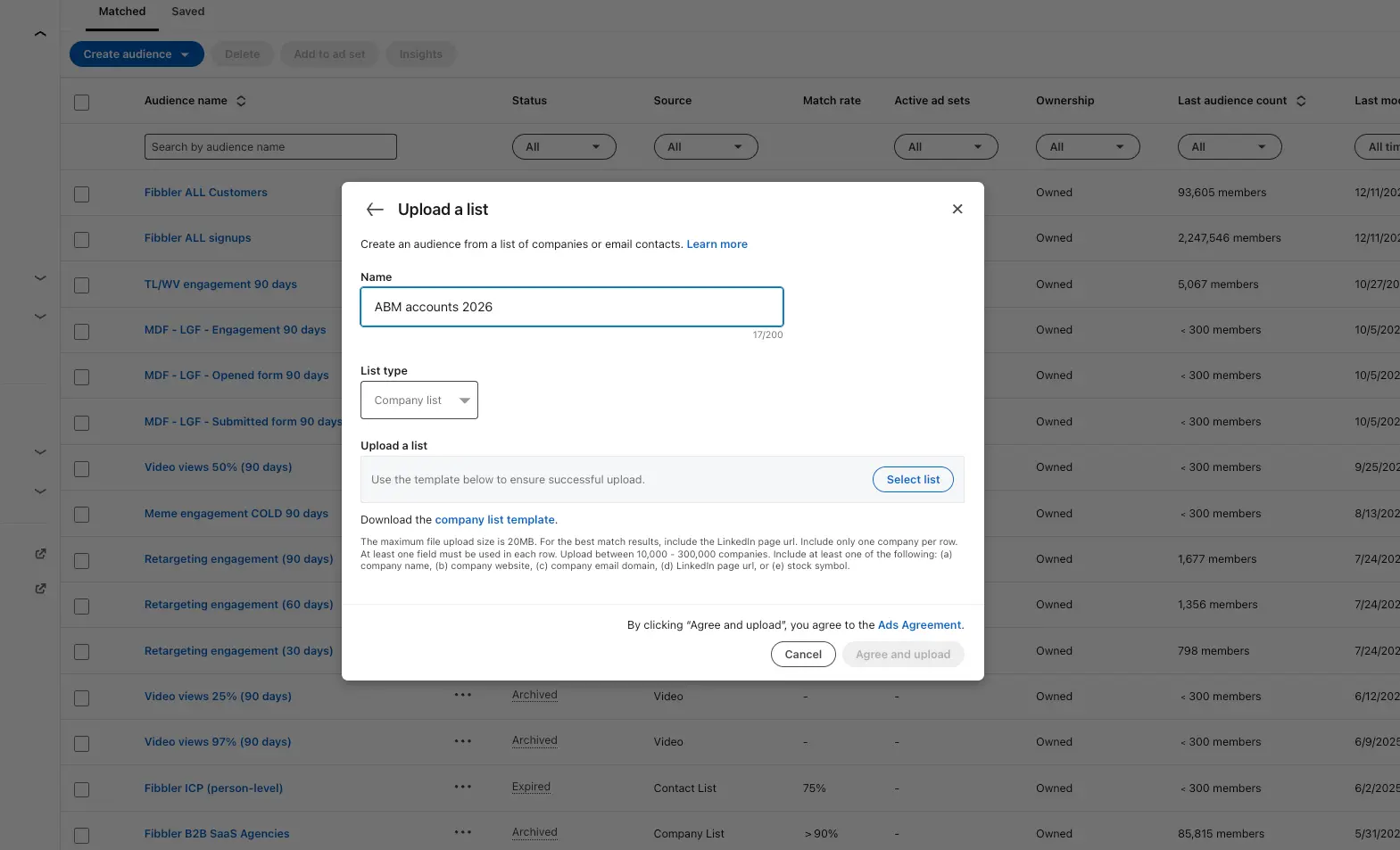
First, you need engagement to capture and that starts with targeting. This works best when you:
- Upload a defined ICP list into LinkedIn (Matched Audiences)
- Run Thought Leader, Text, Video, or Image Ads
- Focus on awareness + engagement, not just form submissions
The goal here is to generate consistent exposure at the company level, so you have real signal to work with later.
Step 2: Create a Signal in Fibbler
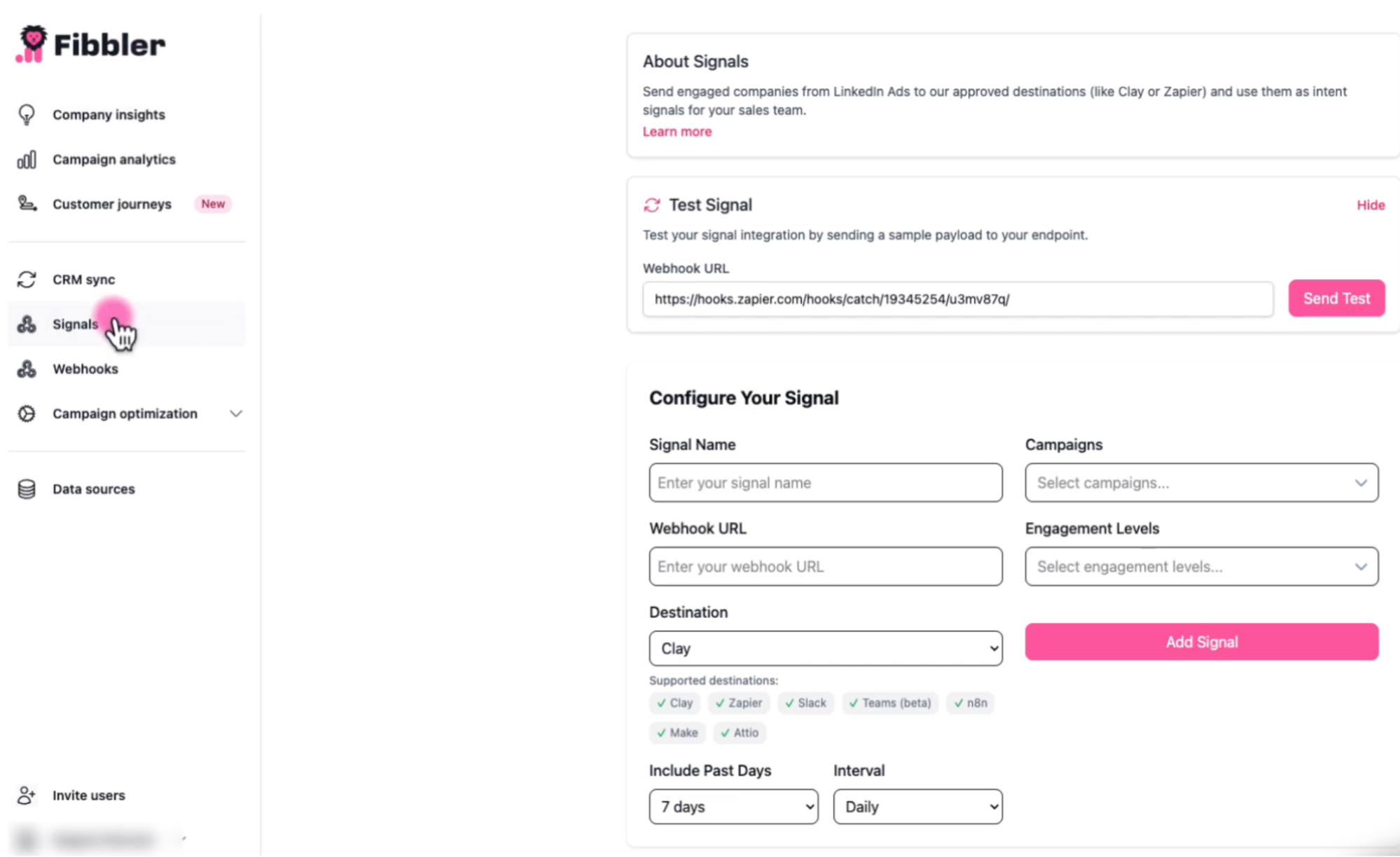
This is the actual bridge. Instead of manually exporting engagement data, you create a Signal inside Fibbler. When configuring a Signal, you define:
- Signal Name (e.g., "High Engagement → Clay")
- Destination (Clay webhook URL)
- Include Past Days (7, 30, or 90 days)
- Interval (Daily or Weekly)
- Campaigns (which LinkedIn campaigns to include)
- Engagement Level filter
Engagement Level is calculated as: (paid + organic engagements) / (paid + organic impressions)
Fibbler automatically classifies companies into:
- Very High (>3%)
- High (2-3%)
- Medium (1-2%)
- Low (0.5-1%)
- Very Low (<0.5%)
If you're triggering outbound, filtering for High or Very High (7- or 30-day window) is usually the sweet spot. You can also use the Test Signal button before going live to validate the webhook connection.
Step 3: Let the Signal Send Qualified Companies to Clay
Once live, the Signal automatically sends engaged companies to Clay via webhook on your chosen schedule.
Each company payload includes:
- Company name
- LinkedIn company URL
- Engagement Level
- Campaign ID
- Campaign Name
- Timestamp
This means Clay receives company-level engagement, not just a list of impressions. If you prefer CRM-first architecture for attribution, you can send Signals to your CRM first, then pull those companies into Clay.
Step 4: Alternative Architecture (If Using HubSpot Lists)
If you're routing through HubSpot and want tighter CRM control, many teams structure the workflow like this:
- Use Fibbler's CRM Sync to send engaged companies into HubSpot. Fibbler sends raw engagement fields such as impressions, clicks, engagements, and engagement level.
- Inside HubSpot, create a dynamic (Active) company list filtered by the signals you care about (for example engagement level, engagements, or clicks).
- Sync that list into Clay for enrichment and outbound activation. Direct HubSpot → Clay syncing is possible with the appropriate Clay subscription.
If you're running a lower Clay plan and can't sync directly, you can use a lightweight relay:
- Send the Active list into a Google Sheet
- Use Make/Zapier to push new rows into Clay via HTTP request.
Step 5: Enrich, Filter, and Exclude Pipeline Accounts in Clay
Now Clay becomes the engine. Inside Clay, you can:
- enrich company records (industry, headcount, tech stack)
- pull decision-makers
- fetch verified emails + LinkedIn profiles
- filter down to your ICP
- exclude companies already in your pipeline
A clean way to automate pipeline exclusion is:
- keep an "Active Pipeline" table (from your CRM)
- use a Lookup in Clay to flag and filter out overlaps
Step 6: Activate Outbound (Optional)
Now you can:
- Trigger outbound sequences (LinkedIn via tools like HeyReach and email via Instantly)
- Sync ICP contacts at engaged accounts back into HubSpot/Salesforce for outbound
Step 7: Track Influence (Attribution Layer)
If you sync engaged accounts into your CRM, you can track:
- which accounts warmed up
- which ones entered pipeline
- which deals moved stages (and when)
This is how LinkedIn Ads stops being judged only by CPL, and starts being tied to pipeline movement.
Best Practices for LinkedIn Ads Clay Integration
Once you have the flow working, the difference between "it runs" and "it actually drives pipeline" comes down to how you manage it. Here are a few best practices that make a big difference:
Use Shorter Engagement Windows (7-30 days)
If you're triggering outbound based on engagement, freshness matters. A company that engaged last week is very different from one that engaged three months ago. Shorter windows keep your outreach aligned with recent exposure, which is what actually improves reply rates.
Set Clear Engagement Thresholds
Not every impression means intent. Define minimum engagement rules based on either:
- Engagement levels (e.g., Medium or High over 7-30 days)
This keeps your outbound focused on the real signal.
Don't Mix Campaign Formats Blindly
Certain ad formats can skew impression volume. If you're measuring engagement trends, separate campaign types (e.g., Image Ads vs. Text Ads) so your thresholds don't get artificially inflated. Clean inputs = clean signal.
Exclude Pipeline Accounts
If an account is already in your pipeline, you don't want your outbound team accidentally treating them like cold prospects. Use Clay filters or CRM lookups to keep lists clean.
Remember: Engagement is Company-Level, Not Person-Level
This is important. Just because a company engaged doesn't mean every contact you pull from that company saw the ad. Don't over-reference the trigger in outreach. Let familiarity do the work.
Keep your Clay Table Streaming
Don't treat this as a one-time export. Let new engaged companies flow into Clay automatically so your outbound list evolves over time. That's when it stops being a campaign and starts becoming a system.
Turning LinkedIn Engagement Into Pipeline
At the end of the day, this workflow is simple:
- LinkedIn Ads → Awareness
- Fibbler → Engagement signal capture
- Clay → Enrichment & segmentation
- CRM → Attribution
- Outreach → Activation
Once you set it up this way, LinkedIn Ads stops being something you "run and hope." It becomes a signal engine you can actually act on while the account is still warm.
If you're running LinkedIn Ads and using Clay but still manually exporting engagement data, Fibbler connects your campaigns to the rest of your GTM stack in real time.
Start your 30-day free trial to see how LinkedIn Ads engagement flows directly into Clay and your CRM.
LinkedIn Ads Clay Integration FAQ
Does Clay integrate directly with LinkedIn Ads?
It depends on what you mean by "integrate." Clay can push enriched audience lists into LinkedIn Ads (for Matched Audiences). But it does not natively pull company-level LinkedIn Ads engagement data (impressions, clicks, engagement) directly into your Clay tables. If your goal is to use ad engagement as an outbound trigger inside Clay, you'll need a bridge layer to capture and route that data properly.
Can I sync LinkedIn Lead Gen Forms to Clay?
Yes. Lead Gen form submissions can be connected using tools like Zapier or Make. But that only covers form-based events. If you want company-level engagement data (like impressions or video views), you'll need to sync LinkedIn Ads engagement through a bridge like Fibbler and push it into a Clay table
How do I get company-level engagement data from LinkedIn Ads?
You need Fibbler to capture LinkedIn Ads engagement at the company level and send it into Clay (and optionally your CRM). That's typically done by syncing ad engagement data first, then pushing it into a Clay table via webhook or CRM integration.
What Timeframe Should I Use for Engagement-Based Outbound?
For outbound activation, shorter windows usually perform better. Most teams use:
- 7 days (very warm)
- 30 days (balanced)
- 90 days (larger pool, less urgency)
If your goal is to stay top-of-mind, 7-30 days tends to work best.
Is this Setup Suitable for ABM?
Yes. In fact, this workflow fits naturally into ABM because you're working at the company level first, then enriching decision-makers inside Clay. Instead of cold outbound, you're activating accounts that have already shown engagement.
Do I Need HubSpot to Make this Work?
No. You can send engagement data directly into Clay and activate from there. However, syncing engaged accounts into a CRM like HubSpot or Salesforce makes attribution and pipeline tracking easier, especially if you want visibility beyond just outreach.
Written by

Adam Holmgren
CEO @ Fibbler

Prove paid ads drive pipeline
Fibbler helps you see which companies view or engage with your LinkedIn, Google and Meta Ads, and connect them to pipeline and revenue in your CRM.
Try 30 days for free
Prove paid ads drive pipeline
Fibbler helps you see which companies view or engage with your LinkedIn, Google and Meta Ads, and connect them to pipeline and revenue in your CRM.
Try 30 days for free