

LinkedIn Ads
- LinkedIn Ads Revenue Attribution
- LinkedIn Ads Customer Journeys
- LinkedIn Ads CRM Sync
- LinkedIn Ads Optimization
- LinkedIn Ads Benchmarks

Google Ads

Meta Ads
Cross-Channel
Ad Signals
New



The LinkedIn Thought Leader Ads Framework That Acquired 600+ New Customers
Quick Links
LinkedIn ads have long been recognized as a valuable marketing channel for B2B brands. For years, the default approach has been to promote content from a company page, but that isn't always the most effective approach.
Our own data reinforces this. Across roughly 1,000 B2B advertisers running LinkedIn Ads through Fibbler between April and June 2026, static thought leader ads generated nearly four times the engagement rate of standard single-image ads promoted from company pages.
LinkedIn thought leader ads let you do this at scale. They look like an organic post in a user's feed but are strategically targeted to reach potential buyers with content that doesn't feel like a blatant ad.
Yet simply enabling this campaign type in LinkedIn Campaign Manager and hoping for the best isn't the ideal approach. Equally, success doesn't come from endlessly tweaking audiences, bids, and campaign settings.
The format works best when it's backed by a consistent framework rather than guesswork.
I've been running LinkedIn thought leader ads for more than two years and have learned a lot along the way. I've condensed those learnings into a five-step framework, one I've used to acquire more than 600 new customers.
What are LinkedIn thought leader ads?
LinkedIn thought leader ads (TLA) are posts promoted from your personal LinkedIn account.
Unlike traditional campaigns, TLAs don't come from a company page. It's your name and your profile photo attached to the ad, making it look like another organic post in your target audience's news feed rather than a traditional brand ad.
The only difference? TLAs have a "Promoted by [Brand]" tag beneath your bio. In this case, my TLA is "Promoted by Fibbler."
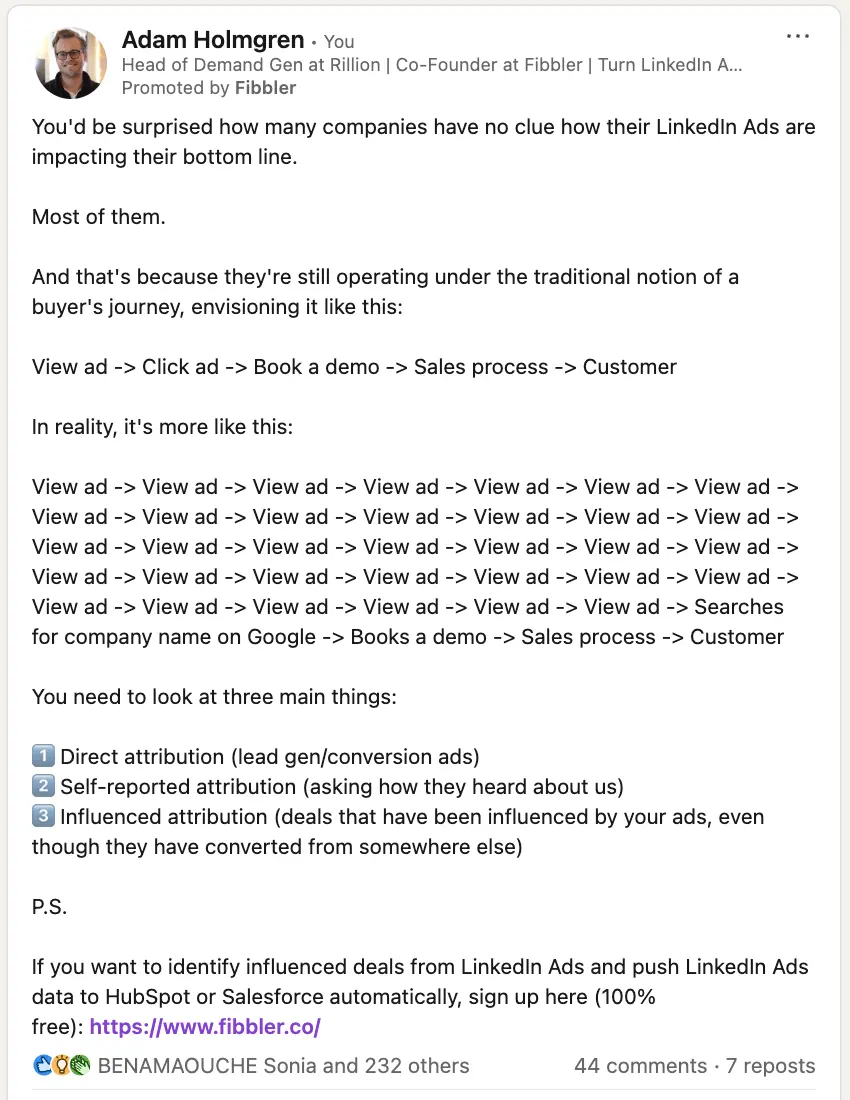
LinkedIn supports two types of thought leader ads:
- Employee thought leader ads, which promote posts published by people inside your organization, such as founders, executives, marketers, or sales leaders.
- Third-party thought leader ads, which promote posts from customers, partners, creators, or industry experts. These require the original author's approval and display LinkedIn's partnership label so viewers know the promotion is a paid collaboration.
Exactly whose profile you use for a LinkedIn TLA depends on the goal of your campaign. It might be:
- Your own account
- Another employee's account
- A happy customer who has posted a testimonial you want to promote
- An industry leader mentioning your brand
But we've found one rule to be true: you need to be the persona you're selling to for LinkedIn thought leader ads to work effectively. If you're selling to sales leaders, for example, promote content posted by a sales leader on your team.
Not every LinkedIn post can become a thought leader ad. Standard text, image, and video posts are generally eligible, while formats such as polls and certain interactive post types are not.
It's also worth understanding one important limitation. Unlike traditional Sponsored Content, thought leader ads don't support CTA buttons such as Book Demo or Learn More. If you want readers to visit your website, include the link naturally within the post itself. In practice, an in-text CTA often feels more authentic, which fits the strength of the format in the first place.
Benefits of thought leader ads on LinkedIn
Thought leader ads are a valuable asset in any LinkedIn advertising campaign because they let you:
- Showcase your expertise:With around 30,000 SaaS companies competing for buyers' attention, product features alone are rarely enough to stand out. Your experience, perspective, and expertise increasingly become the deciding factors. LinkedIn thought leader ads let you amplify that expertise to a much wider audience.
- Generate revenue: TLAs can turn social followers into buyers. In fact, LinkedIn found that almost 50% of buyers say thought leadership led them to discover and ultimately purchase from a company that was not considered to be among the leaders in a particular category.
- Open the door to partnerships:Whether it's speaking at conferences, starting a joint venture, or securing press coverage, being recognized as a LinkedIn thought leader opens more opportunities to grow your business and personal brand.
LinkedIn thought leader ads: Fibbler's benchmark data
The benchmarks in this guide come from actual campaign performance, not the third-party research often quoted in other thought leader ad articles. At Fibbler, we measure LinkedIn Ads performance across more than 1,000 B2B advertisers, and the data below reflects anonymized results from those advertisers running campaigns between April and June 2026.
Benchmarking thought leader ads against other LinkedIn ad formats
LinkedIn doesn't classify thought leader ads as a separate ad type. In Campaign Manager, they appear as standard single-image or video ads, making it difficult to measure their performance on their own.
The table below isolates those campaigns, revealing a very different picture.
| Ad format | Advertisers running it | Engagement rate | Click-through rate | Cost per engagement |
|---|---|---|---|---|
| Thought leader ad (static) | 379 | 3.07% | 2.79% | $3.24 |
| Thought leader ad (video) | 189 | 2.08% | 1.78% | $5.21 |
| Single-image (non-TLA) | 958 | 0.80% | 0.61% | $10.49 |
| Video (non-TLA) | 709 | 0.46% | 0.34% | $18.07 |
| Carousel | 179 | 0.40% | 0.33% | $17.47 |
| Text ad | 206 | Near 0% | Near 0% | Reach play only |
The numbers speak for themselves. Static thought leader ads generated almost four times the engagement rate of traditional single-image ads, more than four times the click-through rate, and achieved those results at roughly one-third of the cost per engagement.
Another interesting pattern is how tightly the other formats cluster together. Standard single-image, video, and carousel campaigns all sit below a 1% engagement rate, while thought leader ads break away from the pack. Text ads also appear near zero, but that's expected because they're designed primarily for low-cost reach rather than engagement.
Great creative turns reach into pipeline
Running ads is ultimately about reaching the right companies. But being seen isn't the same as being remembered.
To understand whether engagement actually matters, we compared two groups of companies: those that simply saw a thought leader ad and those that actively engaged with it. The difference was consistent across the advertisers we measured.
| What a company did with the ads | How often it aligned with entering the pipeline |
|---|---|
| Saw the ads (was reached) | About 1 in 2 advertisers |
| Engaged with the ads | About 2 in 3 advertisers |
That doesn't mean engagement magically creates revenue or that every click becomes a customer. What it tells us is that engagement is a strong indicator that your message resonated. Companies that stop, react, and interact with your content are consistently more likely to appear in the sales pipeline than companies that simply scroll past it.
That's why thought leader ads work so well. They don't replace the need for reach. They make the reach you're already paying for far more effective by presenting expertise in a format buyers naturally engage with.
How to create a thought leader ad on LinkedIn
Before we dive into the framework, here's a step-by-step guide on how to configure this format when you advertise on LinkedIn:
1. Sign into LinkedIn Campaign Manager
LinkedIn Campaign Manager is the platform that powers your campaigns.
Create an account (if you haven't already) and confirm that the LinkedIn Insight Tag is installed. This JavaScript snippet collects information about people who visit your website after interacting with your LinkedIn campaigns, helping you measure their impact later on.
2. Choose the campaign objective
A campaign objective tells LinkedIn what success looks like for your ad. Thought leader ads support objectives such as Brand Awareness, Engagement, and Video Views, depending on the type of content you're promoting.
3. Set a budget and duration
How much do you want to spend on your thought leader ads? LinkedIn gives you two choices:
- Daily budget:the ideal amount you'd like to spend each day.
- Lifetime budget: this gives LinkedIn more flexibility to distribute your spend over the duration of the campaign. For example, you might spend more on a busy Tuesday and less on a quieter Saturday.
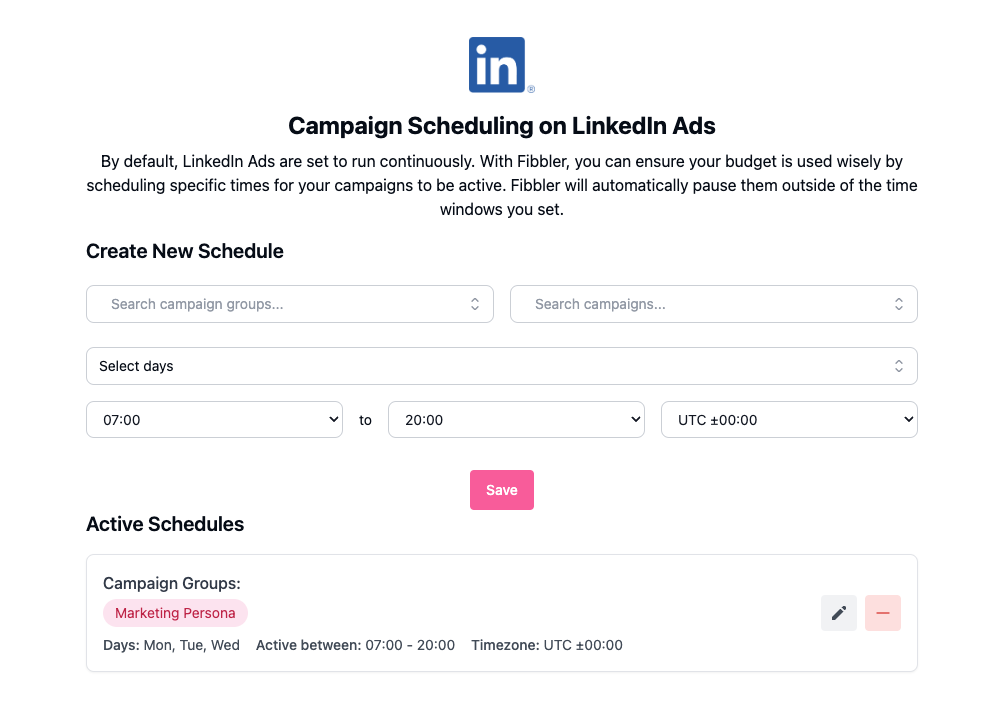
⚡️ Pro tip: Use Fibbler's LinkedIn campaign scheduler to only promote your thought leader ads when your target audience is active. Otherwise, you could be paying to reach B2B buyers at times when they're less likely to be on LinkedIn.
4. Define your target audience
Use LinkedIn's audience builder to define the firmographics and demographics of your ideal buyer, such as company industry, company size, and job title.
Pay attention to the Forecasted results panel on the right-hand side. Since thought leader ads are designed to build awareness and reach new audiences, aim for a healthy audience size while making sure the segment still matches your ICP.
⚡️ Pro tip: Use a third-party sales intelligence tool such as Cognism to build audiences using more advanced firmographic data (like revenue) and technographic data (such as the CRM or ERP they use). This allows for much more precise targeting.
5. Choose an organic post to promote
Next, click Browse existing content to open LinkedIn's content library.
This shows eligible posts published by employees in your organization, as well as approved posts from creators you're connected to. You can also paste the URL of a specific organic post you want to promote.
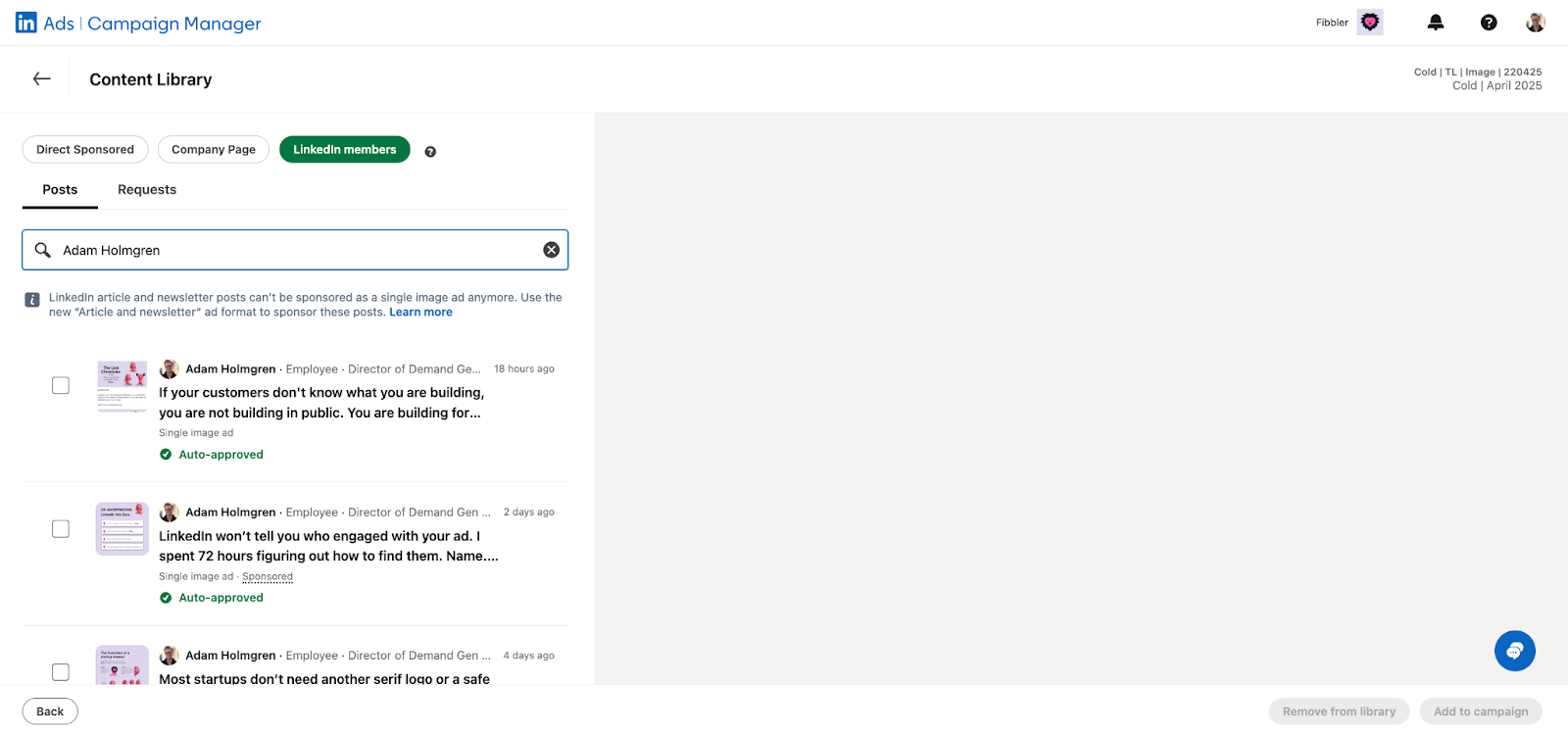
Once you've found the post you want to convert into a TLA, click "Request approval." LinkedIn will notify the original author to approve the sponsorship request. Once they've approved it, your thought leader ad can go live.
Campaign structure: how we run thought leader ads
One mistake we see repeatedly is treating thought leader ads as a single campaign. The best-performing accounts structure them like a funnel, with different objectives, audiences, and budgets at each stage.
Prospecting
This is where most of your spend should go. The goal isn't to generate demo requests immediately, but to introduce your expertise to companies that have never engaged with your brand. Educational posts, industry insights, and founder perspectives tend to perform best here because they earn attention before asking for anything in return.
Nurture
These campaigns target people and companies who have already engaged with your content. Instead of introducing yourself again, the focus shifts to building familiarity through customer stories, practical frameworks, product education, and social proof.
Convert
These campaigns are reserved for your warmest audiences. At this point, prospects already recognize your brand, so the objective becomes generating demos, trials, or conversations using stronger commercial messaging.
Budgeting thought leader ads
LinkedIn technically allows campaigns to run on as little as $10 per day, but that's rarely enough to generate meaningful delivery or optimization. In practice, most marketers recommend budgeting $50 to $100 per day, or roughly $1,500 to $3,000 per month, for a focused thought leader ad campaign.
That lines up closely with what we see across Fibbler customers. Among advertisers running thought leader ads, the median spend is about $1,800 per month, representing roughly 26% of their total LinkedIn Ads budget. A smaller group invests significantly more, pushing the average monthly spend to around $6,700 per month.
As a starting point, it's common to allocate around 60% of your thought leader ad budget to prospecting, 25% to nurture, and the remaining 15%to conversion campaigns. The exact split will vary depending on your sales cycle and the size of your retargeting audiences, but prospecting should typically receive the largest share because it's responsible for generating new demand.
The takeaway isn't that every company should spend thousands of dollars on thought leader ads. It's that the advertisers who get consistent results treat TLAs as a core acquisition channel rather than a side experiment.
The 5-step LinkedIn thought leaders ads framework
Before we dive into the framework, it's worth setting expectations. Success with LinkedIn thought leader ads doesn't come from finding one viral post or endlessly tweaking campaign settings. It comes from following a repeatable process.
The five steps below are the framework I've used to consistently turn high-performing organic content into a reliable customer acquisition channel:
- Create value-driven content related to your product or service
- Promote your best-performing organic posts as TLAs
- Monitor ad performance - and cut poor performers
- Connect and engage with ad viewers
- Expand thought leader ads into other formats for retargeting
1. Create value-driven content related to your product or service
Many marketers rush into creating thought leader ads that are only seen by the target audience of your campaign. But this approach is fraught with challenges-notably the fact you're paying to test different types of content while learning what your audience responds to.
Instead, treat your actual profile as that testing ground. Create organic posts that offer value, but are still related to your product or service, and see what followers engage with.
Concerned about over-promotion and turning your followers away? Break your content into weekly pillars to maintain a balance between value and promotion. For example, my main pillars are LinkedIn Ads, account-based marketing, and being a founder on the side.
Every organic post I share fits within one of those pillars, whether that's:
- Industry trends
- Company growth
- Tactics
- Unique product stories
- Other people talking about your brand
Two to three promotional posts per week is usually enough if you're keeping the rest of your posts purely value-focused.
Start by engaging directly with people who interact organically with your posts. Reply to comments and continue the conversation. High engagement can not only help you learn about your audience, but also signal to LinkedIn that your post is worth displaying in other users' feeds.
Just bear in mind that this works well initially, but it only scales to a certain point since your own network is limited.
⚡️Pro tip: Use a LinkedIn content scheduling tool like Buffer to automate the posting process. You can batch-produce your organic posts, so you only have to check back into LinkedIn to respond to people who engage with them.
2. Promote your best-performing posts
The golden rule of LinkedIn thought leader ads? If it doesn't engage your audience organically, it won't be a winner when you promote it to other people sharing the same traits. Don't waste your money on bad actors.
Instead, review your LinkedIn Analytics to find your 2-3 best-performing posts on a monthly basis. Amplify them beyond your network through TLAs.
Here's a cheatsheet to help you pinpoint your top-performing organic posts:
- Posts with more likes than usual
- Value-first content with a subtle product tie-in
- CTRs of 10–25% depending on the audience
- Super simple formats: mostly just single images
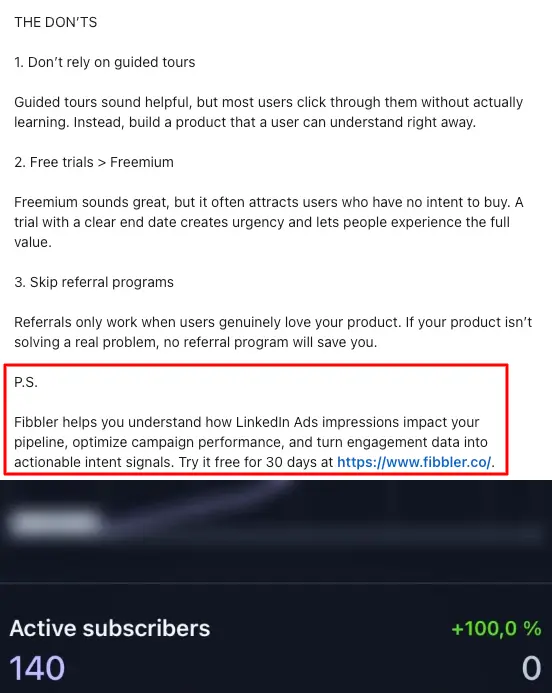
⚡️Pro tip: Before promoting your organic post as a thought leader ad, edit the original post to include a clear CTA at the end. This way, you can measure success by landing page clicks rather than generic clicks (which include all types of engagements).
My go-to format is: "P.S. [Tool] helps you with this, this, and this. Try it free for XX days at [website link]."
3. Monitor ad performance - and cut poor performers
As your campaign progresses and you begin to collect more data, be brutal with which ads you keep on. If an ad underperforms, cut it and reassign that budget to another post that's gaining more traction.
Exactly what "good performance" looks like can depend on your post type, audience, and organic metrics.
Generally speaking, I follow these benchmarks:
- Cold audiences (people with no prior connection to my LinkedIn profile or business page): 10-20% CTR or 10-20% landing page clicks.
- Retargeting audiences: 15-25% CTR or 20-50% landing page clicks.
4. Connect and engage with ad viewers
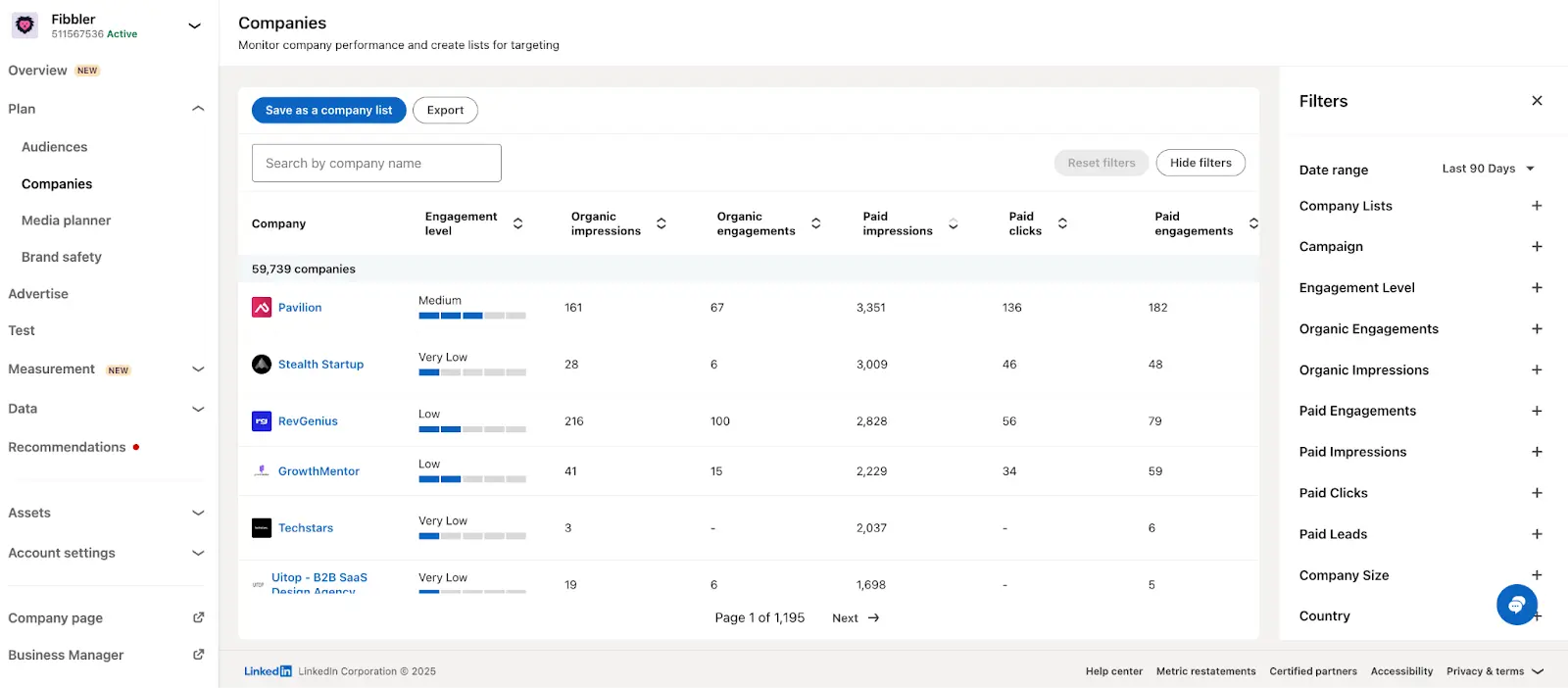
LinkedIn is unique in the sense that it offers insight into exactly who viewed and engaged with your campaigns. Connect with interesting titles you find at the company and start conversations to continue the communication.
To find this insight:
- Go to LinkedIn's Company tab
- Filter for TLA campaigns
- Manually identify companies that are engaged
You can also narrow your campaign targeting to specific titles so that you have a good idea of who at the company is engaging. This helps maintain relevance and makes follow-ups more effective.
Let's put this into practice and say you're a SaaS accounting software that targets small business owners. You've created a TLA that shares your story of starting a business with two young children.
Send a DM to people who've engaged with the TLA that shares:
- An observation from their profile to start a 1-to-1 conversation (e.g. "I saw you just came back from maternity leave-me too! How are you finding the transition back to work?")
- A personalized tip or tool they might find useful (e.g. "My return to work also started around tax time. I wanted to share this template I gave to my accountant to get things back up and running once I got back.")
- A case study from a similar company-but only if you've identified them as being further along the buying journey and receptive to this type of bottom-funnel content.
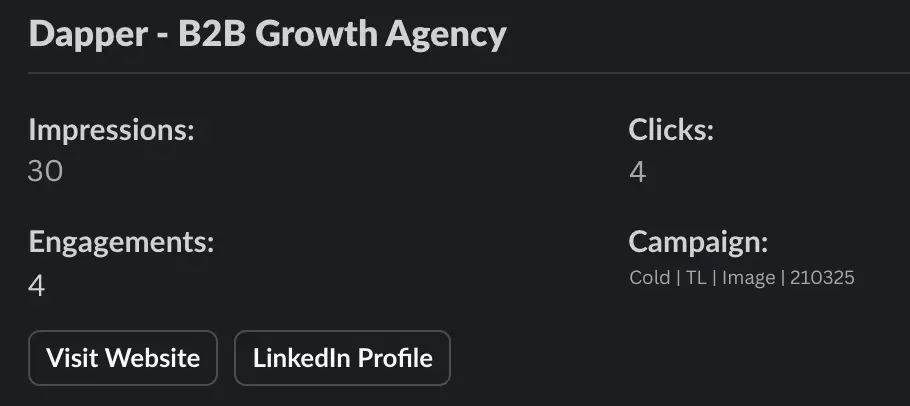
⚡️Pro tip: Automatically send ad engagers from your TLA campaigns to HubSpot, Salesforce, Slack, or your preferred prospecting tool using Fibbler. Then, build outreach workflows to keep the momentum going on autopilot-no need to remember who you said what to.
5. Expand thought leader ads into other formats for retargeting
Sometimes, buyers aren't confident enough to convert off the back of one promoted post. In fact, audiences who are exposed to different ad formats are 6x more likely to convert.
Use this insight to get more mileage from your campaigns by turning your top-performing TLAs into other LinkedIn ad formats.
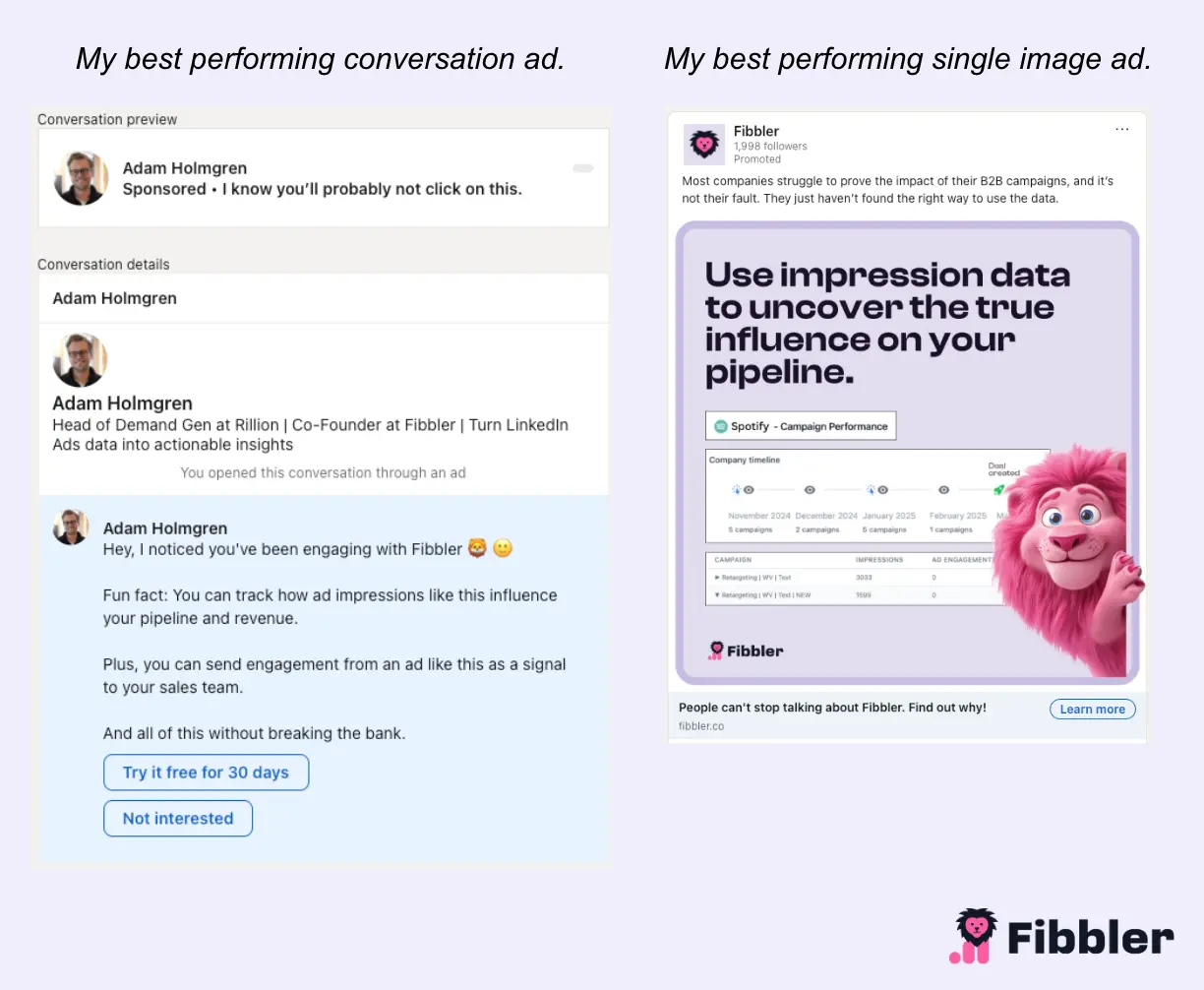
For example, you could build a retargeting campaign to reach prospects who engaged with your initial TLA. Use a format that can capture signups/demos more effectively, such as conversation ads or single-image product ads, to keep your product top of mind.
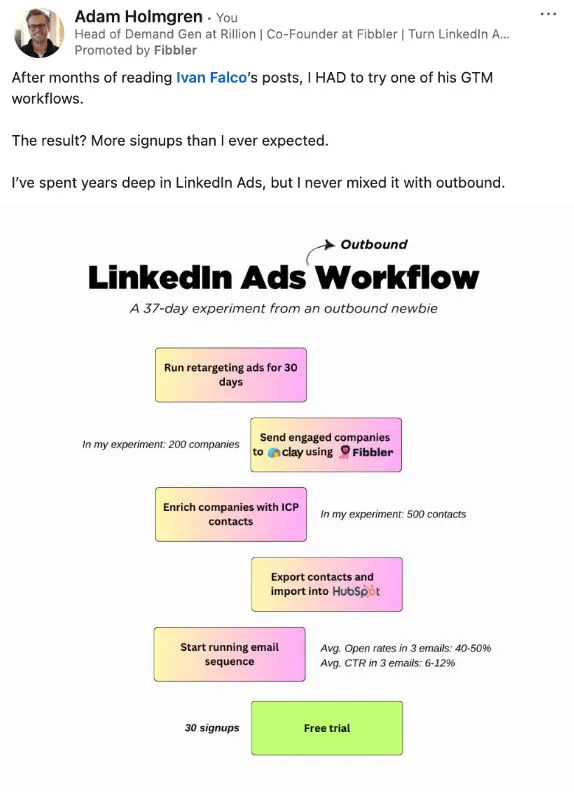
Here's what that looked like when I turned my best-performing conversation ad into an equally high-performing single-image ad:
Mistakes to avoid with LinkedIn thought leader ads
The framework we've shared is simple-but there's still space for things to go wrong. These are the three biggest mistakes to avoid so you can get the most value out of your LinkedIn TLAs.
Over-designing
Bold colors, fancy fonts, annotated screenshots-best practice is to create something that stands out in your audience's feed. But in our experience, it's simple creatives that perform best.
Stick to simple design choices and use organic posts to test creatives before assigning budget to them. This lets you split-test different creatives to see what your audience responds to before you start paying to promote them.
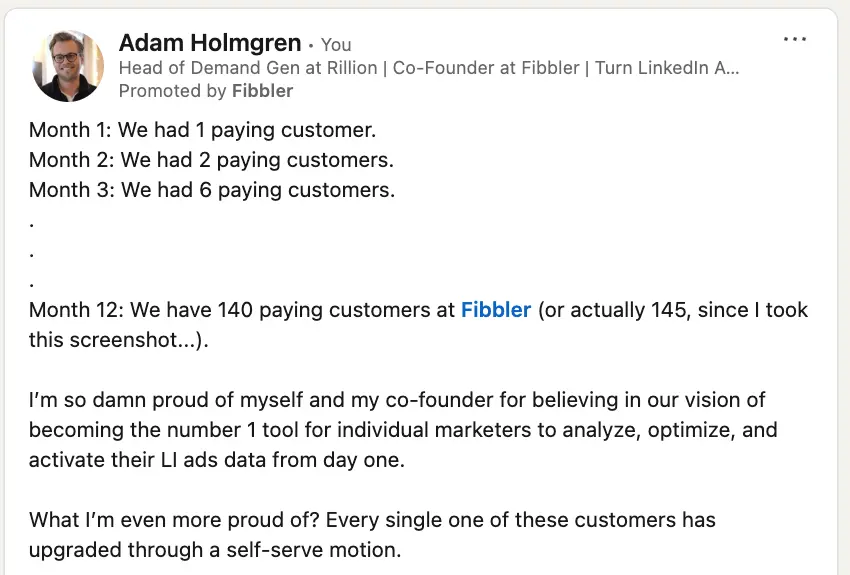
Leading with product
LinkedIn users aren't always using the app to buy. They're often scrolling to get a break from work or looking for education. Lead with this in your TLAs and use your product as the solution (not the main focus).
Here's an example:
Promoting poorly performing posts
Stuck for ideas on what to post and keen to get your TLA campaign up and running? Don't make the mistake of defaulting to promoting posts that didn't perform well organically.
Remember the golden rule: If a post doesn't get much traction organically, it won't when you pay to promote it.
Treating thought leader ads as a single campaign
One of the easiest ways to waste budget is to put every audience into one campaign. Cold prospects, engaged followers, and warm buyers need different messages. Separate prospecting, nurture, and conversion campaigns make it much easier to control budgets, measure performance, and move buyers through the funnel.
Fibbler: the secret trump card for profitable LinkedIn ads
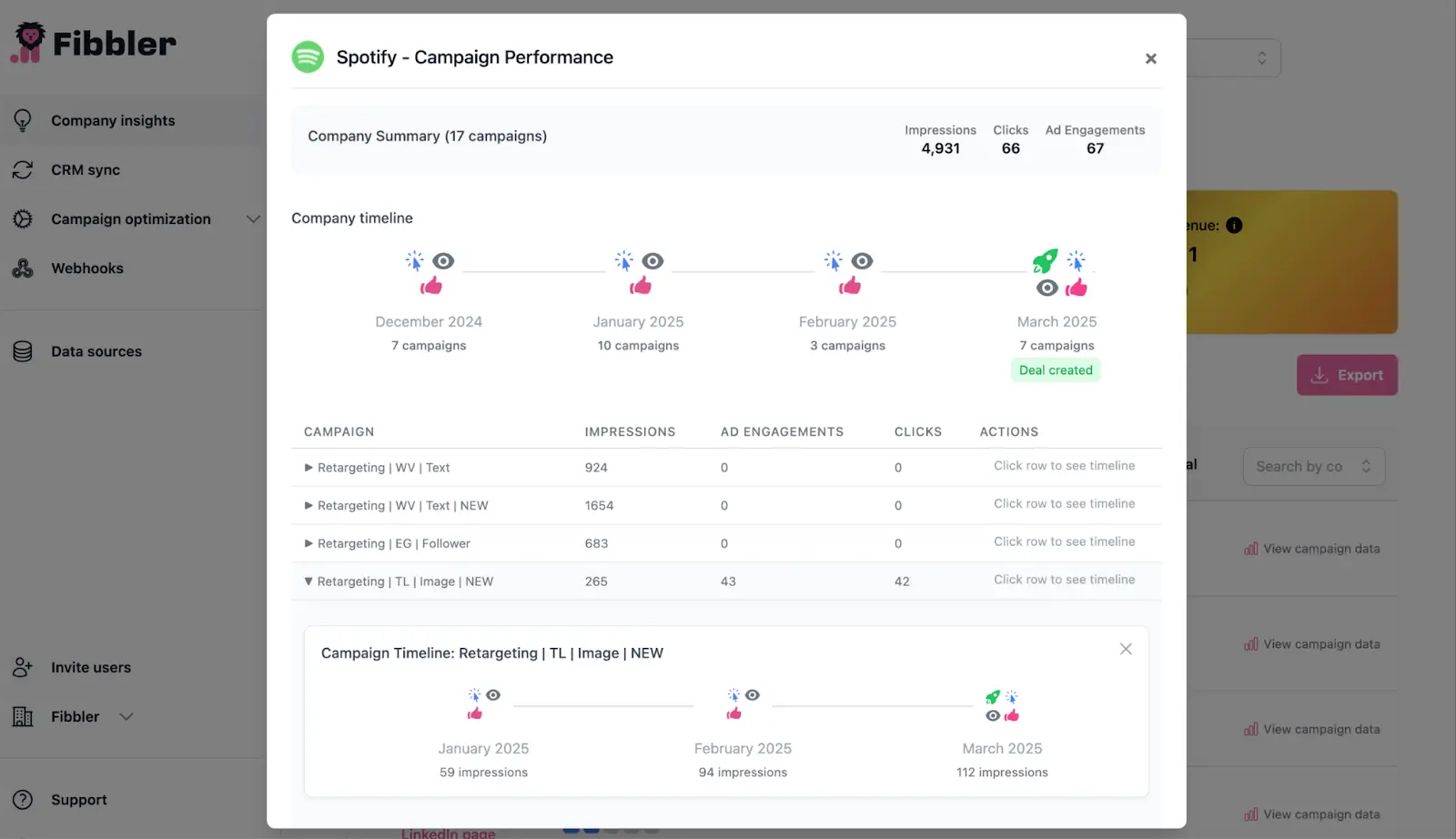
Running thought leader ads is only part of the equation. The real advantage comes from understanding which companies engage with your campaigns and how those interactions translate into pipeline.
That's exactly what Fibbler is built for. It connects LinkedIn, Google, and Meta Ads activity directly to your CRM, helping you identify engaged accounts, measure pipeline influence, and see which campaigns line up with revenue, not just clicks.
If thought leader ads are becoming a core acquisition channel for your business, they deserve attribution that's just as sophisticated. Explore Fibbler to see how it gives you complete visibility into the campaigns driving pipeline and revenue.
LinkedIn thought leader ads FAQ
What is a LinkedIn thought leader?
A LinkedIn thought leader is someone who consistently shares valuable, experience-based content that demonstrates expertise in a particular field. They don't need a massive audience, but they should have credibility with the people they're trying to influence.
How do you do a thought leader ad on LinkedIn?
Creating a thought leader ad is similar to launching any other LinkedIn campaign, except you promote an existing organic post from an individual rather than a company page. LinkedIn supports employee and approved third-party thought leader ads, though not every post format is eligible. Depending on the type of post you're promoting, you can use the Brand Awareness, Engagement, or Video Views campaign objective.
How much do LinkedIn thought leader ads cost?
Most B2B marketers budget $50 to $100 per day, or roughly $1,500 to $3,000 per month, for a focused LinkedIn thought leader ad campaign. While LinkedIn technically allows campaigns to start at around $10 per day, that's rarely enough to generate meaningful delivery or optimization. Across Fibbler customers, the median advertiser running thought leader ads spends approximately $1,800 per month on the format.
When did LinkedIn launch thought leader ads?
LinkedIn launched thought leader ads in 2023 and has continued expanding the format with additional creator and partnership capabilities since then.
Written by

Adam Holmgren
CEO @ Fibbler

Prove paid ads drive pipeline
Fibbler helps you see which companies view or engage with your LinkedIn, Google and Meta Ads, and connect them to pipeline and revenue in your CRM.
Try 30 days for free
Prove paid ads drive pipeline
Fibbler helps you see which companies view or engage with your LinkedIn, Google and Meta Ads, and connect them to pipeline and revenue in your CRM.
Try 30 days for free