

LinkedIn Ads
- LinkedIn Ads Revenue Attribution
- LinkedIn Ads Customer Journeys
- LinkedIn Ads CRM Sync
- LinkedIn Ads Optimization
- LinkedIn Ads Benchmarks

Google Ads

Meta Ads
Cross-Channel
Ad Signals
New



LinkedIn Retargeting Ads: How to Set Them Up & Drive Pipeline in 2026
Quick Summary
LinkedIn retargeting ads let you focus your budget on prospects who have already interacted with your brand, whether they visited your website, watched your videos, or engaged with your ads. This guide walks you through setting up the Insight Tag, building website and matched audiences, structuring hot vs warm campaigns, and optimizing performance.
Ready to Make LinkedIn Retargeting Actually Drive Pipeline?
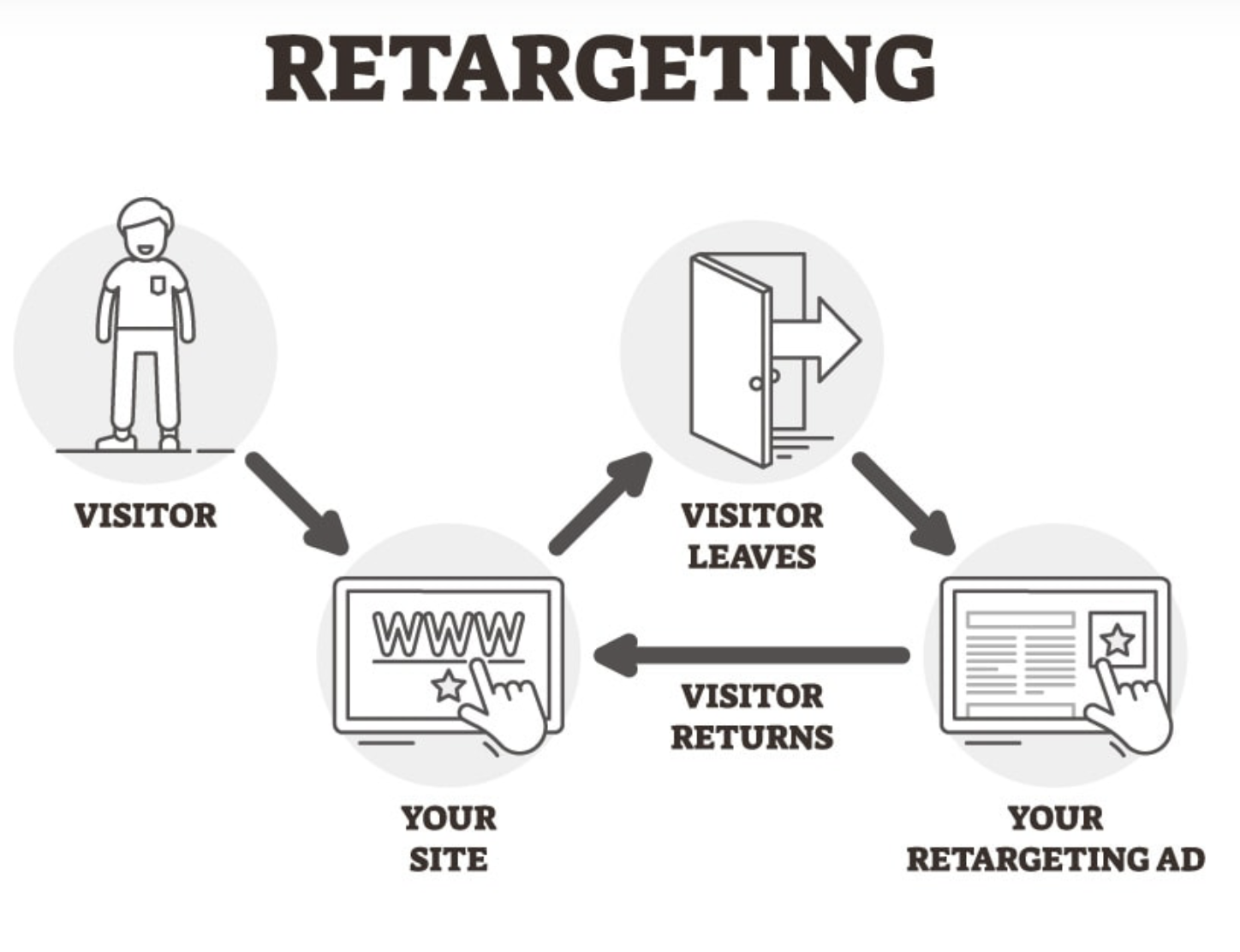
source: https://unbounce.com
Look at the image above.
That's basically what a typical B2B buyer journey looks like in real life: someone checks you out once, gets distracted, compares options, then disappears. And if you look at the moment they leave the site, you'll see the real problem: most interested visitors drop off before they ever fill a form or book a call.
That's exactly what LinkedIn retargeting ads fix.
So if you're running LinkedIn Ads (or planning to) and you want to stay in front of prospects without starting from scratch every time, this guide is for you. We'll show you how to set it up, and how to optimize it so it actually correlates with pipeline.
Why Listen to Us?
At Fibbler, we help B2B teams turn LinkedIn Ads data into something sales can actually use, which is real company-level signals that support outreach, prioritization, and pipeline visibility.
Here's what one of our customers said:
"Fibbler gives Understory and our clients a direct line from marketing to sales, with clear influence insights and LinkedIn Ads data the sales team can act on. We're big fans of the tool!"
Ali Yildirim
CEO and Co-Founder @ Understory
So when we walk you through LinkedIn retargeting ads in this guide, it's coming from real workflows we've seen teams run and improve.
What You Can Retarget on LinkedIn
Website visitors are the most common retargeting audience, but they're not the only one. LinkedIn gives you multiple retargeting sources you can use depending on what you're running, who you're targeting, and how warm you want the audience to be.
Website Visitors (Insight Tag Based)
This is the classic setup. Once your LinkedIn Insight Tag is installed, you can build audiences from:
- all website visitors
- visitors to specific pages (pricing, demo, case studies, etc.)
- people who took certain actions (depending on how you track events)
- different time windows (7, 30, 90 days and more)
This is great when your site traffic is solid and you want to re-engage people who showed interest but didn't convert.
Video Viewers
If you're running video ads, you can retarget based on watch percentage. For example:
- 25% viewers (light interest)
- 50% viewers (warm)
- 75% or 97% viewers (very warm)
This is useful when you want to build warmth before pushing a harder CTA like "Book a demo."
Ad Engagement Audiences (Single Image, Document Ads, etc.)
You can also retarget people who engaged with certain ad types. This is helpful when buyers interact with your content but don't click through to your website.
Step-by-Step: Setting Up Website Retargeting (Insight Tag + Website Audience)
Website retargeting is the most common place to start on LinkedIn because it works across most B2B funnels.
The setup has two parts:
- Install the LinkedIn Insight Tag
- Create a Website Matched Audience
Once both are in place, LinkedIn starts building your retargeting pool automatically.
Step 1: Install the LinkedIn Insight Tag
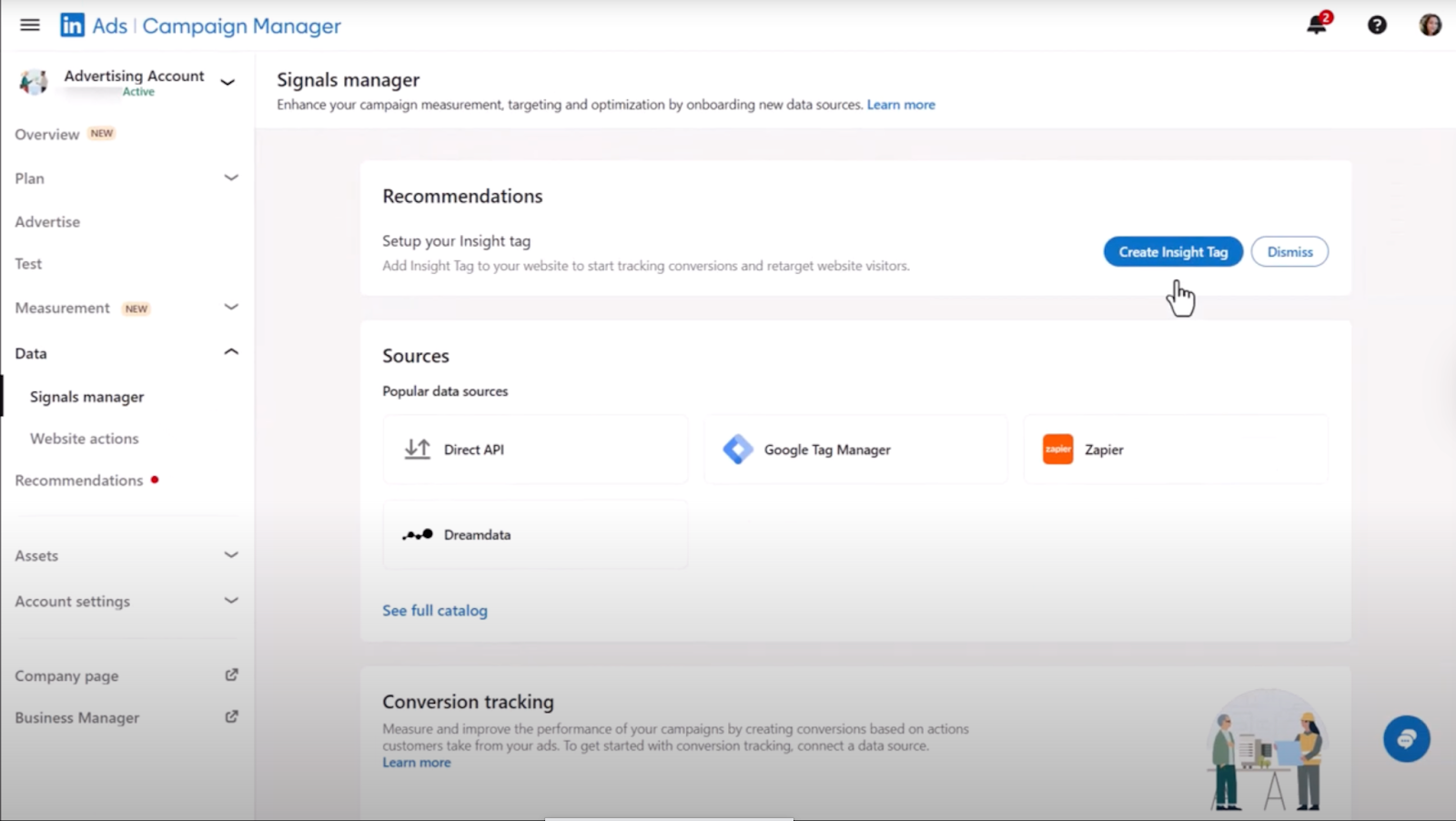
Before you can retarget website visitors, LinkedIn needs a way to track visits. That's what the Insight Tag does. Here's how to set it up:
- Go to Campaign Manager
- Click Data on the left menu, then click Signals manager.
- Click on create Insight Tag
You'll see a few options:
- Install it yourself: copy the JavaScript code and paste it into the <head> section of your website.
- Send it to a developer: LinkedIn emails the code to your developer.
- Use a tag manager: if you use Google Tag Manager, you can paste your Partner ID there instead of adding raw code.
If you're on WordPress, you can also use a plugin that lets you insert scripts into your site header.
Once installed, LinkedIn will show the tag status as Active inside Campaign Manager. You can also use the LinkedIn Insight Tag Helper (Chrome extension) to confirm it's firing properly.
Step 2: Create a Website Matched Audience
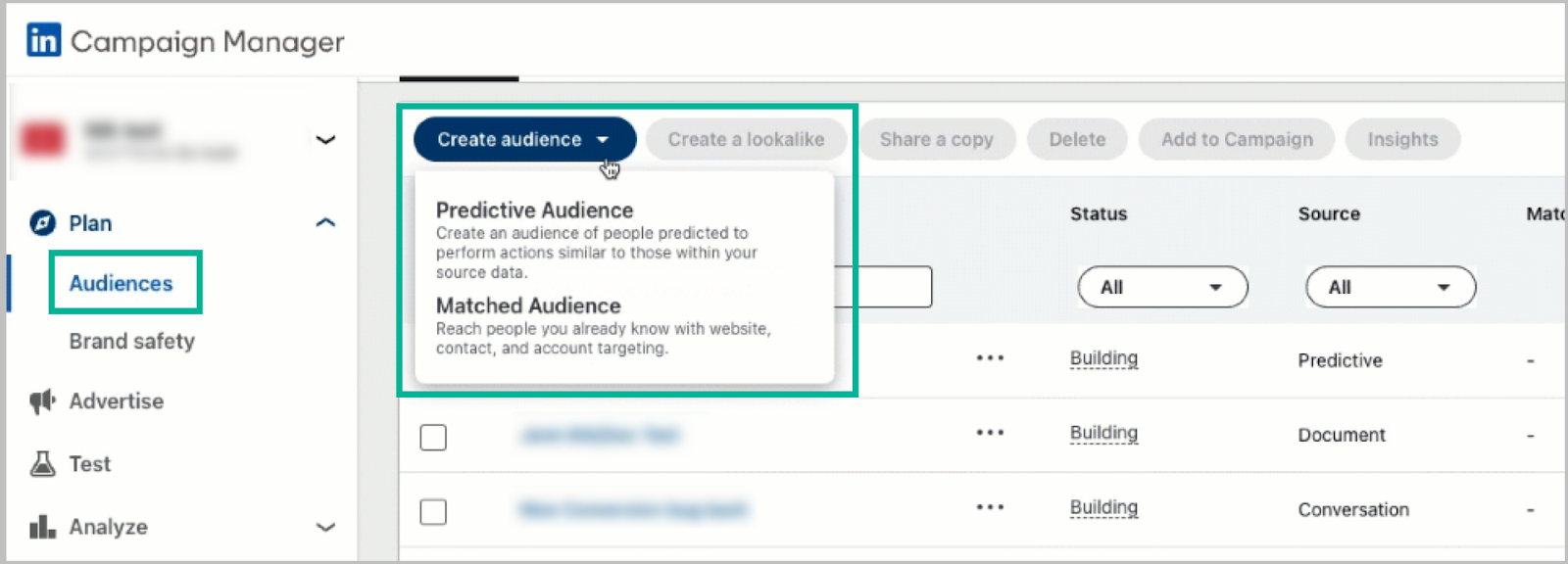
After your Insight Tag is live, create your audience:
- Go to Plan
- Click Audiences
- Click Create Audience
- Choose Matched Audience
- Select Website
Now define who gets included. You can retarget:
- All website visitors
- Visitors to specific URLs (like /pricing, /demo, /case-studies)
- Visitors based on URL rules like contains or starts with
- Visitors within a specific time window (7 / 30 / 90 days, etc.)
Your time window depends on traffic and sales cycle length, but for most B2B accounts, 90 days is a strong starting point. It gives LinkedIn enough data to build a healthy audience while still keeping intent relevant.
Step 3: Attach the Audience to a Retargeting Campaign
Now create the campaign and select your website audience:
- Create a new campaign
- Choose an objective (Website Visits, Engagement etc)
- Under Audience, select your Matched Audience
- Exclude converted users if necessary (demo booked, lead submitted, etc.)
At this point, website retargeting is live.
If You Want to Retarget Other Audience Types Too
Website retargeting is the foundation, but if your audience isn't visiting your site much yet, these are strong options to add:
Video retargeting:
- Go to Audiences → Create Matched Audience → Video
- Choose the video campaign, then set the watch threshold (25%, 50%, 75%, 97%).
This is one of the cleanest ways to build retargeting audiences without needing site traffic.
Company page engagement:
- Go to Matched Audience → Company Page
- Useful if your content is strong and gets consistent engagement.
If you're new to retargeting, start with website audiences. Once that's running smoothly, layer in ad engagers to capture people interacting with your content directly inside LinkedIn.
Campaign Structure Recommendation
Once your retargeting audience is set up, the next win is structure. The biggest mistake teams make is either overcomplicating it or throwing everyone into one undifferentiated campaign.
For most B2B accounts, a simple two-layer structure works extremely well:
1. Core Retargeting (90 Days)
This is your main retargeting audience. It includes website visitors, company page visitors and relevant ad engagers from the last 90 days. It gives you scale, keeps you visible and reinforces familiarity over time.
2. High-Intent Layer (30 Days)
On top of that, create a tighter 30-day audience for people showing stronger intent:
- Visitors to pricing, demo, or case study pages
- People who engaged meaningfully with your ads
This is where you can be more direct. These accounts are most likely closer to a decision, and your messaging can reflect that.
Measuring & Optimizing LinkedIn Retargeting
You don't set up LinkedIn retargeting and forget it. You measure it, optimize it, and make sure it's actually influencing pipeline.
That's why many teams add a measurement layer like Fibbler to see which companies are repeatedly engaging, control exposure, and route high-intent accounts to sales while the signal is still fresh.
Here's what actually matters:
Go Beyond CTR and CPL
In B2B, influence often happens before a form fill. A company might see your ads 15-20 times, visit key pages, and only convert later. With company-level engagement tracking, you can see that build-up instead of judging performance on last-click alone.
Monitor Frequency Closely
Retargeting audiences are smaller by design, which means frequency naturally increases. That's actually one of the advantages. Retargeting allows you to reinforce your message at a lower cost and stay visible to accounts that already know you. A healthy benchmark is around 3-4 of frequency over a 30-day window.
Use Intent Windows Strategically
A 180-day audience may inflate size but dilute urgency. For most B2B accounts, 90 days is the recommended baseline. It balances scale with relevance and works across different sales cycles.
Push Engaged Accounts to Sales at the Right Moment
Retargeting works best when marketing and sales are aligned. If a company's engagement level spikes, that's often the moment to notify account owners. With Fibbler, engaged companies can be pushed into Slack, Clay, or your CRM so sales can act while familiarity is high.
Connect Engagement to Pipeline
Ultimately, the goal is revenue. When impression and engagement data is synced back into your CRM, you can see which retargeted accounts entered pipeline, moved stages, or closed. That's when LinkedIn retargeting stops being a traffic tactic and starts being a measurable growth lever.
Measure it properly, and retargeting becomes less about chasing clicks and more about tracking influence.
Best Practices for LinkedIn Retargeting Ads
Once you're measuring retargeting properly and can see what's influencing pipeline, the next step is keeping the system clean. This is where setups either stay sharp or slowly drift into noisy audiences, wasted spend, and retargeting fatigue.
Here's what keeps performance strong over time.
Align Your Message With Buyer Familiarity
Retargeting is still about engagement, but the audience already knows you. As familiarity increases, let your message become slightly more product-focused and outcome-driven. Don't jump straight to hard selling. Use retargeting to reinforce relevance and guide warmer accounts toward the next logical step.
Keep Audience Logic Clean
If you're running a 90-day core retargeting layer and a 30-day high-intent layer, make sure they're clearly defined and not competing with each other. Exclude converters immediately. Overlapping audiences inflate impressions, distort performance, and quietly waste budget.
Refresh Creatives When Fatigue Appears
Retargeting audiences see you more often, which helps build familiarity. In most cases, consistency is a strength. There's no need to rotate creatives too frequently. Only refresh messaging, angles, or visuals if engagement drops significantly or frequency starts creating clear fatigue.
Align With Sales Timing
Retargeting becomes far more powerful when sales can act on engagement spikes. Even a simple workflow that flags highly engaged accounts improves outreach timing. Retargeting should support revenue motion, not operate in isolation.
Turning Retargeting Into Real Pipeline
LinkedIn retargeting ads work because they focus spend on people who already showed interest. But the real win is knowing what they're actually doing for pipeline. Once you structure retargeting by intent (hot, warm, light) and track performance beyond clicks, you can see which accounts are warming up and where budget is getting wasted.
That's where Fibbler fits. It helps you measure company-level engagement, keep frequency under control, and route engaged accounts to sales while the signal is still fresh.
Get started with Fibbler here.
Written by

Adam Holmgren
CEO @ Fibbler

Prove paid ads drive pipeline
Fibbler helps you see which companies view or engage with your LinkedIn, Google and Meta Ads, and connect them to pipeline and revenue in your CRM.
Try 30 days for free
Prove paid ads drive pipeline
Fibbler helps you see which companies view or engage with your LinkedIn, Google and Meta Ads, and connect them to pipeline and revenue in your CRM.
Try 30 days for free