

LinkedIn Ads
- LinkedIn Ads Revenue Attribution
- LinkedIn Ads Customer Journeys
- LinkedIn Ads CRM Sync
- LinkedIn Ads Optimization
- LinkedIn Ads Benchmarks

Google Ads

Meta Ads
Cross-Channel
Ad Signals
New






Microsoft Dynamics 365 integration
Microsoft Dynamics 365 attribution with Fibbler
Fibbler is a LinkedIn Ads, Google Ads, and Meta Ads attribution tool with a native Microsoft Dynamics 365 integration. It imports your Opportunities and the Accounts they belong to from Dynamics 365 Sales, matches them to your ad activity, and shows the pipeline and revenue your ads influenced. It can also push that data back to Dynamics 365 for reporting, intent signals, and account scoring.
30-day free trial. No credit card needed.
Your Microsoft Dynamics 365 data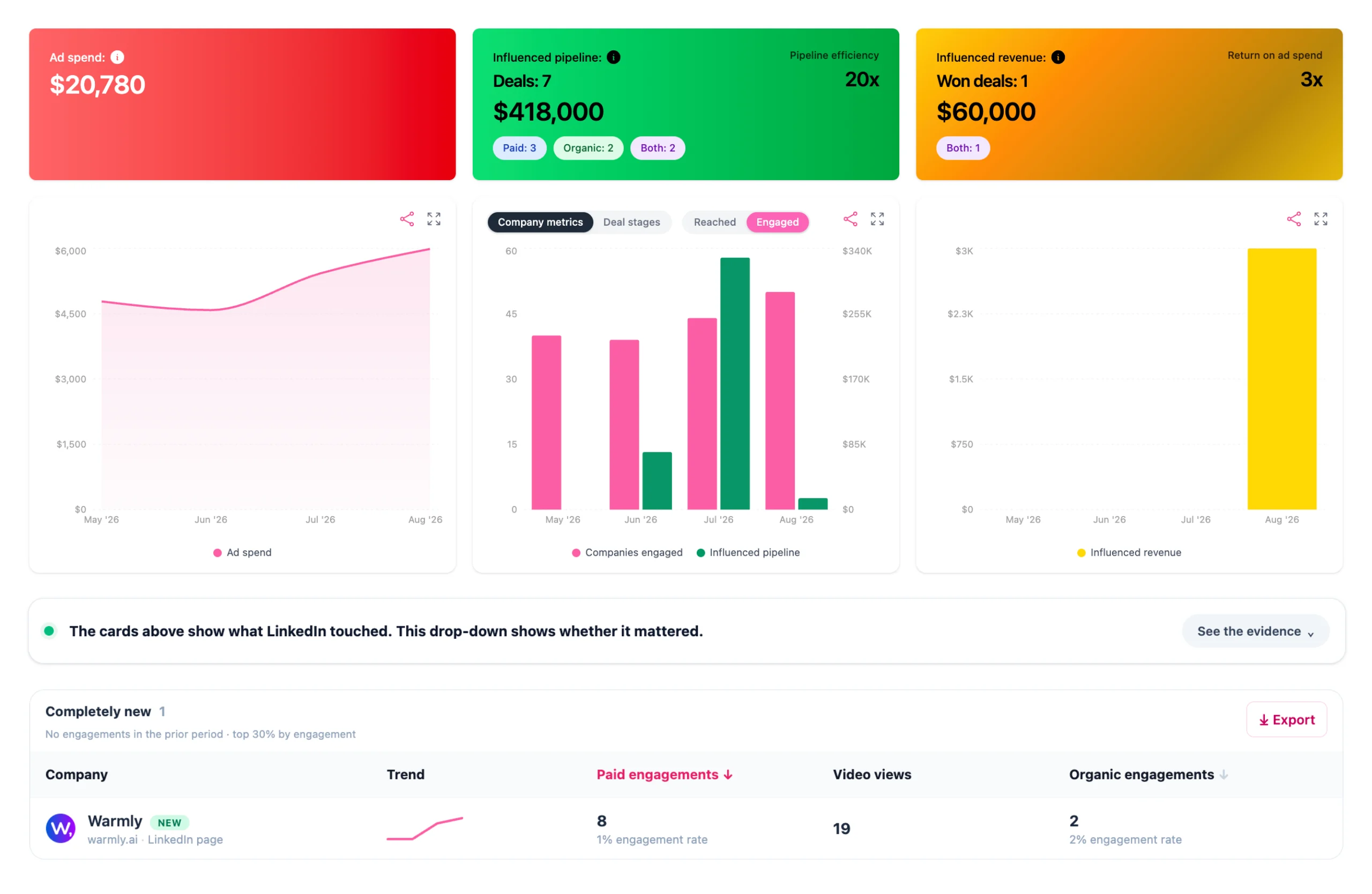
How Fibbler works with Microsoft Dynamics 365
The Microsoft Dynamics 365 integration runs both ways. Fibbler pulls your pipeline in to do the attribution, then pushes engagement back out so you can act on it.
Pull your pipeline into Fibbler
The main job: match your Microsoft Dynamics 365 pipeline to your LinkedIn, Google, and Meta Ads activity and do the attribution for you.

Companies see and engage with your LinkedIn Ads, or visit your site from Google or Meta Ads.

Fibbler reads your Accounts and Opportunities from Microsoft Dynamics 365.
Fibbler matches the two by company domain, with no manual work.
See influenced pipeline, revenue, and customer journeys in Fibbler.
Push engagement back to Microsoft Dynamics 365
The second part: put the data where your team already works.
Fibbler writes the matched data back to each Account.
Engagement lands on the Account record as custom columns.
Build your own reports, intent signals, and account scoring.
Route warm Accounts to your sales team.
The main product
Fibbler does the matching and analysis for you
Connect Microsoft Dynamics 365 and Fibbler reads your Accounts and Opportunities, matches them to your LinkedIn, Google, and Meta Ads activity by company domain, and turns it into attribution you can read at a glance. No exports, no spreadsheets, no manual tagging.
Inside Fibbler you see:
- Influenced pipeline and revenue: Opportunities where the Account had ad activity before the Opportunity was created
- Customer journeys showing every paid and organic touchpoint before the deal
- Campaign analytics showing which campaigns were part of each deal
The second part
Push engagement back into Microsoft Dynamics 365
Once Fibbler has matched the data, it can write Account-level LinkedIn Ads engagement, Google Ads website visits, and Meta Ads website visits back onto your Microsoft Dynamics 365 Accounts as custom columns. Use it for your own reporting, intent signals, and account scoring. Fibbler can create these for you automatically, or you can create them manually.
Fields written to each Account:
- LinkedIn paid and organic impressions
- LinkedIn paid clicks
- LinkedIn paid and organic engagements
- LinkedIn engagement level (very high to very low)
- Google Ads website visits
- Meta Ads website visits
Every metric is tracked across 7, 30, and 90-day windows. The engagement level field gives you a ready-made account score, so your team can spot warming Accounts without leaving Microsoft Dynamics 365.
How it works
Connect Microsoft Dynamics 365
Connect Microsoft Dynamics 365 to Fibbler in a few clicks. Fibbler needs a Microsoft work account that can read Opportunities and Accounts. If you want Fibbler to push engagement data back, the user also needs the System Customizer role and write access to Accounts, so Fibbler can create its own columns on the Account table.
Fibbler matches your pipeline
Fibbler reads your Accounts and Opportunities and matches them to your LinkedIn, Google, and Meta Ads activity using the company domain. Records need a domain populated to be matched. The weekly sync only updates Accounts that already exist and never creates new ones.
See attribution in Fibbler
This is the main product. Fibbler shows influenced pipeline and revenue, customer journeys, and campaign analytics, so you can see which Opportunities your ads touched before they were created.
Push engagement back (optional)
Fibbler can also write LinkedIn engagement, Google Ads visits, and Meta Ads visits onto your Accounts as custom columns for reporting, intent signals, and account scoring. It creates the fields for you and updates them on a weekly sync (LinkedIn Ads data itself refreshes nightly).
Microsoft Dynamics 365 integration FAQ
Does Fibbler integrate with Microsoft Dynamics 365?
Yes. Fibbler has a native Microsoft Dynamics 365 integration. It matches your Accounts and Opportunities to your LinkedIn, Google, and Meta Ads activity, and can push that data back onto your Dynamics 365 Accounts.
Which attribution tools connect to Microsoft Dynamics 365?
How does Fibbler's Dynamics 365 integration work?
Which Dynamics 365 products are supported?
How much does Fibbler's Dynamics 365 integration cost?
What does Fibbler push into Dynamics 365?
Does Fibbler create new Accounts in Dynamics 365?
What permissions does the Dynamics 365 connection need?
How often does the data sync?
Ready to connect Fibbler to Microsoft Dynamics 365?
Start your 30-day free trial. No credit card needed.
Start for free