

LinkedIn Ads
- LinkedIn Ads Company Insights
- LinkedIn Ads Customer Journeys
- LinkedIn Ads Audience Insights
- LinkedIn Ads Campaign Optimization
- LinkedIn Ads Benchmarks

Google Ads

Meta Ads
Cross-Channel
Ad signals
New




How to Connect LinkedIn Ads to Pipedrive (Lead Sync and Revenue Attribution)
Quick Summary
Connecting LinkedIn Ads to Pipedrive means one of two jobs. The first is syncing leads: Pipedrive has no built-in LinkedIn connection, so Lead Gen Form submissions arrive through Zapier, Outfunnel, or LeadsBridge, and reps save LinkedIn profiles with extensions like Surfe or LinkMatch.
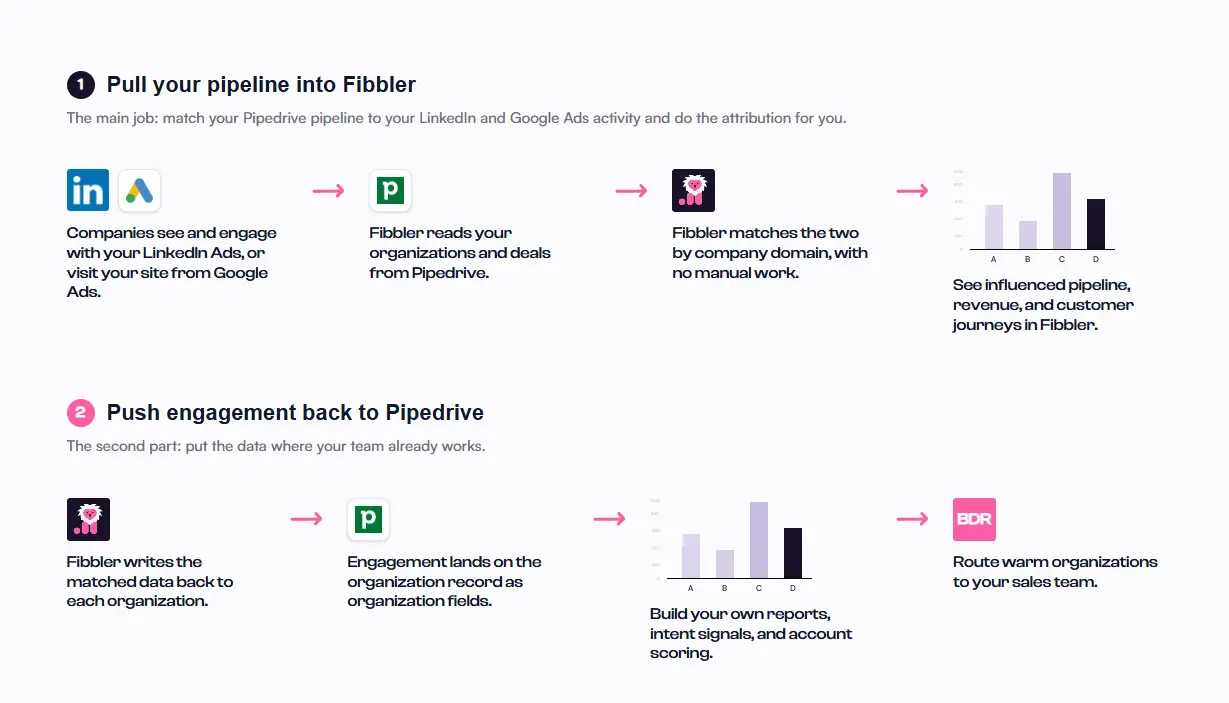
The second is attribution, which shows which companies your ads reached and whether they became pipeline. Lead sync can’t answer that, because most people who see an ad never fill in a form. Fibbler’s native Pipedrive integration matches your organizations and deals to LinkedIn ad engagement by company domain and writes that data back onto organization records.
Why LinkedIn Ads Look Quiet in Pipedrive Until You Connect the Right Tool
In Fibbler’s benchmark data from more than 1,000 B2B advertisers, the median single image ad gets a 0.38% click-through rate. Put another way, fewer than 4 in every 1,000 people who see your ad click it, and only some of those fill in a form.
A Lead Gen Form sync handles that small group well. What it can’t show is everyone else, like the buying committee that saw your ads for weeks, never clicked, and later booked a demo through your website. In Pipedrive, that deal looks like it came from nowhere, and LinkedIn gets no credit.
This guide covers both jobs, in the order most Pipedrive teams run into them.
Why Listen to Us?
Fibbler is an official LinkedIn Marketing Partner built for one job: showing what LinkedIn Ads do for pipeline and revenue. More than 2,000 marketers use it, and our Pipedrive integration is native. You install it from the Pipedrive Marketplace, and it’s included on every plan.
Bas Klomp, Director of Demand at DataSnipper, says Fibbler lets them clearly see the impact on pipeline and revenue. Mary Descalso says it lets them prove LinkedIn’s true impact. Both quotes are on our customers page.
Fibbler has been a game-changer for us because it connects those dots. We can actually see that the people who converted were the same ones engaging with our LinkedIn ads weeks earlier. It's the missing piece that lets us prove LinkedIn's true impact, and the team behind it makes the whole experience even better.

Mary Descalso

Fibbler makes it simple to connect paid media performance to real pipeline impact. The platform is intuitive, flexible for data analysis, and constantly evolving based on customer feedback. It's become a key part of how we understand and optimize our marketing investment.

Danielle Roller
Principal Digital Marketing Manager, Perceptyx
Fibbler helps us do many things that Campaign Manager limits us from. However, the biggest value is that it helps us show our clients the true value that LinkedIn is driving outside of direct attribution.

Rob Muldoon
Founder, Tuned Social
What Is a LinkedIn Ads Pipedrive Integration?
A LinkedIn Ads Pipedrive integration is any connection that moves LinkedIn data into Pipedrive. Pipedrive doesn’t offer a built-in LinkedIn integration, so every option runs through a third-party app or automation tool. They fall into two groups.
Lead and contact sync. This is what most people mean by a LinkedIn Pipedrive integration. Tools like Zapier, Outfunnel and LeadsBridge turn Lead Gen Form submissions into Pipedrive people, leads or deals. Prospecting extensions like Surfe and LinkMatch save LinkedIn profiles into Pipedrive as you browse.
Ad attribution. This matches the organizations and deals already in Pipedrive to LinkedIn ad engagement at the company level, whether or not anyone filled in a form.
How to Connect LinkedIn Ads and Pipedrive
1. Decide Which Job You’re Solving
Start with the question you want answered. If it’s “How do we get form leads into Pipedrive without copy and paste?”, you need lead sync (step 2). If it’s “Is our LinkedIn spend turning into pipeline and revenue?”, you need attribution (steps 3 to 6).
Most teams build lead sync first because it’s familiar. That’s fine, but it won’t answer the revenue question. Plenty of teams run a sync for months and still can’t tell leadership whether LinkedIn Ads works.
2. Sync Your Lead Gen Form Leads Into Pipedrive
Pick the option that matches how your team works:
- Zapier: The LinkedIn Ads and Pipedrive integration uses “New Lead Gen Form Response (Sponsored content)” as the trigger, with actions such as Create Deal, Create Person or Create Organization. Zapier marks LinkedIn Ads as a Premium app, so plan for a paid Zapier plan.
- Outfunnel: A no-code LinkedIn Lead Forms sync that sends new submissions into Pipedrive and can also record web visits and lead scores. Plans start at $29 a month, with a 14-day free trial.
- LeadsBridge: Syncs Lead Gen Form and event registration data into Pipedrive, and can also push Pipedrive contacts to LinkedIn Matched Audiences or send deal events back through LinkedIn’s Conversions API.
- Profile sync extensions: If your reps prospect on LinkedIn rather than run ads, Chrome extensions such as Surfe and LinkMatch create Pipedrive people, deals and activities from LinkedIn profiles. LinkMatch can sync LinkedIn messages too.
For the ad-lead tools, setup follows one pattern: connect your LinkedIn ad account and Pipedrive, pick the form, and map each question (name, email, company, job title) to a Pipedrive field, creating custom fields first if needed.
Then submit a test lead through your own form and check the Pipedrive record. Blank fields usually mean something was mapped wrong.
Remember what this leaves out: everyone your ads reached who didn’t submit a form stays invisible in Pipedrive.
3. Pick a Tool That Matches Pipedrive to LinkedIn Ad Activity
Attribution tools don’t wait for a form submission. They match the organizations and deals already in Pipedrive to LinkedIn ad engagement by company domain, so a deal that opens months after a company first saw your ads still shows that influence.
When you compare tools, check three things: whether the Pipedrive connection is native, whether it counts impressions or only clicks, and whether it writes data back into Pipedrive. Our roundup of the best attribution tools for Pipedrive compares eight options against criteria like these.
We built Fibbler for this job. Its native Pipedrive integration tracks paid and organic LinkedIn impressions, clicks and engagements, and comes with every plan, from $89 a month on Growth. The steps below use Fibbler.
4. Connect Pipedrive to Fibbler
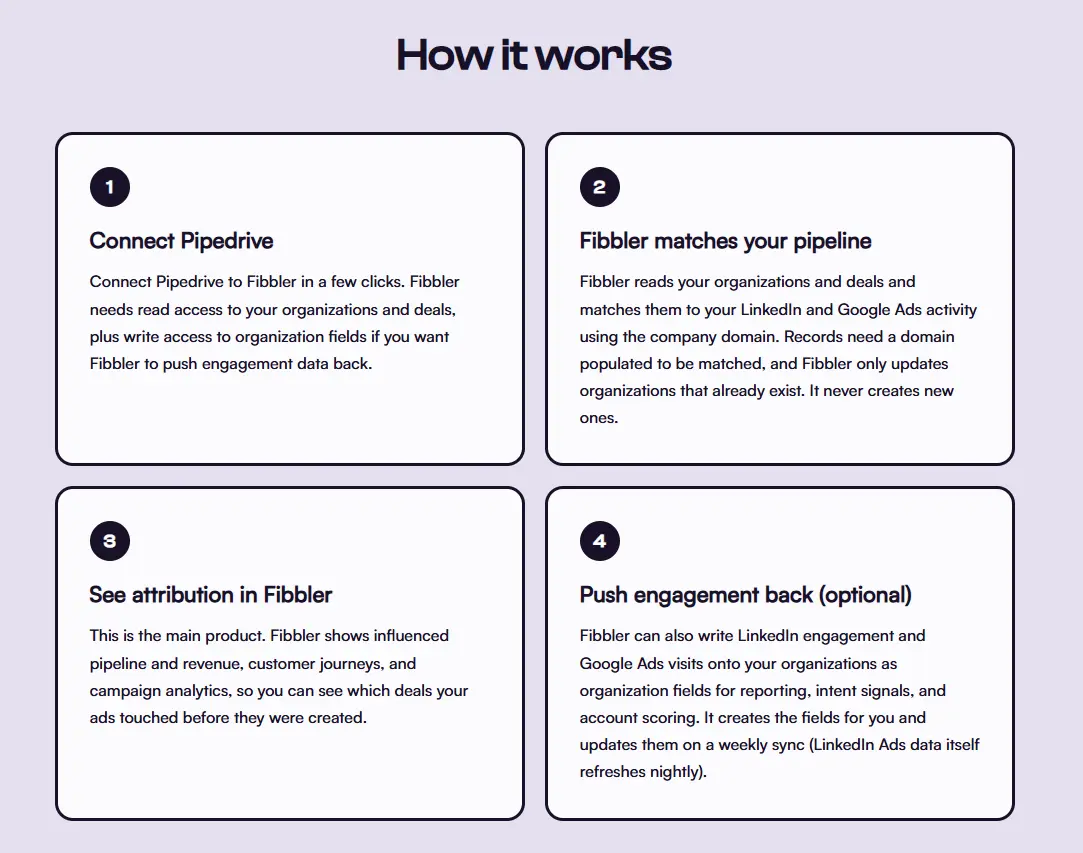
You can start from either side. In Fibbler, go to Data Sources, click Connect Pipedrive, sign in to Pipedrive and approve access. Or open the Fibbler app in the Pipedrive Marketplace and click Install now. Both paths finish on Fibbler’s Data Sources page.
Fibbler connects through OAuth 2.0 and never asks for or stores your Pipedrive API token. Here’s the access it requests:
- Deals: to calculate influenced pipeline and revenue, plus write access to create deal filters
- Organizations: to match them with LinkedIn ad data (Fibbler works with organization records, never individual contacts)
- Organization fields: to create and update custom fields at the organization level
- Basic account information: to identify your Pipedrive workspace and default currency
Matching by company domain is automatic, so make sure organizations have a domain filled in. Our Pipedrive connection docs explain each permission, and the Pipedrive integration setup guide walks through the flow from start to finish.
5. Set Your Pipeline and Mark Your Closed Won and Closed Lost Stages
Next, choose the Pipedrive pipeline Fibbler should track. Then mark which stages count as Closed Won and which count as Closed Lost. You can assign multiple stages to each, which helps if your pipeline has more than one route to a close.
Don’t skip this. Without stage mapping, Fibbler can’t tell which deals closed, so influenced revenue stays empty even though the connection is live. Once it’s set, Fibbler loads your historical data, and you can check the dashboard figures.
6. Read the Engagement Data and Act on It
Fibbler refreshes your LinkedIn Ads data nightly. To see it inside Pipedrive, turn on CRM Data Sync, which is off by default. Fibbler then creates organization fields for LinkedIn impressions, clicks, engagements, paid video views, organic impressions, organic engagements and engagement level (very high to very low), each over 7, 30 and 90 days.
The sync runs weekly on Sundays and only updates organizations that already exist. Reps can see how engaged a company is without leaving Pipedrive.
To act on that interest sooner, turn on Ad Engagement Signals. It sends companies engaging with your ads into Pipedrive, creates a saved filter for each signal and leaves notes on the matching organizations. Fibbler can also send signals to Slack.
Fields still empty after the first Sunday sync? Check that the organization has a domain, since records without one can’t be matched.
Get Both Jobs Done Properly
Lead sync gets form leads into Pipedrive. It can’t tell you whether LinkedIn Ads is paying for itself, which is the question leadership keeps asking.
If you only need form leads in Pipedrive, set up the sync and stop there. If you need to show what your LinkedIn spend is creating, connect Pipedrive to Fibbler. The integration is included on every plan, and you can start a 30-day free trial with no credit card required.
FAQs
Does LinkedIn Have a Native Integration With Pipedrive?
No. Lead sync runs through tools like Zapier, Outfunnel or LeadsBridge, profile sync through extensions like Surfe or LinkMatch, and ad attribution through a Pipedrive Marketplace app like Fibbler.
What’s the Difference Between Syncing LinkedIn Leads and LinkedIn Ads Attribution in Pipedrive?
Lead sync captures the people who filled in a Lead Gen Form. Attribution matches your Pipedrive organizations to LinkedIn ad engagement, impressions included, so it credits companies your ads influenced even when nobody submitted a form.
Why Isn’t My LinkedIn Ad Data Showing Up in Pipedrive Yet?
Fibbler refreshes LinkedIn data nightly, but CRM Data Sync writes to Pipedrive weekly on Sundays, and only once you’ve enabled it. If fields are still empty after a Sunday sync, confirm the sync is on and the organization has a domain filled in.
Will Connecting Fibbler Create Duplicate Organizations in Pipedrive?
Not through CRM Data Sync, which only updates organizations that already exist. The one feature that can create a missing organization is Ad Engagement Signals, and that option is off by default.
How Much Access Does Fibbler Need in Pipedrive?
Access to deals, organizations, organization fields and basic account information, granted through OAuth 2.0. It never asks for your API token and works with organization records, not individual contacts.
Can I Track Google Ads Alongside LinkedIn Ads in Pipedrive?
Yes. Fibbler’s Google Ads and Meta Ads add-ons each cost $59 per account per month, and both are part of every 30-day trial. Once an add-on is on, CRM Data Sync adds its visit fields over 7, 30 and 90 days to the same Pipedrive organizations. Our Meta Ads Pipedrive integration guide covers that setup.
Written by

Adam Holmgren
CEO @ Fibbler

Prove paid ads drive pipeline
Fibbler helps you see which companies view or engage with your LinkedIn, Google and Meta Ads, and connect them to pipeline and revenue in your CRM.
Try 30 days for free
Prove paid ads drive pipeline
Fibbler helps you see which companies view or engage with your LinkedIn, Google and Meta Ads, and connect them to pipeline and revenue in your CRM.
Try 30 days for free