

LinkedIn Ads
- LinkedIn Ads Company Insights
- LinkedIn Ads Customer Journeys
- LinkedIn Ads Audience Insights
- LinkedIn Ads Campaign Optimization
- LinkedIn Ads Benchmarks
Google Ads

Meta Ads
Cross-Channel
Ad signals
New




How to Connect Meta Ads to Salesforce and Track Company-Level Pipeline
Quick Summary
A Meta Ads Salesforce integration can mean three different things: pulling Instant Form leads into Salesforce, sending lead and opportunity stages back to Meta so it optimizes for better leads, or importing campaign metrics into Salesforce Data 360. All three work at the lead or campaign level.
None of them tell you which companies your Facebook and Instagram ads brought to your website, or whether those accounts turned into pipeline.
To get there, set up the native connections, add URL parameters to every ad, and layer company-level attribution on top so Meta visit data lands on your Salesforce account records, where you can report on it next to your opportunities.
Salesforce and Meta Already Talk to Each Other, but the Conversation Stops at Leads
Meta and Salesforce have more ways to connect than most teams realize, from lead sync to stage feedback to campaign reporting.
The optimization side is worth having. In an A/B test of 1,031 advertisers, Meta found that Instant Form campaigns using Conversions API for CRM with the Conversion Leads goal averaged a 21% lower cost per quality lead than campaigns optimized for lead volume alone.
But every one of those connections answers a lead question: which person filled in the form, and how can Meta find more like them?
That’s the wrong unit when you sell to buying committees. Most people who click a B2B ad on Facebook or Instagram never fill in a form. They read the landing page, leave, and come back weeks later through branded search or a sales email. By then, Meta has no record of them, and Salesforce has no idea Meta was ever involved.
The native integration can’t tell you which accounts your Meta campaigns reached, or whether they’re now in your pipeline. That takes an extra layer.
Why Listen to Us?
Writing ad engagement data into Salesforce is what we do every day. Fibbler’s Salesforce integration already pushes LinkedIn Ads and Google Ads engagement onto Account records as custom fields, in 7, 30 and 90-day windows, for B2B teams that want Salesforce to stay their single source of truth.
Our Meta Ads add-on follows the same pattern, so we’ve worked through the Salesforce side of this problem in detail: which objects to read, which fields to write, and how to name them inside Salesforce’s 40-character API limit.
Fibbler is an official LinkedIn Marketing Partner, more than 2,000 marketers use the platform, and it’s rated 4.8/5 on G2. Everything we sync is company-level, so no personal data about the people clicking your ads ends up in your CRM.


What Is a Meta Ads Salesforce Integration?
A Meta Ads Salesforce integration is any connection that moves data between your Facebook and Instagram campaigns and the Salesforce org where you track deals. There are several, and each moves a different kind of data in a different direction.
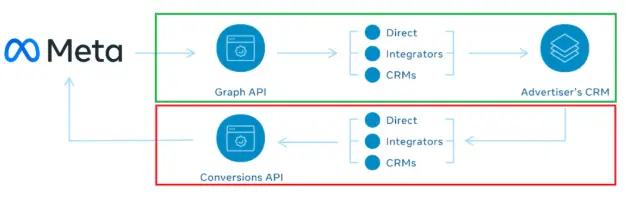
| Connection | Built by | Direction | What moves | Level |
|---|---|---|---|---|
| Lead Capture in Sales Cloud | Salesforce | Meta to Salesforce | Instant Form submissions, created as leads | Person |
| Conversions API for CRM (Conversion Leads) | Meta | Salesforce to Meta | Lead status and opportunity stage changes | Person |
| Data 360 Meta Ads connector | Salesforce | Meta to Salesforce | Impressions, clicks, cost and conversions | Campaign |
| Company-level attribution (e.g. Fibbler) | Third party | Meta to Salesforce | Companies visiting your site from Meta ads, by campaign | Account |
The native options have real limits for B2B teams:
- Conversion Leads only works with Lead Ads: Meta’s documentation says the Conversion Leads goal is currently only compatible with Instant Forms, so it does nothing for campaigns that send people to your website.
- It needs volume: Meta asks for at least 200 leads a month and a target stage that 1% to 40% of leads reach within 28 days. A B2B team with a narrow ICP and a long sales cycle can miss both.
- The Data 360 connector reports totals: You see clicks and spend per campaign, not which companies clicked.
- Nothing native reaches the Account object: Leads get created and stages get sent back, but no field on your Salesforce accounts says “this company has been visiting from Meta.”
How to Connect Meta Ads to Salesforce
1. Install the Meta Conversion Leads Integration in Salesforce
Start with the lead flow, because Conversion Leads depends on it. If you run Instant Form campaigns, install Lead Capture in Sales Cloud, Salesforce’s free app on AppExchange. From the App Launcher, create a new task, authenticate with Facebook, pick a Page you’re an admin on, choose a lead form and map its fields to your Salesforce lead fields.
Each task covers one form, so repeat it for every form you run. The app also stores each lead’s Meta lead ID in the External Lead ID field, which the next part needs.
Then connect Salesforce back to Meta. Meta’s help center walks through linking Sales Cloud to a CRM dataset you create in Events Manager. Once it’s live, lead status changes in Salesforce reach Meta as conversion events.
You can then switch your Lead Ads campaigns to the Conversion Leads goal, so Meta optimizes toward leads that progress instead of raw form fills.
You’ll need admin access to Salesforce and your Meta business account. And all of this happens at the lead level, so it tells you nothing about accounts.
2. Add URL Parameters to Every Meta Ad
URL parameters are how a website visit gets tied back to the Meta campaign, ad set and ad that drove it. Meta doesn’t pass a click identifier the way Google Ads does, so if the parameters aren’t on the ad, the visit arrives with no campaign attached.
In Ads Manager, paste this string into the URL parameters field of every ad you want to track:
utm_source=facebook&utm_medium=paid&utm_id={{campaign.id}}&utm_campaign={{campaign.name}}&utm_content={{ad.id}}&utm_term={{adset.id}}
The utm_id parameter is the one that matters most. It carries the campaign ID, and campaign-level reporting is keyed on it. Leave it off and visits still show up as Meta traffic, but you can’t split them by campaign.
Two things catch people out. Parameters only apply to ads served after you add them, so set them up before a campaign launches. And redirects or consent banners that reload the page can strip the query string, so click a live ad and check the address bar to confirm the parameters survive.
3. Configure the Salesforce Data Cloud Meta Ads Connector
If your org has Data 360 (formerly Data Cloud), the Meta Ads connector imports campaign performance data like impressions, clicks, cost, conversions and audience engagement across Facebook, Instagram, Messenger and Audience Network.
You set it up under Other Connectors in Data Cloud Setup: create a new Meta Ads connection, authenticate with Meta, select the ad account, test the connection, then create a data stream.
The connector uses batch ingest, so the data isn’t real-time. It puts Meta spend next to your other channels, but you’ll see how many clicks a campaign got, not which companies were behind them. If you don’t have Data 360, skip this step. Nothing else in the setup depends on it.
4. Send Salesforce Lead Stages Back to Meta via Conversions API
Step 1 sends lead status. If your later stages live on opportunities, or you’d rather control the connection yourself, Meta also documents a no-code route built on Salesforce outbound messages and record-triggered Flows:
- Create a CRM dataset in Meta Events Manager and choose Salesforce webhooks as the connection method.
- Create an outbound message on the Lead object that sends status, last modified date, Meta lead ID, email and phone to Meta’s endpoint.
- Build a record-triggered Flow that fires the outbound message whenever lead status changes.
- Repeat both for Opportunities if that’s where your pipeline stages live.
Matching depends on the 15 to 17-digit Meta lead ID being stored on each record, with email or phone as a fallback. Meta also expects stage updates at least once a day.
The bigger risk is data quality. If reps don’t update statuses consistently, you’re training Meta to find the wrong people.
5. Identify Which Companies Click Your Meta Ads With Fibbler
Leads now move between Meta and Salesforce. What’s still missing is the account view: which companies visited your site from Meta, which campaigns brought them, and whether they’re in your pipeline.
That’s what Fibbler’s Meta Ads add-on does. It runs alongside our LinkedIn Ads and Google Ads attribution and is part of every Fibbler trial. Setup takes four steps:
- In Fibbler, go to Settings, then Sources, click the Meta Ads card, authenticate with Facebook and select your ad accounts.
- Make sure the URL parameters from Step 2 are live on your ads.
- Add the tracking script to the <head> of your website. If you’ve already installed it for Google Ads, skip this.
- Wait for the green checkmark on the Sources page confirming the script has been detected.
The first identified companies usually appear within 24 hours. The tracking script identifies the company behind each visit from a Meta ad, and the URL parameters tell Fibbler which campaign, ad set and ad it came from. Fibbler then matches those companies to your Salesforce accounts and opportunities by domain and tracks pipeline and revenue by campaign.
Next, turn on CRM sync. Fibbler writes Meta visit counts to your Salesforce account records as custom fields, with 7, 30 and 90-day rolling windows you can toggle independently: fibbler_meta_visits_7_days__c, fibbler_meta_visits_30_days__c and fibbler_meta_visits_90_days__c.
You can also create campaign-specific sync groups. Give a group a name like “Retargeting” or “Q4 webinar,” choose the Meta campaigns it covers, and Fibbler creates a matching set of fields (in the format fibbler_meta_7d_vis_abc123__c) so you can track engagement from those campaigns separately. Sync groups rely on utm_id, which is where Step 2 pays off.
Everything here is company-level. Fibbler tells you that a company visited from a Meta campaign, not which person clicked, and it doesn’t create leads or contacts in Salesforce.
The Meta Ads add-on costs $59 a month per ad account, or $699 a year, and covers up to 1,000 identified companies a month. It’s part of every Fibbler trial for 30 days from the day the tracking script goes live, then needs an active Fibbler plan and a connected CRM. Salesforce is included on the Unlimited ($129/month) and Agency ($159/month) plans.
6. Build a Meta-Influenced Pipeline Report in Salesforce
Start with an Opportunities report. Filter to open opportunities where the account’s fibbler_meta_visits_30_days is greater than zero, then group by stage. That gives you every active deal at a company that has visited your site from Meta in the past month, with the total pipeline value at the top.
From there:
- Swap the global field for a sync group’s field to compare which Meta campaigns are reaching accounts with open deals.
- Build an Accounts report with a cross filter for accounts without open opportunities and Meta visits above zero. That’s a warm list for your SDRs.
- Put both on a dashboard next to your LinkedIn and Google fields, so leadership sees paid social in one place.
One caveat: the Salesforce fields are rolling visit counts, so this report shows current overlap, not strict attribution. For influenced pipeline and revenue, where the Meta visit has to happen before the deal was created, use Fibbler’s Meta Ads dashboard.
Your CFO doesn’t want clicks or cost per lead. They want a clear line between Meta spend and pipeline, and this is how you draw it.
Start Connecting Your Meta Ads to Salesforce Pipeline
The native Meta and Salesforce connections are worth setting up for lead sync and smarter Instant Form bidding.
But for a B2B team, leads aren’t the unit that matters. Accounts are. Company-level attribution shows which accounts your Facebook and Instagram ads brought to your site, and putting that data on Salesforce account records means sales, marketing and RevOps all work from the same view. If your team runs HubSpot or Pipedrive instead, see our guides to the Meta Ads HubSpot integration and the Meta Ads Pipedrive integration.
Start a 30-day free Fibbler trial, no credit card required, and see which companies your Meta campaigns are sending your way.
FAQs
Does Salesforce Have a Native Meta Ads Integration?
Yes, a few: Salesforce’s free Lead Capture in Sales Cloud app for Instant Form leads, Meta’s Conversions API for CRM for sending stages back, and a Data 360 connector for campaign metrics. All work at the lead or campaign level, not the account level.
Can You Track Which Companies Click Your Meta Ads in Salesforce?
Not with the native integrations alone. You need a company-level attribution tool like Fibbler, which uses IP-based company identification to spot the businesses visiting from Meta ads and syncs visit counts to Salesforce account records.
What Is the Difference Between the Conversions API and Company-Level Attribution?
The Conversions API sends individual lead events from Salesforce back to Meta so the ad platform can optimize for quality leads. It works at the person level and only for Instant Form campaigns. Company-level attribution identifies which businesses visited your site from any Meta ad and ties that activity to pipeline and revenue at the account level.
How Long Does It Take to See Meta Ads Data in Salesforce?
Lead Capture imports Instant Form leads in real time. Meta expects Conversions API stage updates at least daily. The Data 360 connector runs in batches. Fibbler usually shows the first identified companies within 24 hours, and longer lookback windows fill in as data builds up.
Does Fibbler’s Meta Ads Attribution Work with Salesforce?
Yes. Fibbler’s Meta Ads add-on syncs company-level visit data to Salesforce account records. You’ll need the Unlimited ($129/month) or Agency ($159/month) plan, since Salesforce isn’t included on Growth, plus an active Salesforce connection.
Why Does Fibbler Show Companies from Meta but No Campaigns?
The utm_id parameter is almost always missing from your ads. Add the full parameter string from Step 2 to every ad. If it’s there, check that redirects, duplicate “?” characters or consent banners aren’t stripping the query string.
Why Can’t I Connect Salesforce to Fibbler?
The connecting user needs the “Modify Metadata Through Metadata API” and “View All Data” permissions. If you see OAUTH_APPROVAL_ERROR_GENERIC, enable “Approve Uninstalled Connected Apps” in a permission set, assign it to your user and retry. If you see OAUTH_APP_BLOCKED, an admin has blocked the app, so go to Setup, then Connected Apps OAuth Usage, find Fibbler and click Unblock.
Why Aren’t My Salesforce Lead Stages Matching in Meta?
Usually the Meta lead ID is missing. Leads created by Lead Capture store it in the External Lead ID field, but leads from other sources won’t have one, so include email or phone as a fallback. Also check your volume. Below roughly 200 leads a month, Conversion Leads struggles to optimize.
Written by

Adam Holmgren
CEO @ Fibbler

Prove paid ads drive pipeline
Fibbler helps you see which companies view or engage with your LinkedIn, Google and Meta Ads, and connect them to pipeline and revenue in your CRM.
Try 30 days for free
Prove paid ads drive pipeline
Fibbler helps you see which companies view or engage with your LinkedIn, Google and Meta Ads, and connect them to pipeline and revenue in your CRM.
Try 30 days for free