

LinkedIn Ads
- LinkedIn Ads Company Insights
- LinkedIn Ads Customer Journeys
- LinkedIn Ads Audience Insights
- LinkedIn Ads Campaign Optimization
- LinkedIn Ads Benchmarks

Google Ads

Meta Ads
Cross-Channel
Ad signals
New




Meta Ads HubSpot Integration: What It Tracks, Where It Breaks and How to Fix It (2026)
Quick Summary
HubSpot’s native Meta Ads integration is free on every plan and handles the basics well: it pulls in Facebook and Instagram campaign data, syncs lead form submissions as contacts, adds UTM tracking, and sends lifecycle events back to Meta via the Conversions API. The gaps show up in attribution.
Free and Starter accounts only get last ad interaction reporting, every report is built on contacts rather than companies, and the Conversions API often throws duplicate events or numbers that never match Meta Ads Manager.
This guide covers what the native integration does, where it breaks, which third-party tools patch which gaps, and how Fibbler’s Meta Ads add-on syncs company-level ad visit data into HubSpot company records.
Meta Ads HubSpot Integration: Why Attribution Breaks After Setup
Connecting Meta Ads to HubSpot takes a few minutes. Getting it to tell you which ads created pipeline is a different job.
Picture a typical B2B deal. Four people at the same company scroll past your Instagram ad over a month. Two of them click through to your site and leave. A fifth person, the one who books the demo, arrives through a Google search three weeks later.
HubSpot has no record linking the first four to the deal, because none of them filled in a form. The deal gets credited to organic search.
That’s not a bug. HubSpot’s ads attribution is built around contacts, so anything that happens at the account level before a form fill sits outside the model.
HubSpot’s knowledge base covers connecting the accounts in detail. This guide picks up where it stops: the integration is working, but the attribution isn’t.
Why Listen to Us?
Fibbler is a paid ads attribution platform for B2B teams, rated 4.8 out of 5 on G2. Teams at Arrows, Perceptyx and Storylane use it to connect ad engagement to pipeline and revenue in their CRM.
Fibbler is a LinkedIn Marketing Partner with a native HubSpot integration, and we built our Meta Ads add-on because the native integration stops at the contact, while B2B deals are won at the account.


What HubSpot’s Native Meta Ads Integration Actually Does
HubSpot’s ads tool connects to Meta, though parts of the interface still call the connection “Facebook Ads”. According to HubSpot’s setup documentation, the ads tool is available on all products and plans.
What the Integration Covers
| Feature | What it does | HubSpot plan |
|---|---|---|
| Campaign reporting | Pulls Meta campaigns, ad sets and ads into HubSpot with spend, impressions and clicks | All plans |
| Auto-tracking | Appends UTM parameters to ad URLs so contacts and deals can be tied to campaigns (on by default) | All plans |
| Lead syncing | Creates HubSpot contacts from Meta lead form submissions | All plans |
| Conversion events (Conversions API) | Sends form submissions, lifecycle stage changes and page views to Meta | Marketing Hub Starter (5 events), Professional (50), Enterprise (100) |
| Attribution reports | Credits contacts and closed-won deals to ads | Free and Starter: last ad interaction only. Professional and Enterprise: all report types |
How to Connect Meta Ads to HubSpot
- Check your access first: The connecting user needs ads publishing permission in HubSpot, admin access to the Meta ad account and Facebook Page, and Leads Access on the Page if you run lead ads. The ad account and Page must sit in the same Business Manager.
- Connect the account: In HubSpot, go to Settings, then Marketing, then Ads. Click Connect ad network, choose Meta and authenticate. Accept every permission Meta asks for, because a partial grant is the most common reason lead syncing fails later.
- Have each teammate connect separately: On a shared ad account, every person who manages Meta ads in HubSpot connects with their own Meta login.
- Turn on lead syncing: In the Lead syncing tab, select the Pages to sync and set the sync timeframe to All leads. When you first connect, lead ad submissions from the last 90 days are created as contacts.
- Connect the Meta pixel through HubSpot: This turns on browser and server tracking through Meta’s Conversions API. Then go to Marketing, then Ads, and click Create, then Event, to build conversion events for the form submissions and lifecycle stages you want Meta to optimize toward.
- Confirm auto-tracking is on and the HubSpot tracking code is installed on every page your ads send traffic to. Without both, contact and deal attribution will not work.
The problems start when you use it to prove revenue.
Where the Native Integration Falls Down
Last-Click by Default
On Free CRM and Marketing Hub Starter, the only ads attribution report available is last ad interaction, according to HubSpot’s ads attribution documentation. A Meta ad only gets credit if it was the contact’s final ad touch before they converted.
For B2B, Meta usually works higher in the funnel, so last-click reporting undercounts it. Professional and Enterprise unlock first ad interaction, re-engagement and all ad interactions reports, which helps but doesn’t fix the next problem.
Lead-Level Only, With No Company View
Every HubSpot ads report is built on contacts. For a contact to be attributed, they must click an ad, start a web session, submit a form and convert. For a deal to be attributed, it must be closed won, have a close date, and be associated with an attributed contact at the Customer lifecycle stage.
HubSpot’s documentation does not describe any company or account-level ads attribution. So if three people from a target account click your Meta ads and one colleague who never saw an ad fills in the demo form, HubSpot has no way to connect that company’s ad engagement to the deal.
The pipeline Meta helped create looks like it came from somewhere else.
For B2B, that’s the core issue: most ad clickers never submit a form, and the account is what sales is selling to. The same gap exists on other channels, as we cover for Google Ads and HubSpot and LinkedIn Ads and HubSpot too.
Conversions API Confusion
The Conversions API is meant to improve Meta’s optimization by sending CRM outcomes back to the platform. In practice, it’s where most setup questions come from:
- Duplicate events. HubSpot’s documentation warns that if the Meta pixel was also added manually to your site header or footer, you should remove it, or you risk duplicate events and inconsistent reporting. HubSpot sends both browser and server events so Meta can deduplicate them, and that only works when HubSpot is the single source of the pixel.
- No history. Only form submissions and lifecycle stage changes that happen after you create a conversion event are sent. Past pipeline does not flow to Meta retroactively.
- HubSpot forms only. Submissions from non-HubSpot forms cannot be synced to Meta.
- Numbers that never match. HubSpot states plainly that totals in Meta Events Manager are not expected to match HubSpot’s data, because Meta calculates each metric differently. Multiple HubSpot events mapped to the same Meta event also show up as one event in Events Manager.
- Every stage needs an event. HubSpot says that to optimize Meta campaigns, you must create a conversion event for each lifecycle stage, including Other.
The Conversions API improves what Meta optimizes toward. It does not change how HubSpot attributes revenue.
Third-Party Workarounds
Once the native integration hits its limits, teams usually reach for one of four types of tool. Each fixes a specific gap.
| Workaround | Examples | What it fixes | What it doesn’t |
|---|---|---|---|
| Lead sync middleware | Zapier, LeadsBridge | Routes Meta lead form data into HubSpot, with more control over field mapping | Still contact-level, and only covers people who fill in a lead form |
| Server-side conversion tools | AnyTrack, Able CDP | Sends HubSpot lifecycle events to Meta with more matching data than the native setup | Improves Meta’s optimization, not HubSpot’s attribution |
| UTM and attribution capture | Madlitics | Stores source, campaign and click data on HubSpot contacts when a form is submitted | Nothing is captured for visitors who never convert |
| Attribution platforms | See our roundup of Meta Ads attribution tools | Multi-touch and account-level reporting outside HubSpot’s native model | Often priced and scoped for larger teams with data warehouses |
Most workarounds either move lead data more reliably or feed Meta better signals. Few answer the question asked in a pipeline review: which accounts engaged with Meta before they became opportunities. For the wider field, see our list of attribution tools for HubSpot.
Fibbler’s Company-Level Attribution Layer Synced to HubSpot
Fibbler’s Meta Ads add-on works alongside HubSpot’s native integration rather than replacing it. Keep HubSpot for lead syncing and the Conversions API, and use Fibbler for the account view.
How It Works
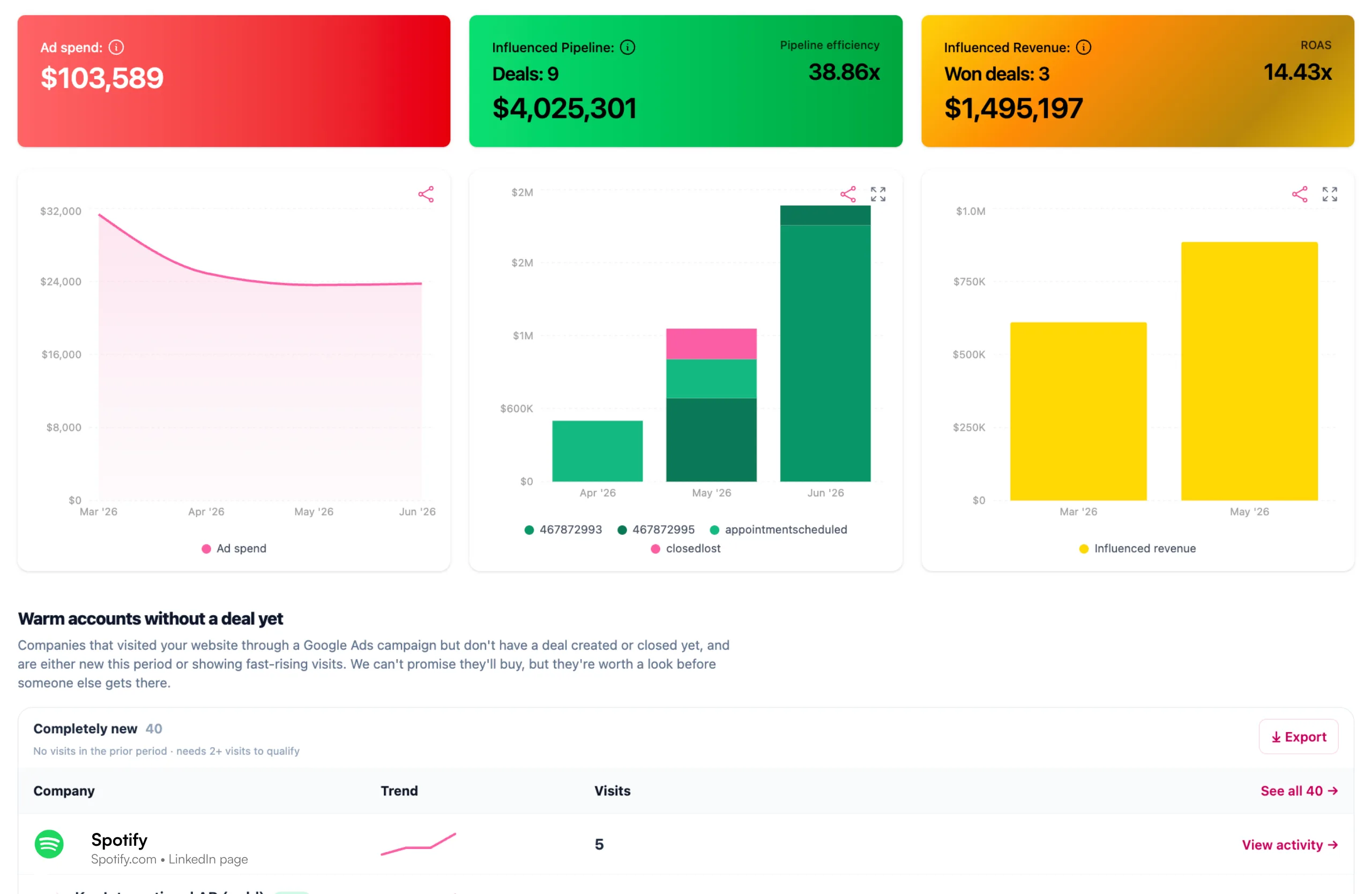
Fibbler identifies the companies that visit your website from Facebook and Instagram ads, using a tracking script on your site and URL parameters on your ads.
No form fill is needed. It matches those companies to your CRM to track pipeline and revenue by Meta campaign, then syncs the visit data into HubSpot company records.
The attribution is company-level: Fibbler does not identify the individual people who clicked, so it complements HubSpot’s lead data rather than replacing it.
How to Set It Up
The full walkthrough is in the Meta Ads getting started guide. In short:
- Connect Meta: In Fibbler, go to Settings, then Sources, and click Continue with Facebook on the Meta Ads card. Choose the ad accounts to track.
- Add URL parameters to every Meta ad you want tracked: Paste this string into the URL parameters field: utm_source=facebook&utm_medium=paid&utm_id={{campaign.id}}&utm_campaign={{campaign.name}}&utm_content={{ad.id}}&utm_term={{adset.id}}. The utm_id value matters most, because it carries the campaign ID Fibbler uses for campaign-level attribution.
- Install the tracking script: From the setup wizard in your site’s head section.
- Wait for verification: A green checkmark appears on the Sources page once the script is detected.
- Check your first companies: Data starts appearing within 24 hours of the script and parameters going live.
Fibbler’s docs also recommend updating your privacy and cookie policies to disclose IP collection and first-party cookies used for B2B company identification.
What Syncs to HubSpot
Meta visit data lands on HubSpot company records, as described in the Meta Ads CRM sync docs. There are two ways to set it up.
| Sync type | What you get in HubSpot |
|---|---|
| Global sync | Rolling 7, 30 and 90-day Meta Ads visit counts per company, in the properties fibbler_meta_ads_visits_7_days, fibbler_meta_ads_visits_30_days and fibbler_meta_ads_visits_90_days. |
| Campaign-specific sync groups | Custom-named properties that track visits for chosen campaigns, for example a retargeting group. These rely on utm_id being present in the ad URL. |
With the data on the company record, you can build lists, score accounts, alert account owners through workflows and report on pipeline by campaign.
The same sync works for Salesforce, Attio and Pipedrive, which we cover in our guides to the Meta Ads Salesforce integration and Meta Ads Pipedrive integration.
Pricing and Availability
Meta Ads attribution is a $59 a month add-on, or $699 a year billed annually, with up to 1,000 identified companies a month included. It’s part of every Fibbler trial for 30 days from the day the tracking script goes live, so you can test it alongside LinkedIn before paying for it.
Base plans start at $89 a month for Growth, with Unlimited at $129 and Agency at $159, and HubSpot is included on all of them. See Fibbler’s pricing for current details.
Is the HubSpot Meta Ads Integration Worth It?
HubSpot’s native Meta Ads integration is worth setting up properly for lead syncing, campaign tracking and Conversions API signals. What it can’t show is which companies your Facebook and Instagram ads reached before anyone filled in a form, and for B2B that’s where most of Meta’s influence sits.
Run the native integration for leads and optimization, then add a company-level layer so HubSpot reflects the accounts Meta reached. For more on the channel itself, read our guide to Meta Ads for B2B or our comparison of LinkedIn Ads vs Meta Ads.
Fibbler connects LinkedIn, Google and Meta ad engagement to pipeline and revenue in HubSpot. Start your 30-day free trial, with no credit card required.
Troubleshooting FAQ
Where Are My Facebook Leads in HubSpot?
Synced lead ad submissions do become HubSpot contacts, but the first ad interaction report only shows leads whose first recorded touch was the ad.
So anyone already in your CRM gets left out. Switch to all ad interactions to see every synced lead, or on Free and Starter, build a contact list using the Ads interactions filters. Also confirm the Page’s sync timeframe is set to All leads rather than New leads (HubSpot’s lead syncing guide).
Why Does Meta Show More Leads Than HubSpot?
The connected user needs admin access to both the Page and ad account, Leads Access on the Page, and both assets in the same Business Manager.
All HubSpot integration permissions must be enabled in Meta, and HubSpot selected as the CRM in the Page’s lead setup. On first connection, only leads from the last 90 days are imported (HubSpot’s Facebook lead ads FAQ).
Why Am I Seeing Duplicate Events After Setting Up the Conversions API?
The most common cause is a Meta pixel installed twice: once through HubSpot and once manually in your site code or tag manager. HubSpot recommends removing any manually installed pixel code so HubSpot is the only source.
HubSpot already sends both browser and server events so Meta can deduplicate them, so you don’t need a separate Conversions API setup for events HubSpot is syncing.
Why Don’t My HubSpot and Meta Ads Manager Numbers Match?
They measure different things. Meta counts conversions using its own attribution rules and windows, while HubSpot attributes contacts and deals based on tracked sessions and form submissions. HubSpot’s documentation says Events Manager totals are not expected to match HubSpot.
Can HubSpot Show Which Companies Saw or Clicked My Meta Ads?
Not natively. HubSpot’s ads attribution works at the contact level. To see which companies visited your site from Meta ads, you need a company-level tool like Fibbler’s Meta Ads add-on, which writes visit counts to HubSpot company records.
Does the Meta Ads HubSpot Integration Cost Extra?
The ads tool itself is available on all HubSpot plans, including free. Conversion events through Meta’s Conversions API require Marketing Hub Starter or above, and the full set of attribution reports requires Professional or Enterprise.
Written by

Adam Holmgren
CEO @ Fibbler

Prove paid ads drive pipeline
Fibbler helps you see which companies view or engage with your LinkedIn, Google and Meta Ads, and connect them to pipeline and revenue in your CRM.
Try 30 days for free
Prove paid ads drive pipeline
Fibbler helps you see which companies view or engage with your LinkedIn, Google and Meta Ads, and connect them to pipeline and revenue in your CRM.
Try 30 days for free