

LinkedIn Ads
- LinkedIn Ads Company Insights
- LinkedIn Ads Customer Journeys
- LinkedIn Ads Audience Insights
- LinkedIn Ads Campaign Optimization
- LinkedIn Ads Benchmarks

Google Ads

Meta Ads
Cross-Channel
Ad signals
New




LinkedIn Document Ads: Specs, Examples, Benchmarks, and When to Use Them
Quick Summary
LinkedIn document ads let you put a PDF, Word file, or slide deck straight into the feed, where people can page through it without leaving LinkedIn. You can share the whole file freely, or show a preview of up to 10 pages and ask for a Lead Gen Form submission to unlock the rest.
In Fibbler’s benchmark data from more than 1,000 B2B advertisers, document ads post the highest median engagement rate of any format (5.20%) and a median CPC of $15.25, but a median CTR of just 0.11%.
This guide covers the full specs (verified September 2026), where the ads show up, real examples, the benchmarks, when the format is worth the budget, and how it compares with carousel ads.
LinkedIn Document Ads Hold Attention, but Attention Isn’t Pipeline
Most LinkedIn formats are built to get a click. LinkedIn document ads are built to get read. People flip through your guide, report, or case study in the feed, and if you gate it, they hand over their details to see the rest.
That makes them one of the best formats on LinkedIn for turning long-form content into leads. It also makes them easy to misjudge. A document ad can post a great engagement rate and still do nothing for pipeline if the wrong companies are reading it.
This guide gives you the specs straight from LinkedIn, the numbers from Fibbler’s own dataset, and a clear view of when document ads are worth running. If you’re still deciding between formats, start with our full guide to LinkedIn ad formats.
Why Listen to Us?
Fibbler is an Official LinkedIn Marketing Partner that connects LinkedIn Ads engagement to pipeline and revenue in your CRM. Our LinkedIn Ads benchmarks cover more than 1,000 B2B advertisers and over $200 million in ad spend from August 2025 to July 2026, measured at the company level with data directly from LinkedIn. Every benchmark in this guide comes from that dataset or from a named, linked source.


What Are LinkedIn Document Ads?
LinkedIn document ads are a Sponsored Content format that lets people read and download documents directly in their feed. You upload a file, and LinkedIn turns it into a page-by-page viewer inside the ad. Nobody has to click through to a landing page to see your content.
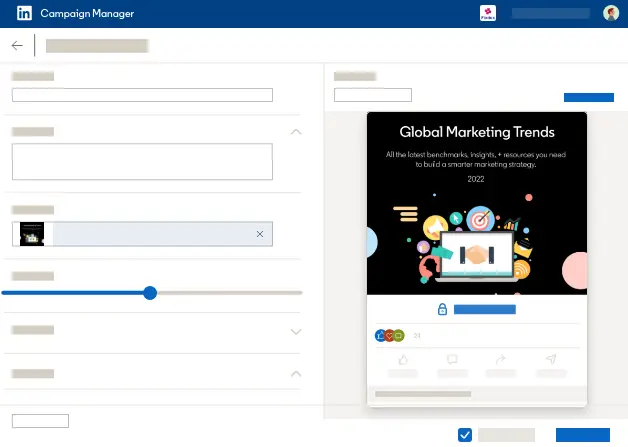
They support three campaign objectives: Brand Awareness, Engagement, and Lead Generation. How you use them depends on which of two setups you choose.
Ungated Document Ads
Anyone who sees the ad can read the whole document and download it. This works when the goal is reach and education, like putting a benchmark report or a practical checklist in front of your target accounts without asking for anything in return.
Gated Document Ads
With the Lead Generation objective, you choose how many pages people can preview, up to a maximum of 10, according to LinkedIn’s getting started guide. Once someone reaches the end of the preview, they select “Unlock Document” and fill in a Lead Gen Form to get the rest.
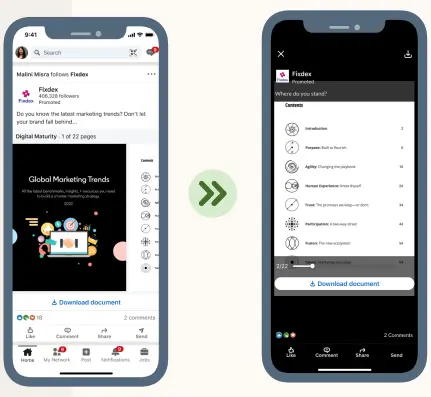
The preview does the selling. People see real content before they hand over their details.
LinkedIn Document Ad Specs
Specs verified September 2026 against LinkedIn’s document ads specifications page.
| Spec | Requirement |
|---|---|
| File types | PDF, DOC, DOCX, PPT, PPTX |
| Maximum file size | 100 MB |
| Length | Under 10 pages recommended; 300 pages or 1 million words maximum |
| Aspect ratio | Vertical, horizontal, or square |
| Ad name | 255 characters |
| Headline | 70 characters |
| Introductory text | 150 characters |
| Preview pages (Lead Generation objective only) | Up to 10 |
Layout Rules
LinkedIn supports standard document layouts in both imperial and metric sizes: Letter, Tabloid, Legal, Statement, Executive, Folio, A3, A4, B4, and B5. A few more rules from the spec page are worth knowing before you export your file:
- Flatten layered PDFs: PDFs with multiple layers must be flattened or merged.
- Use one page size: if your PDF has pages of different sizes, fit them all to the same size.
- Use secure links: any hyperlinks in the document must be secure.
- Respect copyright: the file has to comply with LinkedIn’s Copyright Policy.
Design for the Feed
LinkedIn’s getting started guide recommends keeping the document under 10 pages and using images, bullets, and graphics rather than dense text. Write the document for the feed instead of uploading a 40-page whitepaper as is.
Where LinkedIn Document Ads Show Up
Document ads appear in the LinkedIn feed across desktop and mobile.
LinkedIn’s getting started guide says document ads are not available on the LinkedIn Audience Network (LAN) or in Sponsored Messaging. So you can’t extend a document ad campaign to LinkedIn’s partner network.
LinkedIn Document Ads Examples
Here are six examples. The first is the only one with published results. The other five come from NoGood’s roundup of LinkedIn ad examples, which labels each one as a document ad. We couldn’t view the live ads ourselves, so we describe them the way NoGood and the brands’ own pages do.
Tilt Metrics: A Straight Swap That Cut Cost per Lead by 52%
Tilt Metrics is a US agency that runs lead gen campaigns for B2B software and services companies. Long-form content such as guides and eBooks played a big part in many of its clients’ strategies, but the agency had been promoting that content with single image ads. Anyone who wanted to read the document had to leave LinkedIn first.
What the test looked like: according to LinkedIn’s case study, the agency ran a case study it had already been promoting and kept the same document, audience, and campaign setup. The only change was swapping the single image ads for document ads, which showed people a preview before asking for their details.
| Metric | Change |
|---|---|
| Cost per lead | 52% lower |
| Cost per click | 44% lower |
| Click-through rate | 64% higher |
| Lead Gen Form completion rate | 85% higher |
Why it worked: Tilt Metrics usually saw a 50% drop-off between someone becoming a lead and opening the document later from their email. Because document ads kept people in the feed, the agency could say that “100% of leads at least read part of their document.” Founder Brandyn Morelli said the team “couldn’t believe how much it impacted our CPLs and lead volume.”
What you can copy: if you already promote gated content with single image ads, run the same asset as a document ad and keep everything else the same. Because only the format changes, you’ll know the format caused the difference.
Gong: Proof on the Cover
Gong promoted its “7 Irresistible Cold Email Templates” guide as a document ad with a “Download” call to action. NoGood notes that the creative used Gong’s brand colors and put a hook inside an envelope graphic.
What the document shows: the hook was one number, 304,174. The cover of Gong’s PDF reads “We analyzed 304,174 cold emails,” then promises “7 data-backed templates to start booking more meetings.” Inside, the nine pages lay out a day-by-day email cadence with findings from that analysis, such as asking for interest being “2X more effective” than asking for time.
Why it works: NoGood points out that the number does two jobs. It proves the templates are based on real data, and it shows off what Gong’s product does, which is capture and analyze customer interactions. The ad sells the product without pitching it.
What you can copy: put your strongest proof on page one. If you have a number that only your company could produce, lead with it.
Grin: A Gated Guide Built to Be Read
Grin, an influencer marketing platform, ran a document ad with an “Unlock Full Document” call to action. That’s the button people see when a document is gated behind a Lead Gen Form.
What the ad showed: NoGood highlights the design. The headline used contrasting colors, and each bullet point ended with a small graphic, which made the pages easy to scan in the feed.
Why it works: a gated ad only converts if the preview pages are worth reading. NoGood notes that the ad presents useful information in a visually appealing way, then gives people “a clear path to accessing the full document.”
What you can copy: treat your preview pages as the ad. If they don’t teach something on their own, nobody will unlock the rest.
Notion: A Promise People Understand in a Second
Notion ran a document ad offering “3 viable ways to add structure to your documentation,” with a “Download” call to action.
What the ad showed: an illustration of a person pointing at the highlighted text, which draws the eye straight to the promise.
Why it works: as NoGood puts it, “In a split second, we understand the added value that Notion is trying to provide.” The title tells readers exactly what they’ll get and how much of it.
What you can copy: give your document a numbered, specific title. “3 ways to fix X” is easier to say yes to than “The complete guide to X.”
Drift: Content That Isn’t About the Product
Drift ran a document ad with a bold headline and a “Download” call to action.
Why it works: NoGood notes that the ad “has nothing to do with the platform itself.” Drift built a following of marketers and salespeople by offering useful resources like this one, which positioned it as a trusted authority in its space.
What you can copy: your document doesn’t have to pitch your product. It has to be useful to the people you want in your pipeline. The credibility you earn carries over to the product later.
Tableau: A Whitepaper for Overwhelmed Users
Tableau used a document ad to promote a whitepaper with practical advice on getting more out of the platform, again with a “Download” call to action.
Why it works: NoGood notes that the headline “clearly states what readers can expect from the whitepaper,” and that the design and message were aimed at people who “may feel overwhelmed when using the software.”
What you can copy: document ads aren’t only for new prospects. A how-to guide can reach existing customers and trial users who need help getting value, which matters for retention and expansion.
LinkedIn Document Ads Benchmarks
Here’s how document ads compare with other formats in Fibbler’s LinkedIn Ads benchmarks. The dataset covers more than 1,000 B2B advertisers and over $200 million in spend from August 2025 to July 2026.
| Format | Median CTR | Top quartile CTR | Median CPC | Median CPM | Engagement rate |
|---|---|---|---|---|---|
| Document ads | 0.11% | 1.00% | $15.25 | $88.63 | 5.20% |
| Single image | 0.38% | 0.92% | $16.03 | $64.55 | 0.59% |
| Thought leader ads | 1.35% | 2.35% | $6.95 | $88.17 | 1.84% |
| Video | 0.09% | 0.35% | $30.55 | $59.38 | 0.32% |
| Carousel | 0.05% | 0.20% | $28.98 | $71.98 | 0.17% |
Three things stand out.
Engagement Is the Highest of Any Format, With a Caveat
Document ads post a 5.20% median engagement rate, nearly nine times the 0.59% for single image ads. But Fibbler’s benchmark report points out that engagement for document ads includes clicks that move people between pages of the document. Paging through counts, so the number runs higher than it would for a format where engagement means a like, comment, or click.
Use engagement rate to compare document ads with each other, not with other formats.
The Median CTR Is Low, but the Top Quartile Isn’t
The median CTR for document ads is 0.11%, below single image ads at 0.38%. Yet the top quartile reaches 1.00%, which is higher than the top quartile for single image ads (0.92%). The spread between weak and strong document ads is wider than for most formats, so the document you run matters a lot.
Keep in mind that Fibbler measures identified companies only. As the benchmark report explains, CTR will generally look lower and CPM higher than what you see in an unfiltered Campaign Manager account.
Clicks Cost Less Than Most Formats
At $15.25, the median CPC for document ads is about half that of LinkedIn video ads ($30.55) and carousel ads ($28.98), and slightly below single image ads ($16.03). Only thought leader ads come in lower, at $6.95.
Cost per Lead
Fibbler’s benchmark report also cites Stackmatix 2026 data that puts document ad cost per lead at $38 to $82. That compares with $45 to $165 for Lead Gen Forms in general and $65 to $220+ for external landing pages, based on the same Stackmatix figures.
Metrics to Watch Inside Campaign Manager
Document ads come with their own reporting metrics. LinkedIn’s getting started guide lists:
- Download clicks: how many people clicked the “Download” button.
- Document displays: how much of your document people saw, at 25%, 50%, and 75%.
- Completions: how many people reached the end.
- Lead Form Completion Rate: Lead Gen Forms submitted divided by Lead Gen Forms opened.
The display and completion numbers are your best signal of whether the content itself is working. If most people drop off before 25%, fix the first pages before you touch the targeting or the bid.
When to Use LinkedIn Document Ads
Document ads are the right choice when the content is the reason people engage, and a weak one when you just need a click.
Use document ads when:
- You have long-form content worth gating: a research report, playbook, template pack, or case study.
- You want leads without a landing page: The preview and Lead Gen Form happen inside the feed.
- You’re already promoting gated content with single image ads: The Tilt Metrics test shows what a straight swap can do.
- You want to know how far people read: Display and completion data tell you whether the content holds attention.
Skip document ads when:
- You need traffic to your website: A median CTR of 0.11% makes this a poor traffic driver.
- You want a personal, one-to-one follow-up: A LinkedIn conversation ad sends a message to the inbox, which suits a meeting request better than a PDF does.
- The document is a sales brochure: If nobody would read it for free, a gate won’t make it more appealing.
If you’re planning a full LinkedIn program rather than a single campaign, our guide on how to advertise on LinkedIn covers campaign setup, bidding, and budgets step by step.
LinkedIn Document Ads vs Carousel Ads
LinkedIn document ads show one uploaded file (PDF, DOC, DOCX, PPT, or PPTX) that people read page by page inside the feed, with the option to gate it behind a Lead Gen Form after a preview. Carousel ads show 2 to 10 square images, each with its own link. Document ads suit substantial content. Carousels suit short visual sequences that point to different pages.
| Document ads | Carousel ads | |
|---|---|---|
| What you upload | One file (PDF, DOC, DOCX, PPT, PPTX) | 2 to 10 images (JPG or PNG) |
| File size limit | 100 MB | 10 MB per card |
| Aspect ratio | Vertical, horizontal, or square | 1:1 square |
| Headline | 70 characters | 45 characters per card |
| Intro text | 150 characters | 255 characters |
| Links | Reader stays in the feed | Each card can have its own link |
| Gating | Preview up to 10 pages, then unlock with a Lead Gen Form | Can use a Lead Gen Form, but no page preview to unlock |
| Median CTR | 0.11% | 0.05% |
| Median CPC | $15.25 | $28.98 |
| Engagement rate | 5.20% | 0.17% |
Specs come from LinkedIn’s official pages for document ads and carousel ads. Benchmarks come from Fibbler’s dataset.
On Fibbler’s numbers, document ads beat carousels on all three benchmarks: a higher median CTR, about half the median CPC, and a far higher engagement rate. The engagement gap is partly down to page turns counting as engagement, but the CTR and CPC gaps aren’t.
Carousel still has a job. Pick it when each piece of your message needs its own destination, like five features that each link to a different product page. Pick document ads when the message is the content itself.
For the carousel side of the comparison, including its specs and examples, see our guide to LinkedIn carousel ads.
From Pages Read to Pipeline
Document ads tell you a lot about the people who read them. Campaign Manager shows you how far they read, how many downloaded, and how many filled in the form. What it doesn’t show you is which companies were reading, and whether those companies turned into pipeline.
Fibbler shows you which companies view or engage with your LinkedIn Ads, ties that engagement to pipeline and revenue in HubSpot, Salesforce, Attio, or Pipedrive, and lets you send engaged companies to sales. So when a target account pages through your report three times before booking a demo, you’ll see it.
Try Fibbler free for 30 days, with no credit card required.
LinkedIn Document Ads FAQs
What File Types Do LinkedIn Document Ads Support?
LinkedIn document ads support PDF, DOC, DOCX, PPT, and PPTX files up to 100 MB. LinkedIn recommends keeping the document under 10 pages, with a maximum of 300 pages or 1 million words.
What Size Should a LinkedIn Document Ad Be?
LinkedIn document ads accept vertical, horizontal, and square pages, in standard layouts such as Letter, Legal, A4, and A3. Every page in the file needs to be the same size, and PDFs with multiple layers must be flattened before you upload them.
How Much Do LinkedIn Document Ads Cost?
In Fibbler’s benchmark data, LinkedIn document ads post a median CPC of $15.25 and a median CPM of $88.63. Stackmatix 2026 data, cited in the same report, puts the cost per lead for document ads at $38 to $82. Your actual cost depends on your audience, bid strategy, and competition.
Can You Gate a LinkedIn Document Ad With a Lead Gen Form?
Yes. With the Lead Generation objective, you choose how many pages people can preview, up to 10. After the preview, they select “Unlock Document” and fill in a Lead Gen Form to read the rest, according to LinkedIn’s getting started guide.
What Is a Good CTR for LinkedIn Document Ads?
The median CTR for LinkedIn document ads is 0.11% in Fibbler’s benchmarks, and top-quartile campaigns reach 1.00%. Fibbler measures identified companies only, so CTR will look lower than in an unfiltered Campaign Manager account. For document ads, completions and Lead Gen Form completion rate usually tell you more than CTR does.
Do LinkedIn Document Ads Run on the LinkedIn Audience Network?
No. LinkedIn’s getting started guide says document ads are not available on the LinkedIn Audience Network or in Sponsored Messaging. They run in the LinkedIn feed on desktop and mobile.
Are LinkedIn Document Ads Better Than Carousel Ads?
For long-form content and lead generation, usually yes. In Fibbler’s benchmarks, document ads beat carousel ads on median CTR (0.11% vs 0.05%), median CPC ($15.25 vs $28.98), and engagement rate (5.20% vs 0.17%). Carousel ads are the better fit when each card needs to link to a different page.
Written by

Adam Holmgren
CEO @ Fibbler

Prove paid ads drive pipeline
Fibbler helps you see which companies view or engage with your LinkedIn, Google and Meta Ads, and connect them to pipeline and revenue in your CRM.
Try 30 days for free
Prove paid ads drive pipeline
Fibbler helps you see which companies view or engage with your LinkedIn, Google and Meta Ads, and connect them to pipeline and revenue in your CRM.
Try 30 days for free