Audience Insights
Audience Insights shows which industries, company sizes and countries your LinkedIn ads are actually reaching. Your campaign targeting says who you meant to reach. This page says who you reached. Use it to check whether the audience LinkedIn delivered matches your ICP.
You will find it under Audience insights in the LinkedIn section of the sidebar. By default it shows paid reach only. The Seen via filter lets you add your organic company page posts, or look at them on their own.
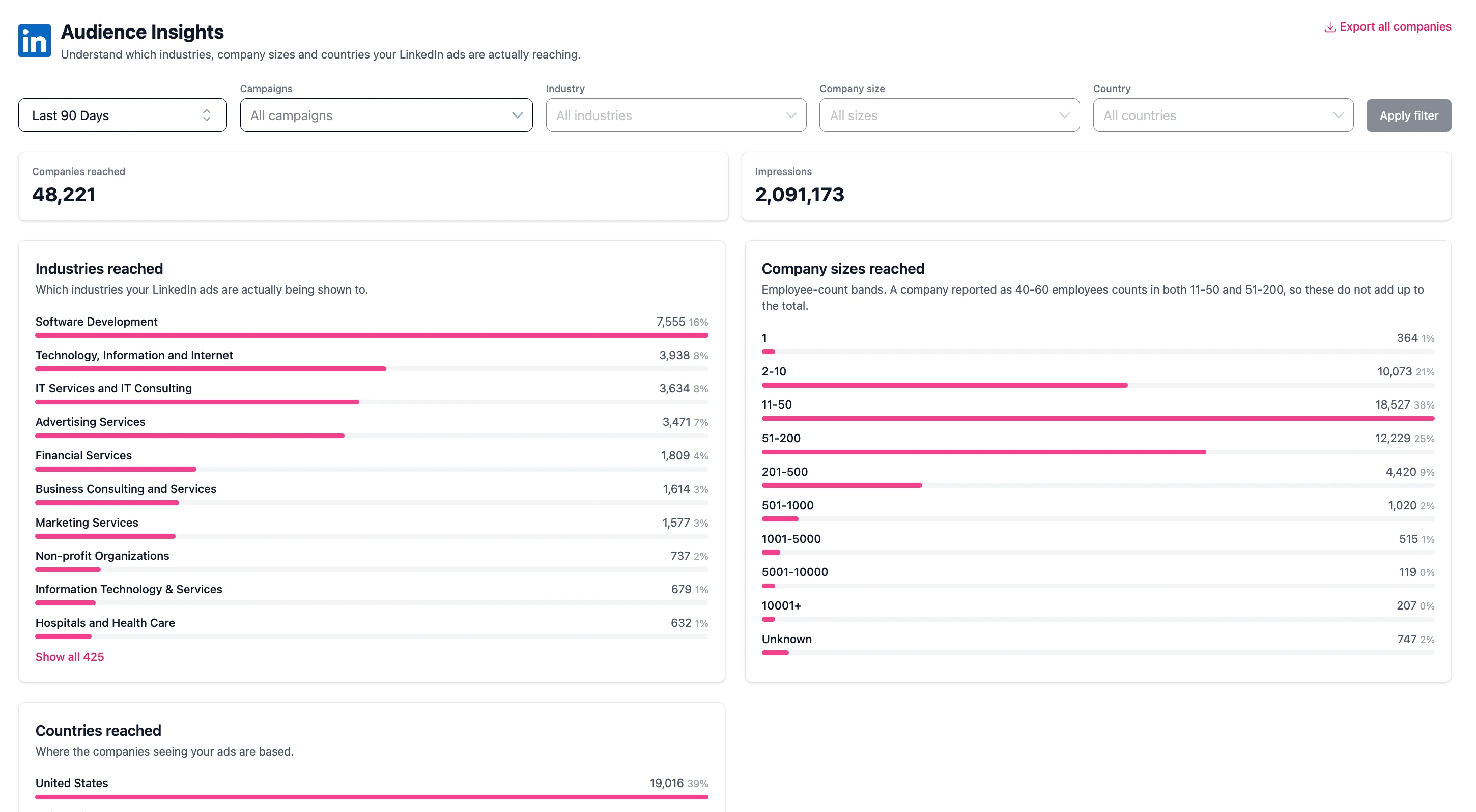
What the page shows
Two tiles at the top give the totals for the period:
- Companies reached: how many separate companies saw you in the period. A company is counted once no matter how many times it saw you.
- Impressions: the impressions behind those companies.
Both tiles follow the Seen via filter, so on the default setting they describe paid reach only.
Below the tiles are three breakdowns of the same set of companies:
- Industries reached: which industries your ads are being shown to.
- Company sizes reached: how big those companies are, by employee count.
- Countries reached: where those companies are based.
Each row shows the number of companies in that group and what share of your reached companies they are. The ten largest groups are shown first, with a control to show the rest.
Seen via: paid, organic, or both
Seen via decides which kind of reach the whole page describes:
- Paid only (the default) counts only companies that saw your paid ads. Organic is excluded entirely.
- Paid and organic combines your paid ads and your organic company page posts.
- Organic only counts only companies that saw your organic company page posts. Paid is excluded entirely.
The choice runs through everything on the page: the two tiles, all three breakdowns, the company list behind a group, the filter dropdowns and both CSV exports. The line under the page title tells you which setting the numbers you are looking at were built on.
Companies: everyone you reached, or only those with deals
The Companies filter decides which companies the breakdowns are built from:
- All you reached (the default) shows every company your ads reached.
- With influenced deals shows only the companies behind deals your ads influenced.
- With influenced won deals shows only the companies behind influenced deals that were won.
On the two deal options, each group shows the influenced deal amount (or the influenced won amount) in your CRM's currency, and the groups are ranked by it. So you can see which industries, company sizes and countries your influenced pipeline and revenue actually come from.
Where industry, size and country come from
All three come from the company's own LinkedIn page, not from your CRM and not from the person who saw the ad. Industry is the industry LinkedIn has on the page, size is the employee range on the page, and country is where the company itself is headquartered.
The Unknown group
Not every company has an industry, size or country on record. Rather than quietly dropping those companies, Fibbler puts them in an explicit Unknown group in each breakdown. A company can be known in one breakdown and unknown in another.
Filters
You can filter by time period, campaign, Seen via, Companies, industry, company size and country. Pick what you want and press Apply filter. The filters only offer values that actually occur in your data for the selected period and the selected Seen via, so you cannot filter your way to an empty page by accident.
Filters apply before the breakdowns are calculated, so every tile and every group describes the same filtered set of companies. Combining them is the point: filter to Sweden and read the industry breakdown to see which industries you reach there, or filter to one campaign to see who that campaign actually delivered to.
Your filters are kept in the page address, so you can bookmark a view or send it to a colleague.
See the companies behind a group
Click any row to open the companies in that group, with their industry, size and impressions. The list shows the top 500 companies by impressions and tells you the true total when there are more, so you always know what you are looking at.
Export CSV inside that view downloads the companies for that one group. Export all companies at the top of the page downloads every company in the current filtered audience, with name, domain, industry, size, country, impressions and engagements. Both exports respect the filters you have applied.
Acting on what you find
- Reaching industries or countries you do not sell to usually means the targeting is too broad, or that LinkedIn is spending budget outside your intended audience.
- Reaching companies far smaller or larger than your ICP is a sign to tighten the company size targeting in Campaign Manager.
- Individual companies that should never see your ads can be excluded from Company Insights.
- To check who is seeing your ads by job title rather than by company, use Audience Exclusions.
Google Ads and Meta Ads
If you have the Google Ads or Meta Ads add-on, there is a separate Google Ads Audience Insights or Meta Ads Audience Insights page. It answers the same question for website visitors from those ads. They are counted differently, LinkedIn by impressions and Google Ads and Meta Ads by visits, so do not add their numbers together.